
We will start this
article with a simple application where we will learn how to open and view text
and image files using the OpenFileDialog class.
In doing so, we will learn some basics of GDI+ drawing, menus and panel control.
I assume you have some familiarity with the .NET framework and how to develop
Windows applications using VB.NET and hence I am not delving into the basics of
these topics.
The application that I am going to explain has two menu options: File and Help.
File has three sub-menu options: Openfile, Closefile and exit. Openfile option
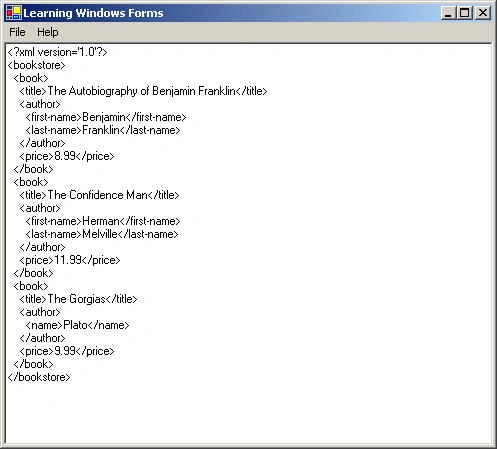
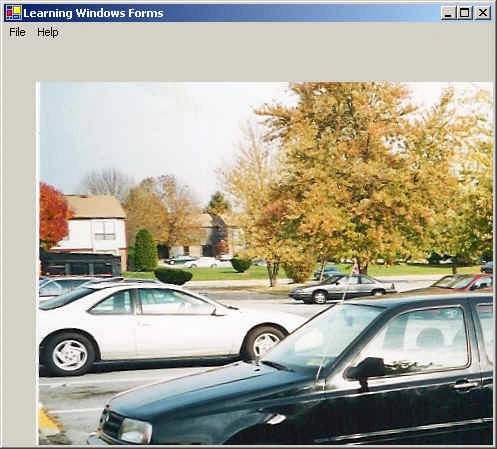
allows you to open either a text file or an image file. Help has a dummy
sub-option Learning .NET, which I leave upon the readers to attach events and
play around with. I will explain every option in more details as we explore the
code. In section_
one of the code, I will define
and initialize the different classes to draw Menus, aRichTextBox,
a PictureBox and
a Panel.
A Panel is
a control that contains other controls. It holds the two controls: RichTextBox and PictureBox in
this case. A RichTextBox control
allows you to load a Rich Text Format (RTF) or a plain text file and do editing
on it. A PictureBox control
is used to display graphics from GIF, JPEG or bitmaps etc.
'section_one
Imports System
Imports System.Drawing
Imports System.ComponentModel
Imports System.Windows.Forms
Imports System.IO
Imports System.Resources
Namespace FileDisplay
'windows_forms inherits from the Form class
Public Class windows_forms
Inherits Form 'class
in System.Windows.Forms
'
Container is the class in System.ComponentModel namespace
Private components As Container
'MenuItem
is the class in System.Windows.Forms namespace
Private file As MenuItem
Private openfile As MenuItem
Private openTextfile As MenuItem
Private openImagefile As MenuItem
Private closefile As MenuItem
Private [exit] As MenuItem
Private help As MenuItem
Private abouthelp As MenuItem
'MainMenu
is the class in System.Windows.Forms namespace
Private mainMenu1 As MainMenu
'RichTextBox, PictureBox, Panel are the classes in System.Windows.Forms
namespace
Private fileLoadArea As RichTextBox
Private pictureBox1 As PictureBox
Private mainPanel As Panel
Public Sub New() 'constructor
InitializeComponent()
End Sub 'New
Private Sub InitializeComponent()
'initializing the classes
Me.mainMenu1 = New MainMenu
Me.file = New MenuItem
Me.openfile = New MenuItem
Me.openTextfile = New MenuItem
Me.openImagefile = New MenuItem
Me.closefile = New MenuItem
Me.exit = New MenuItem
Me.help = New MenuItem
Me.abouthelp = New MenuItem
Me.fileLoadArea = New RichTextBox
Me.pictureBox1 = New PictureBox
Me.mainPanel = New Panel
Me.SuspendLayout()
End Sub 'InitializeComponent
End Class 'windows_forms
End Namespace 'FileDisplay
SuspendLayout() method temporarily suspends
the layout logic of the controls. You can set the properties of the control like
Name, Text, Size, Dock (as has been done) and then callResumeLayout()
to display the layout. The method AddRange lets us add a number of controls to a
given control rather than adding them individually.
' mainMenu1
Me.mainMenu1.MenuItems.AddRange(New MenuItem()
{Me.file, Me.help})
' file
Me.file.Index
= 0
Me.file.MenuItems.AddRange(New MenuItem()
{Me.openfile, Me.closefile, Me.exit})
Me.file.Text = "File"
'
openfile
Me.openfile.Index
= 0
Me.openfile.MenuItems.AddRange(New MenuItem()
{Me.openTextfile, Me.openImagefile})
Me.openfile.Text
= "OpenFile"
'
openTextfile
Me.openTextfile.Index
= 0
Me.openTextfile.Text
= "OpenTextFile..."
Whenever the user clicks on the sub-menu option 'OpenTextFile...' we attach an event handler called 'onFileOpen' to handle the clicks. What this event handler does will soon become clear. The same follows when the user clicks 'OpenImageFile...' option. Its event handler gets triggered to handle the event and so on for the menu-options 'CloseFile' and 'exit'.
Me.openTextfile.Click
+= New System.EventHandler(Me.onFileOpen)
'
openImagefile
Me.openImagefile.Index
= 1
Me.openImagefile.Text
= "&OpenImageFile..."
Me.openImagefile.Click
+= New System.EventHandler(Me.onImageOpen)
'
closefile
Me.closefile.Index
= 1
Me.closefile.Text
= "CloseFile"
Me.closefile.Click
+= New System.EventHandler(Me.onFileClose)
' exit
Me.exit.Index
= 2
Me.exit.Text
= "exit"
Me.exit.Click
+= New System.EventHandler(Me.onWindowClose)
' help
Me.help.Index
= 1
Me.help.MenuItems.AddRange(New MenuItem()
{Me.abouthelp})
Me.help.Text
= "Help"
'
abouthelp
Me.abouthelp.Index
= 0
Me.abouthelp.Text
= "Learning .NET"
'
fileLoadArea
Me.fileLoadArea.Dock
= DockStyle.Fill
Me.fileLoadArea.Name
= "fileLoadArea"
Me.fileLoadArea.Size
= New Size(600,
400)
Me.fileLoadArea.Text
= ""
'
pictureBox1
Me.pictureBox1.Location
= New Point(32,
40)
Me.pictureBox1.Name
= "pictureBox1"
Me.pictureBox1.Size
= New Size(600,
400)
'
mainPanel
'Control class is in System.Windows.Forms namespace
Me.mainPanel.Controls.AddRange(New Control()
{Me.fileLoadArea,Me.pictureBox1})Me.mainPanel.Dock
= DockStyle.Fill
Me.mainPanel.Name
= "mainPanel"
Me.mainPanel.Size
= New Size(600,
400)
Join the conversation! Your thoughts help the community grow.