

Introduction
In this article, we will learn about various operators provided by R language for performing different types of operations, including arithmetic, logical and bitwise operations.
R Operators
In R, an operator is a symbol that instructs the interpreter to perform a certain mathematical or logical operation. R comes with several built-in operators that you can use for such tasks. R operators are classified as follows:
- Arithmetic Operators
- Relational Operators
- Logical Operators
- Assignment Operators
Arithmetic Operators
These are the types of operators used to perform mathematical operations like addition, subtraction, division, etc. Here are the various arithmetic operators provided by R and the tasks we use them for:
- + : Addition
- - : Subtraction
- *: Multiplication
- / : Division
- ^ : Exponent
- %% : Modulus (Remainder from division)
- %/% : Integer Division
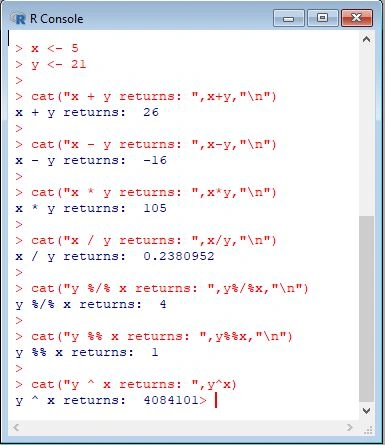
Let us run the following set of scripts to demonstrate how the above operators can be used in R:
- > x <- 5
- > y <- 21
- >
- > cat("x + y returns: ",x+y,"\n")
- x + y returns: 26
- >
- > cat("x - y returns: ",x-y,"\n")
- x - y returns: -16
- >
- > cat("x * y returns: ",x*y,"\n")
- x * y returns: 105
- >
- > cat("x / y returns: ",x/y,"\n")
- x / y returns: 0.2380952
- >
- > cat("y %/% x returns: ",y%/%x,"\n")
- y %/% x returns: 4
- >
- > cat("y %% x returns: ",y%%x,"\n")
- y %% x returns: 1
- >
- > cat("y ^ x returns: ",y^x)
- y ^ x returns: 4084101
- >
Just create an R script file and write the code there. Run it on the command prompt of your OS by invoking the Rscript interpreter. It will return the following:
Relational Operators
Relational operators help us make comparisons between values. Here is the list of operators supported in R:
- > :Greater than
- <= :Less than or equal to
- >= :Greater than or equal to
- == :Equal to
- != :Not equal to
- < :Less than
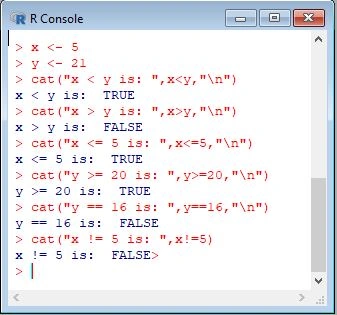
Consider the following example:
- > x <- 5
- > y <- 21
- > cat("x < y is: ",x<y,"\n")
- x < y is: TRUE
- > cat("x > y is: ",x>y,"\n")
- x > y is: FALSE
- > cat("x <= 5 is: ",x<=5,"\n")
- x <= 5 is: TRUE
- > cat("y >= 20 is: ",y>=20,"\n")
- y >= 20 is: TRUE
- > cat("y == 16 is: ",y==16,"\n")
- y == 16 is: FALSE
- > cat("x != 5 is: ",x!=5)
- x != 5 is: FALSE>
Write the script in an R script file and execute it from the command prompt of your OS. It will return the following output,
Logical Operators
We use these operators to perform Boolean operations such as AND, OR etc. Logical operators are only applicable to numeric, logical, or complex vectors.
Here are the logical operators supported by R:
- !: Logical NOT
- & :Element-wise logical AND
- && :Logical AND
- | :Element-wise logical OR
- || :Logical OR
The & and | operators perform an element-wise operation to give a result having the length of the longer operand. The && and || will examine only the first element of the operands and returns a single length logical vector. Zero is considered to be FALSE while non-zero numbers are treated as TRUE.
The following example demonstrates how to use logical operators in R:
- > x <- c(TRUE, FALSE, 0, 7)
- > y <- c(FALSE, TRUE, FALSE, TRUE)
- >
- > cat("!x returns: ",!x,"\n")
- !x returns: FALSE TRUE TRUE FALSE
- >
- > cat("x&y returns: ",x&y,"\n")
- x&y returns: FALSE FALSE FALSE TRUE
- >
- > cat("x&&y returns: ",x&&y,"\n")
- x&&y returns: FALSE
- >
- > cat("x|y returns: ",x|y,"\n")
- x|y returns: TRUE TRUE FALSE TRUE
- >
- > cat("x||y returns: ",x||y,"\n")
- x||y returns: TRUE
- >
Write the script in an R script file and run it on the terminal of your OS. It will return the following result:
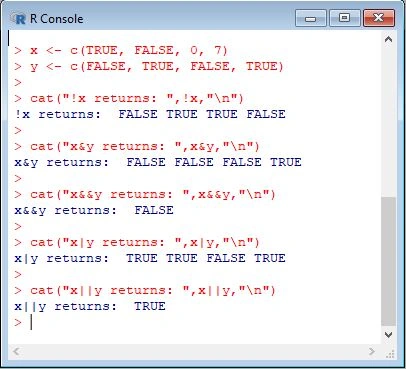
The ! x reversed the values stored in x. For True, it returned False and vice versa. For a 0, it returned a True and for a non-zero number, it returned a False.
In the other cases, each element is compared to other respective elements, that is, 1st element in x is compared to 1st element in y, 2nd element in x is compared to 2nd element in y, etc.
Join the conversation! Your thoughts help the community grow.