

Microsoft has introduced a powerful new capability in Microsoft Fabric that helps organizations reduce long-term storage expenses while maintaining compliance and accessibility requirements. The new OneLake storage tiers and lifecycle management features, currently in preview, give administrators greater control over how data is stored and managed over time.
As organizations continue to accumulate massive volumes of analytical and historical data, storage costs can grow rapidly. Many businesses are required to retain data for years due to auditing, governance, or regulatory obligations, yet much of that data is rarely accessed after its initial use. Microsoft’s new OneLake enhancements are designed to address this challenge by enabling automatic movement of data into more cost-effective storage tiers.

Understanding OneLake Storage Tiers
OneLake now supports three distinct storage tiers, each optimized for different access patterns and cost considerations:
Hot Tier – Designed for frequently accessed and active data workloads.
Cool Tier – Intended for infrequently accessed data where lower storage cost is prioritized.
Cold Tier – Optimized for long-term archival and retention at the lowest storage price point.
Currently, all existing OneLake data resides in the hot tier by default. Organizations can now move files between tiers manually, assign tiers during upload, define workspace-level defaults, or automate the process entirely using lifecycle management policies.
While cool and cold storage significantly reduce storage expenses, they also introduce higher transaction and retrieval costs compared to the hot tier. This creates a strategic balance between cost savings and access performance.
Automating Storage Optimization with Lifecycle Management
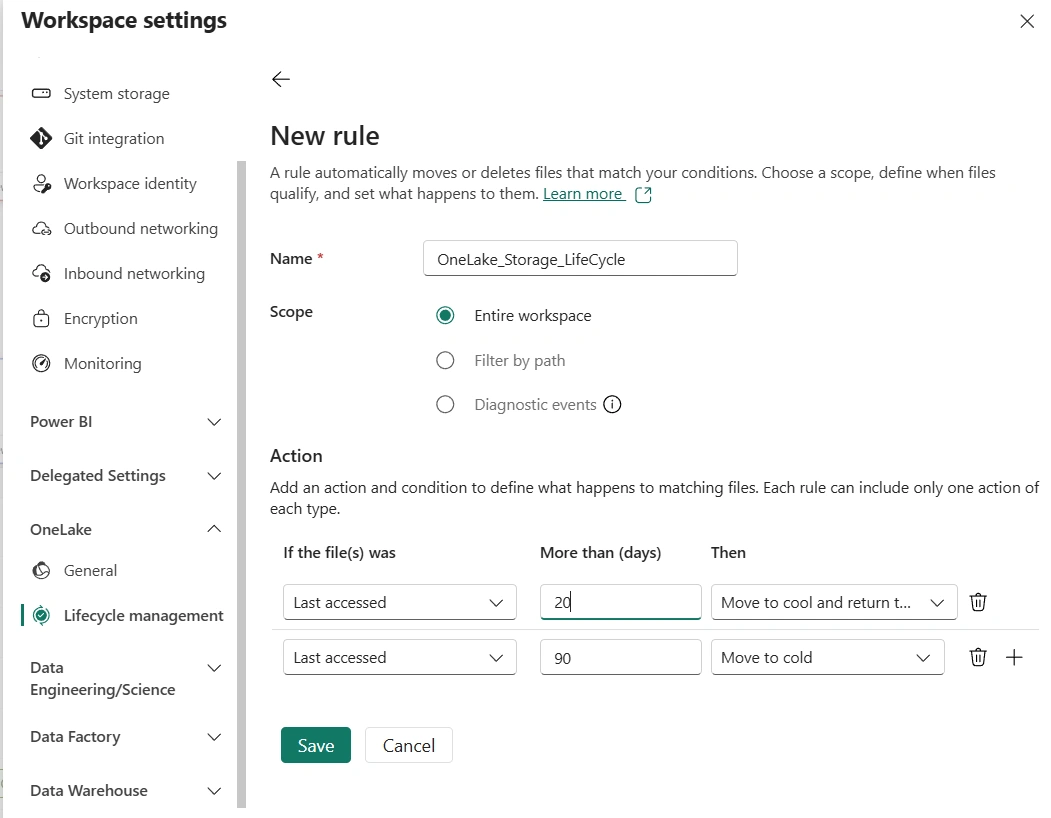
A major highlight of the update is the introduction of lifecycle management policies. These policies allow administrators to automate tier transitions based on customizable rules such as:
File creation date
Last modification date
Last access date
For example, organizations can configure policies to:
Move files not modified in 30 days to the cool tier.
Transfer files inactive for 90 days into the cold tier.
Automatically return files to the hot tier when they are accessed again.
This automation ensures that storage costs are continuously optimized without requiring manual intervention. It also aligns storage strategies with real-world data usage patterns.
Real-World Cost Savings Example
Microsoft demonstrated the potential financial impact using a scenario involving 10TB of historical bronze-layer data stored over five years. According to the example:
| Storage Tier | Monthly Cost | Five-Year Cost |
|---|---|---|
| Hot | $230/month | $13,800 |
| Cool | $125/month | $7,500 |
| Cold | $40/month | $2,400 |
The savings are substantial, particularly when moving long-term archival data into the cold tier.
However, Microsoft also emphasized that cooler tiers increase compute consumption during retrieval operations. In the example, reading 1TB of data annually generated significantly higher capacity unit (CU) consumption in cool and cold tiers compared to the hot tier.
This means organizations should carefully estimate access frequency and retrieval patterns before selecting a storage strategy. Even with higher retrieval costs, Microsoft notes that temporary capacity scaling is often still more economical than maintaining all data in hot storage indefinitely.
Why This Matters for Organizations
The introduction of storage tiers and lifecycle management represents an important advancement for enterprises using Microsoft Fabric. Businesses can now:
Reduce long-term storage expenses
Retain historical data for compliance purposes
Automate storage governance
Improve operational efficiency
Align storage costs with actual data usage patterns
For organizations managing petabytes of analytical data, these capabilities can translate into significant financial savings while maintaining flexibility and governance.
Getting Started
To begin using OneLake storage tiers and lifecycle management, workspace administrators can:
Open a workspace in Microsoft Fabric.
Navigate to Workspace Settings > OneLake > Lifecycle Management.
Create lifecycle rules with predefined actions, scopes, and conditions.
Microsoft has also introduced new lifecycle management APIs that allow developers and administrators to automate and integrate tier management into broader data governance workflows.
As data volumes continue to expand, intelligent storage optimization is becoming essential for modern analytics platforms. With OneLake storage tiers and lifecycle management, Microsoft Fabric provides organizations with a practical way to balance performance, accessibility, compliance, and cost efficiency in a scalable data environment.
Join the conversation! Your thoughts help the community grow.