

RECORDS
Records are composed of multiple elements and are a composite data structure that can hold the data items of various kinds. It seems like a row that exists in a table in the database, but a record's elements cannot stand on its own. It consists of multiple fields, similar to a row of a database table.
Here is the syntax of a composite datatype:
Syntax:
Oracle supports three kinds of records:
Note: To create a table-based or cursor_based record use the %ROWTYPE attribute.
Syntax: <record_name> <table_name or cursor_name>%ROWTYPE.
TABLE BASED RECORDS
As the name implies, table-based records are records with a structure drawn from the structure of tables, in other words whose set of columns are derived from a list of the columns of a table. The name of the fields in the records must be similar to the name of the column in the table.
To understand the example clearly, we are assuming a table known as EMPLOYEES.
Example:
DECLARE
Employee_Info Employees%rowtype;
BEGIN
SELECT * into Employee_Info
FROM Employees
WHERE ID = 1004;
dbms_output.put_line('Emp id: ' || Employee_Info.id);
dbms_output.put_line('Employee Name: ' || Employee_Info.name);
dbms_output.put_line('Employee Address: ' || Employee_Info.Designation);
dbms_output.put_line('Employee Salary: ' || Employee_Info.Salary);
dbms_output.put_line('Employee City: ' || Employee_Info.City);
END;
Result:
Emp_id : 1004
Employee Name : SHREYA
Employee Designation : Senior Developer
Employee Salary : 50k
Employee_City : KANPUR
CURSOR BASED RECORDS
Records with a derived from the SELECT list of a cursor is known as Cursor Based Records. They have a structure that matches the elements of a predefined cursor.
Example: Assuming the preceding Employee table and Employee_cur as a cursor:
DECLARE
CURSOR Employee_cur is
SELECT id, name, Designation
FROM Employees;
Employee_Info Employee_cur%rowtype;
BEGIN
OPEN Employee_cur;
LOOP
FETCH Employee_cur into Employee_Info;
EXIT WHEN Employee_cur%NOTFOUND;
DBMS_OUTPUT.put_line (Employee_Info.id || ' ' || Employee_Info.name || ' ' ||
Employee_Info.Designation);
END LOOP;
END;
Result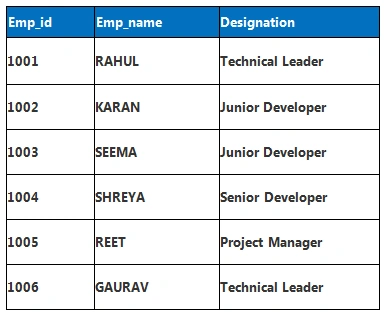
PROGRAMMER DEFINED / USER DEFINED RECORDS
User / Programmer defined records provided by Oracle allows us to define the record structures of various types that consist of various fields.
Syntax:
TYPE type_name IS RECORD
(
field_name1 datatype1 [NOT NULL] [:= DEFAULT EXPRESSION],
field_name2 datatype2 [NOT NULL] [:= DEFAULT EXPRESSION],
...
field_namen datatypen [NOT NULL] [:= DEFAULT EXPRESSION]
);
record-name type_name;
Example
Suppose we want to keep the records of our customers, and for that we must have some attributes of the customers like: their ID, Name, Contact Number, and Country and so on.
To access the records we need to define them first, so let us define our records.
Defining Records
DECLARE
TYPE Customers IS RECORD
(
Cust_ID Number,
Cust_Name varchar(50),
Contact_Num NUMBER),
Country varchar(50)
);
Customer1 Customers;
Customer2 Customers;
Customer3 Customers;
Customer4 Customers;
Now, access these records using the (.) operator.
Accessing Records
DECLARE
TYPE Customers IS RECORD
Join the conversation! Your thoughts help the community grow.