

Introduction
Dynamic pricing is no longer just about supply and demand curves; it is about real-time decision-making in complex, stochastic environments. Traditional rule-based engines struggle to adapt to rapid market shifts. This is where Reinforcement Learning (RL) shines. But how do we integrate an RL model into a robust enterprise architecture that also requires context retrieval, memory, and multi-agent coordination?
In this article, we explore exactly where RL fits into a modern AI architecture. We will build a Dynamic Pricing Engine for a ride-sharing scenario. The system uses LangGraph to orchestrate agents that retrieve market context via RAG, consult historical transaction data, and use an RL Agent to determine the optimal price multiplier. The goal is not just to predict a price, but to learn the best pricing strategy over time based on user acceptance (rewards).
Disclaimer: This POC uses simulated transaction history and a simplified Q-Learning algorithm for educational purposes.
The Role of Reinforcement Learning in Pricing
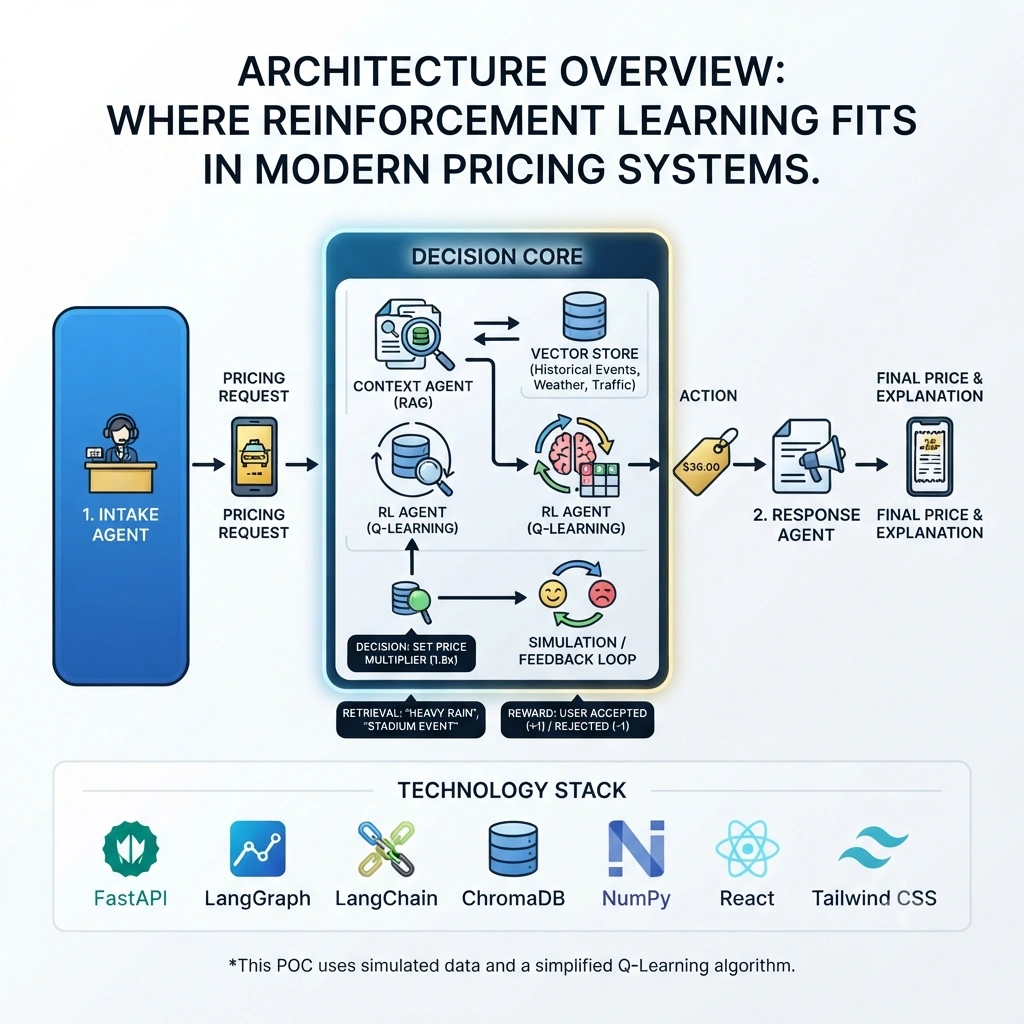
In our architecture, RL is not the entire system; it is the Decision Core.
State: Current demand, supply, weather, event data (retrieved via RAG).
Action: Set a price multiplier (e.g., 1.2x, 1.5x).
Reward: User accepts the ride (+1) or cancels/rejects (-1).
The RL agent learns which actions yield the highest cumulative reward in specific states.
Architecture Overview: Where RL Fits
Intake Agent: Receives the pricing request.
Context Agent (RAG): Retrieves relevant market conditions (e.g., "Heavy Rain," "Concert Nearby") from a vector store of historical events.
RL Agent: Takes the current state (demand + context) and outputs a price multiplier based on its Q-Table.
Simulation/Feedback Loop: Simulates user response and updates the Q-Table (Learning).
Response Agent: Formats the final price and explanation.
Real-Time Use Case: Ride-Sharing Surge Pricing
Scenario: A user requests a ride during a rainy evening near a stadium. Query: "Calculate the optimal surge multiplier for a ride from Downtown to the Stadium." System Behavior:
Retrieves context: "Rainy," "Post-Game Rush."
RL Agent checks Q-Table for state
(Rain, High_Demand)-> Action:1.8x.System simulates user acceptance.
Reward is logged, and the Q-Table is updated for future decisions.
Technology Stack
Backend: Python 3.12, FastAPI, Uvicorn
Orchestration: LangGraph
RAG: LangChain, ChromaDB, HuggingFace Embeddings
RL: Custom Q-Learning Implementation (NumPy)
Memory: SQLite via LangGraph Checkpointer
Frontend: React, Vite, Tailwind CSS
Project Structure
pricing-rl-engine/
├── backend/
│   ├── app/
│   │   ├── main.py
│   │   ├── config.py
│   │   ├── models/
│   │   │   └── state.py
│   │   ├── agents/
│   │   │   ├── context_retriever.py
│   │   │   ├── rl_agent.py
│   │   │   └── response_formatter.py
│   │   ├── graph/
│   │   │   └── workflow.py
│   │   └── rag/
│   │       └── ingest.py
│   └── requirements.txt
├── frontend/
│   ├── src/
│   │   ├── App.jsx
│   │   └── components/
│   │       ├── PricingDashboard.jsx
│   └── package.json
└── README.md
Step-by-Step POC Implementation
1. Backend Setup and Configuration
backend/requirements.txt
fastapi
uvicorn
langgraph
langchain
langchain-community
chromadb
sentence-transformers
numpy
python-dotenv
pydantic
backend/app/config.py
import os
from dotenv import load_dotenv

load_dotenv()

class Settings:
    CHROMA_PATH = "./chroma_db"
    LEARNING_RATE = 0.1
    DISCOUNT_FACTOR = 0.9
    EXPLORATION_RATE = 0.1

settings = Settings()
2. Defining the LangGraph State
backend/app/models/state.py
from typing import TypedDict, List, Optional, Annotated
from langgraph.graph import add_messages

class PricingState(TypedDict):
    messages: Annotated[list, add_messages]
    user_request: str
    market_context: List[dict]
    current_state_key: str
    suggested_multiplier: float
    user_action: str # 'accept' or 'reject'
    reward: float
    q_table_updated: bool
    final_response: str
3. The RAG Component: Market Context Retrieval
backend/app/rag/ingest.py
from langchain_core.documents import Document
from langchain_community.vectorstores import Chroma
from langchain_community.embeddings import HuggingFaceEmbeddings
from langchain_text_splitters import RecursiveCharacterTextSplitter

def get_market_context_docs():
    return [
        Document(
            page_content="Event: Concert at Stadium. Impact: High Demand. Typical Surge: 1.5x - 2.0x.",
            metadata={"context": "Stadium_Event", "demand": "High"}
        ),
        Document(
            page_content="Weather: Heavy Rain. Impact: Low Supply, High Demand. Typical Surge: 1.8x - 2.5x.",
            metadata={"context": "Heavy_Rain", "demand": "High"}
        ),
        Document(
            page_content="Time: Late Night. Impact: Low Supply. Typical Surge: 1.2x - 1.5x.",
            metadata={"context": "Late_Night", "demand": "Medium"}
        )
    ]

def ingest_data():
    docs = get_market_context_docs()
    splitter = RecursiveCharacterTextSplitter(chunk_size=500, chunk_overlap=50)
    split_docs = splitter.split_documents(docs)

    embeddings = HuggingFaceEmbeddings(model_name="all-MiniLM-L6-v2")
    vector_store = Chroma.from_documents(
        documents=split_docs,
        embedding=embeddings,
        persist_directory="./chroma_db"
    )
    print("Market context ingested.")
    return vector_store
4. The RL Agent: Q-Learning for Price Optimization
backend/app/agents/rl_agent.py
import numpy as np
import random
from app.config import settings

# Simplified Q-Learning Agent
class QLearningAgent:
    def __init__(self):
        self.q_table = {}
        self.actions = [1.0, 1.2, 1.5, 1.8, 2.0, 2.5] # Possible multipliers

    def get_state_key(self, context_list):
        # Create a simple state key from context metadata
        contexts = [c['metadata']['context'] for c in context_list]
        return "_".join(sorted(contexts)) if contexts else "Default"

    def choose_action(self, state_key):
        if state_key not in self.q_table:
            self.q_table[state_key] = np.zeros(len(self.actions))

        if random.uniform(0, 1) < settings.EXPLORATION_RATE:
            return random.choice(self.actions)
        else:
            idx = np.argmax(self.q_table[state_key])
            return self.actions[idx]

    def learn(self, state_key, action, reward):
        if state_key not in self.q_table:
            self.q_table[state_key] = np.zeros(len(self.actions))

        idx = self.actions.index(action)
        old_value = self.q_table[state_key][idx]
        next_max = np.max(self.q_table[state_key])

        new_value = old_value + settings.LEARNING_RATE * (reward + settings.DISCOUNT_FACTOR * next_max - old_value)
        self.q_table[state_key][idx] = new_value

rl_agent = QLearningAgent()

def rl_node(state):
    state_key = rl_agent.get_state_key(state["market_context"])
    state["current_state_key"] = state_key

    # If we have a previous reward, learn from it
    if "reward" in state and state["reward"] is not None:
        prev_action = state.get("prev_action")
        if prev_action:
            rl_agent.learn(state_key, prev_action, state["reward"])
            state["q_table_updated"] = True

    # Choose new action
    multiplier = rl_agent.choose_action(state_key)
    state["suggested_multiplier"] = multiplier
    state["prev_action"] = multiplier # Store for next learning step

    return state
5. The Multi-Agent Workflow
Context Retriever
backend/app/agents/context_retriever.py
from langchain_community.vectorstores import Chroma
from langchain_community.embeddings import HuggingFaceEmbeddings

def context_node(state):
    embeddings = HuggingFaceEmbeddings(model_name="all-MiniLM-L6-v2")
    db = Chroma(persist_directory="./chroma_db", embedding_function=embeddings)

    docs = db.similarity_search(state["user_request"], k=2)
    state["market_context"] = [
        {"content": d.page_content, "metadata": d.metadata} for d in docs
    ]
    return state
Response Formatter
backend/app/agents/response_formatter.py
def response_node(state):
    mult = state["suggested_multiplier"]
    base_price = 20.0 # Example base price
    final_price = base_price * mult

    state["final_response"] = f"Optimal Surge Multiplier: {mult}x. Final Price: ${final_price:.2f}. Context: {state['current_state_key']}"
    return state
Orchestrating with LangGraph
backend/app/graph/workflow.py
from langgraph.graph import StateGraph, END
from app.models.state import PricingState
from app.agents.context_retriever import context_node
from app.agents.rl_agent import rl_node
from app.agents.response_formatter import response_node
from langgraph.checkpoint.sqlite import SqliteSaver

def create_workflow():
    workflow = StateGraph(PricingState)

    workflow.add_node("context", context_node)
    workflow.add_node("rl_decision", rl_node)
    workflow.add_node("format", response_node)

    workflow.set_entry_point("context")
    workflow.add_edge("context", "rl_decision")
    workflow.add_edge("rl_decision", "format")
    workflow.add_edge("format", END)

    memory = SqliteSaver.from_conn_string(":memory:")
    app = workflow.compile(checkpointer=memory)
    return app

pricing_graph = create_workflow()
6. FastAPI Endpoints
backend/app/main.py
from fastapi import FastAPI, HTTPException
from pydantic import BaseModel
from app.graph.workflow import pricing_graph
from app.rag.ingest import ingest_data
import uuid

app = FastAPI(title="RL Pricing Engine")

class PricingRequest(BaseModel):
    request_details: str
    conversation_id: str = None
    # Simulated feedback from previous turn
    previous_reward: float = None

@app.post("/ingest")
def ingest():
    ingest_data()
    return {"status": "Context Updated"}

@app.post("/price")
def get_price(req: PricingRequest):
    thread_id = req.conversation_id or str(uuid.uuid4())
    config = {"configurable": {"thread_id": thread_id}}

    initial_state = {
        "messages": [{"role": "user", "content": req.request_details}],
        "user_request": req.request_details,
        "reward": req.previous_reward,
        "q_table_updated": False
    }

    try:
        result = pricing_graph.invoke(initial_state, config=config)
        return {
            "conversation_id": thread_id,
            "response": result["final_response"],
            "multiplier": result["suggested_multiplier"],
            "context": result["current_state_key"],
            "learned": result["q_table_updated"]
        }
    except Exception as e:
        raise HTTPException(status_code=500, detail=str(e))
Frontend Implementation with React
frontend/src/App.jsx
import React, { useState } from 'react';

function App() {
  const [request, setRequest] = useState('');
  const [result, setResult] = useState(null);
  const [convId, setConvId] = useState(null);
  const [lastReward, setLastReward] = useState(null);

  const handlePriceCheck = async () => {
    try {
      const res = await fetch('http://localhost:8000/price', {
        method: 'POST',
        headers: { 'Content-Type': 'application/json' },
        body: JSON.stringify({
          request_details: request,
          conversation_id: convId,
          previous_reward: lastReward
        }),
      });
      const data = await res.json();
      setResult(data);
      setConvId(data.conversation_id);
      setLastReward(null); // Reset for next turn
    } catch (err) {
      console.error(err);
    }
  };

  const provideFeedback = (reward) => {
    setLastReward(reward);
    alert(`Feedback sent: ${reward > 0 ? 'Accepted' : 'Rejected'}. Click 'Check Price' again to see learning.`);
  };

  return (
    <div className="p-10 max-w-4xl mx-auto">
      <h1 className="text-2xl font-bold mb-4">RL Dynamic Pricing Engine</h1>
      <input
        className="w-full p-2 border rounded mb-2"
        value={request}
        onChange={(e) => setRequest(e.target.value)}
        placeholder="E.g., Ride to Stadium during rain"
      />
      <button onClick={handlePriceCheck} className="bg-blue-600 text-white px-4 py-2 rounded">
        Calculate Price
      </button>

      {result && (
        <div className="mt-6 p-4 border rounded bg-gray-50">
          <h2 className="font-bold">{result.response}</h2>
          <p className="text-sm text-gray-600">Context: {result.context}</p>
          <p className="text-sm text-green-600">Learned from previous: {result.learned ? 'Yes' : 'No'}</p>

          <div className="mt-4 flex gap-2">
            <button onClick={() => provideFeedback(1)} className="bg-green-500 text-white px-3 py-1 rounded">Simulate Acceptance</button>
            <button onClick={() => provideFeedback(-1)} className="bg-red-500 text-white px-3 py-1 rounded">Simulate Rejection</button>
          </div>
        </div>
      )}
    </div>
  );
}

export default App;
Running the Application
Backend:
cd backend
pip install -r requirements.txt
python -m uvicorn app.main:app --reload
Ingest Data:
curl -X POST http://localhost:8000/ingestFrontend:
cd frontend
npm install
npm run dev
Analyzing the Results
When you first run the engine, the RL agent explores random multipliers. As you click "Simulate Acceptance" or "Simulate Rejection," the previous_reward is sent back to the graph. The rl_node then updates its Q-Table. Over several iterations, you will see the agent start to consistently choose multipliers that lead to "Acceptance" for specific contexts like "Heavy_Rain."
Enterprise Production Considerations
Scalability: Replace the in-memory Q-Table with a distributed store like Redis or a dedicated RL service (e.g., Ray RLlib).
Safety: Implement hard constraints (min/max prices) that override the RL agent to prevent extreme pricing.
Observability: Use LangSmith to trace the state transitions and Q-Table updates for auditing.
Limitations
The Q-Learning implementation is simplified for demonstration.
Transaction history is simulated.
Real-world pricing involves thousands of features, not just two or three.
Conclusion
Reinforcement Learning fits into the architecture as the adaptive decision-maker. By wrapping it in a LangGraph workflow, we can combine its learning capabilities with the contextual awareness of RAG and the structural integrity of Multi-Agent Systems. This POC demonstrates how to build a pricing engine that doesn't just react to data, but learns from every transaction to optimize future revenue.
Join the conversation! Your thoughts help the community grow.