

Introduction
In this tutorial, I am going to explain about ORDER BY clause in MySQL with examples. Without wasting time, let’s start.
ORDER BY
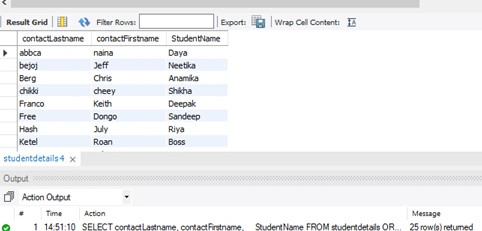
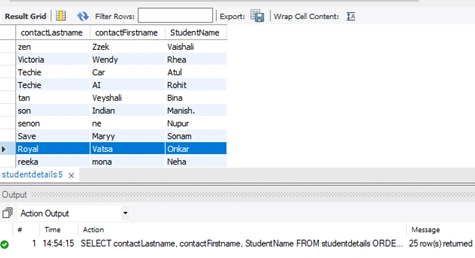
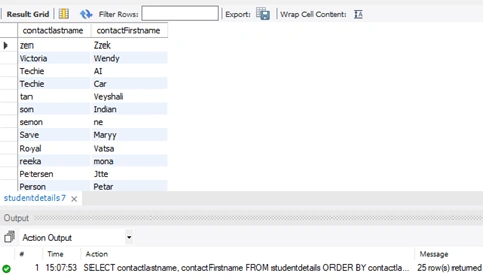
ORDER BY will tell the MySQL server to sort the rows by a column. Define in which direction to sort, as the order of the returned rows may not yet be meaningful. Rows can be returned in ascending or descending order.
Then, you query your MySQL database, you can sort the results by any field in an ascending or descending order by just adding 'ORDER BY' at the end of your query. You would use ORDER BY field_name ASC for an ascending order or ORDER BY field_name DESC for a descending order.
In MySQL, an Order By is used to sort the data in a record set. You can also use multiple sorting criteria separated by commas.
Syntax
SELECT col1, col2, col3, …coln
FROM table_name
ORDER BY
   Col1 [ASC|DESC],
   Col2 [ASC|DESC]...
Note. You can specify more than one column name in the ORDER BY clause that you want to sort.
User can sort their data (resultset) in two different formats, ASC or DESC. ‘ASC’ stands for ascending order or ‘DESC’ stands for descending order.
Syntax
ORDER BY Column_name ASC;
ORDER BY Column_name DESC;
Note. By default, the ORDER BY clause sorts the records (result set) in ascending order.
ORDER BY Column_name ASC;
ORDER BY Column_name; and ORDER BY Column_name ASC;
Both ORDER BY clauses are equivalent.
If you want to sort multiple columns, specify all the columns by a comma.
SELECT column1, column2, …column
FROM table_name
ORDER BY
 column1 DESC,
 column2 ASC;
Here, the result is sorted by column1 in descending order first then, result is sorted by column2 in ascending order.
So, without wasting time, let’s see some examples. First, we have to create a database and a few tables and then insert some records into them. I have also attached the sample database here.
Create a database
CREATE DATABASE ORDER_BY;
Create a StudentDetails table
USE ORDER_BY;
CREATE TABLE StudentDetails (
  StudentNumber int NOT NULL,
  StudentName varchar(50) NOT NULL,
  contactLastName varchar(50) NOT NULL,
  contactFirstName varchar(50) NOT NULL,
  contactnumber varchar(50) NOT NULL,
  addressLine1 varchar(250) NOT NULL,
  addressLine2 varchar(250) DEFAULT NULL,
  city varchar(50) NOT NULL,
  state varchar(50) DEFAULT NULL,
  postalCode varchar(15) DEFAULT NULL,
  country varchar(50) NOT NULL,
  PRIMARY KEY (StudentNumber)
);
Insert records into it
INSERT INTO StudentDetails(StudentNumber, StudentName, contactLastName, contactFirstName, contactnumber, addressLine1, addressLine2, city, state, postalCode, country) VALUES
(1, 'Atul', 'Techie', 'Car', '9876543210', '544, rue Royale', NULL, 'noida', NULL, '44000', 'India'),
(2, 'Simran', 'King', 'John', '9876543210', '844 Strong St.', NULL, 'Delhi', NULL, '83030', 'India'),
(3, 'Alok', 'Person', 'Petar', '9876543210', '787 St Kilda Road', 'Level 3', 'Mumbai', NULL, '3004', 'India'),
(4, 'Rohit', 'Techie', 'AI ', '9876543210', '778, rue des Cinquante Otages', NULL, 'Delhi', NULL, '44000', 'India'),
(5, 'Onkar', 'Royal', 'Vatsa', '9876543210', 'Erling Skakkes gate 787', NULL, 'Bulandshahr', NULL, '4110', 'India'),
(6, 'Manish.', 'son', 'Indian', '9876543210', '787 Strong St.', NULL, 'San', NULL, '97562', 'India'),
(7, 'Vaishali', 'zen', 'Zzek ', '9876543210', 'ul. Filtrowa 787', NULL, 'Warszawa', NULL, '01-012', 'India'),
(8, 'Boss', 'Ketel', 'Roan', '9876543210', 'Lyonerstr. 787', NULL, 'Frankfurt', NULL, '60528', 'India'),
(9, 'Mini', 'Murphy', 'Jule', '9876543210', '7878 North Pendale Street', NULL, 'San Francisco', NULL, '94217', 'India'),
(10, 'Lakshay', 'Leaa', 'Kwi', '9876543210', '898 Long Airport Avenue', NULL, 'NYC', NULL, '10022', 'India'),
(11, 'Sandeep', 'Free', 'Dongo', '9876543210', 'C/ Moralzarzal, 787', NULL, 'Madrid', NULL, '28034', 'India'),
(12, 'Anamika', 'Berg', 'Chris', '9876543210', 'Berguvsvägen  787', NULL, 'lucknow', NULL, 'S-958 22', 'India'),
(13, 'Divya', 'Petersen', 'Jtte', '9876543210', 'Vinbæltet 787', NULL, 'Delhi', NULL, '1734', 'India'),
(14, 'Sonam', 'Save', 'Maryy', '9876543210', '787, rue du Commerce', NULL, 'Delhi', NULL, '69004', 'India'),
(15, 'Reetika', 'Native', 'Epic', '9876543210', 'Bronz Sok.', 'Bronz Apt. 3/6 Tesvikiye', 'Delhi', NULL, '079903', 'India'),
(16, 'Neetika', 'bejoj', 'Jeff', '9876543210', '78787 Furth Circle', 'Suite 400', 'Delhi', NULL, '10022', 'India'),
(17, 'Meetika', 'Long', 'Kelvin', '9876543210', '8787 Pompton St.', NULL, 'Delhi', NULL, '70267', 'India'),
(18, 'Riya', 'Hash', 'July', '9876543210', '8787 Furth Circle', NULL, 'Delhi', NULL, '94217', 'India'),
(19, 'Rhea', 'Victoria', 'Wendy', '9876543210', '8787 Linden Road Sandown', '2nd Floor', 'Delhi', NULL, '069045', 'India'),
(20, 'Bina', 'tan', 'Veyshali', '9876543210', 'Brehmen St. 8787', 'PR 334 Sentrum', 'Delhi', NULL, 'N 5804', 'India'),
(21, 'Deepak', 'Franco', 'Keith', '9876543210', '87787 Spinnaker Dr.', 'Suite 101', 'New Delhi', NULL, '97823', 'India'),
(22, 'Daya', 'abbca', 'naina', '9876543210', 'Estrada da saúde n. 8787', NULL, 'Delhi', NULL, '1756', 'India'),
(23, 'Neha', 'reeka', 'mona', '9876543210', '87878, chaussée de Tournai', NULL, 'Delhi', NULL, '59000', 'India'),
(24, 'Nupur', 'senon', 'ne', '9876543210', '8787, boulevard Charonne', NULL, 'Delhi', NULL, '75012', 'India'),
(25, 'Shikha', 'chikki', 'cheey', '9876543210', '78787 Baden Av.', NULL, 'New Delhi', NULL, '51247', 'India');
Create a Library table
CREATE TABLE Library(
    BookNumber int NOT NULL,
    BookCode varchar(15) NOT NULL,
    BookIssue int NOT NULL,
    CostEach decimal(10, 2) NOT NULL,
    PRIMARY KEY(BookNumber, BookCode)
); 
Onkar SharmaPosted Aug 25, 2020, 2:16 PM
Very well explained, thanks for sharing with us...