

Introduction
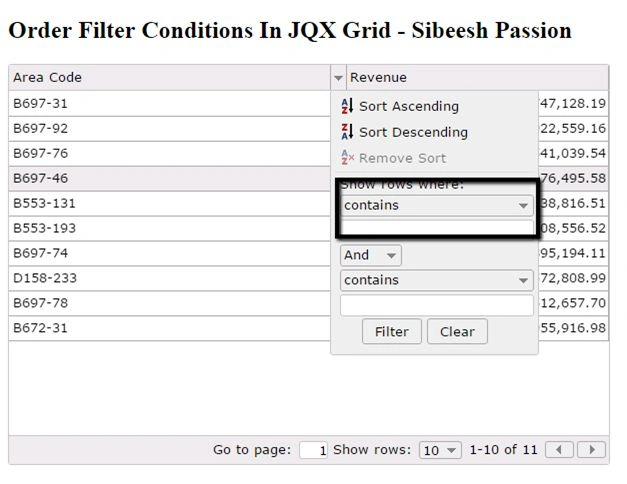
I recently came across a situation that the grid filter condition must be shown as ‘equal’ for any type of filter like string, numeric, etc. So I have done this requirement by using some in-built functionalities of the jQWidget JQX grid. Here I am going to share with you that. I hope you will like it.
To load a grid from a JSON, you can follow the steps as discussed in this article: Load jQWidget JQX Grid From JSON.
Background
If you are new to JQWidget JQX Grid, please find out here.
Using the code
I hope you have implemented your grid as shown in that article. Now I guess your page will be looking like this.
- <!DOCTYPE html>
- <html lang="en">
- <head>
- <title>Order Filter Conditions In JQX Grid - Sibeesh Passion</title>
- <script src="jquery-1.9.1.js"></script>
- <script type="text/javascript" src="JQXItems/jqwidgets/jqxcore.js"></script>
- <script type="text/javascript" src="JQXItems/jqwidgets/jqxdata.js"></script>
- <script type="text/javascript" src="JQXItems/jqwidgets/jqxbuttons.js"></script>
- <script type="text/javascript" src="JQXItems/jqwidgets/jqxscrollbar.js"></script>
- <script type="text/javascript" src="JQXItems/jqwidgets/jqxlistbox.js"></script>
- <script type="text/javascript" src="JQXItems/jqwidgets/jqxdropdownlist.js"></script>
- <script type="text/javascript" src="JQXItems/jqwidgets/jqxmenu.js"></script>
- <script type="text/javascript" src="JQXItems/jqwidgets/jqxgrid.js"></script>
- <script type="text/javascript" src="JQXItems/jqwidgets/jqxgrid.filter.js"></script>
- <script type="text/javascript" src="JQXItems/jqwidgets/jqxgrid.sort.js"></script>
- <script type="text/javascript" src="JQXItems/jqwidgets/jqxgrid.selection.js"></script>
- <script type="text/javascript" src="JQXItems/jqwidgets/jqxgrid.pager.js"></script>
- <script type="text/javascript" src="JQXItems/jqwidgets/jqxgrid.columnsresize.js"></script>
- <script type="text/javascript" src="JQXItems/jqwidgets/jqxgrid.columnsreorder.js"></script>
- <script type="text/javascript" src="JQXItems/jqwidgets/jqxgrid.export.js"></script>
- <script type="text/javascript" src="JQXItems/jqwidgets/jqxdata.export.js"></script>
- <script type="text/javascript" src="JQXItems/jqwidgets/jqxdatatable.js"></script>
- <link href="JQXItems/jqwidgets/styles/jqx.base.css" rel="stylesheet" />
- <script type="text/javascript">
- $(document).ready(function() {
- // prepare the data
- var data = {
- datatype: "json",
- datafields: [{
- "name": "AreaCode",
- "type": "string"
- }, {
- "name": "Revenue",
- "type": "number"
- }],
- //id: 'id',
- url: "jsonData.txt"
- };
- $("#jqxgrid").jqxGrid({
- source: data,
- columns: [{
- "text": "Area Code",
- "dataField": "AreaCode",
- "cellsalign": "left",
- "cellsformat": "d"
- }, {
- "text": "Revenue",
- "dataField": "Revenue",
- "cellsalign": "right",
- "cellsformat": "c2"
- }],
- pageable: true,
- filterable: true,
- sortable: true
- });
- });
- </script>
- </head>
- <body class='default'>
- <h2>Order Filter Conditions In JQX Grid - Sibeesh Passion</h2>
- <div id="jqxgrid"></div>
- </body>
- </html>
- rendered
- updatefilterconditions
- updatefilterpanel
So our grid settings will look as follows.
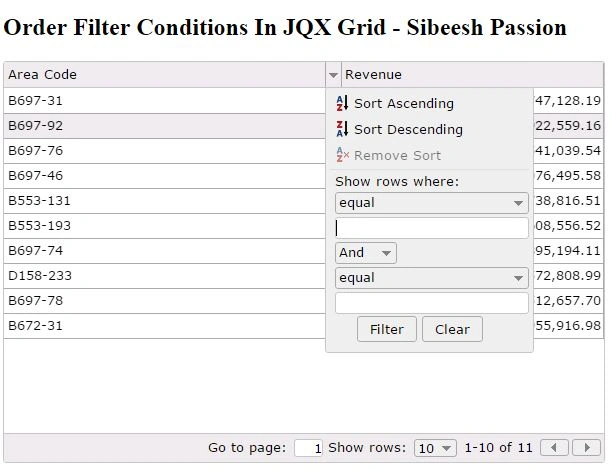
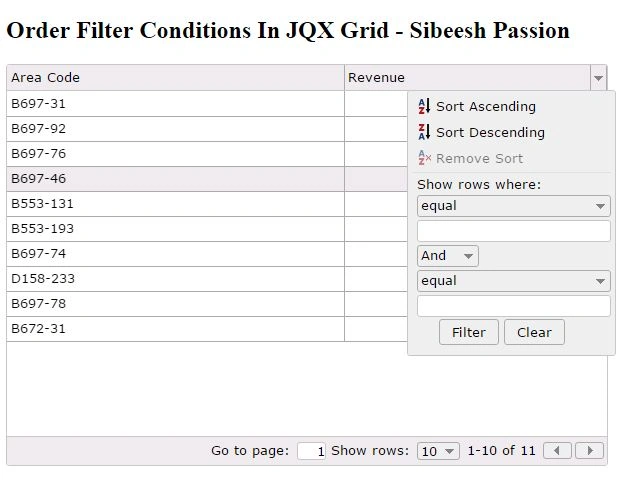
Here in the updatefilterpanel we are setting the index for the filter dropdown. And inupdatefilterconditions and rendered functions we are applying the localization according to our requirement. Now save the changes and run your grid again, you can see the filter option ‘equal’ will be loaded as default.
Santhakumar MunuswamyPosted Oct 25, 2015, 11:49 AM
Good one
Sibeesh VenuPosted Oct 21, 2015, 3:38 AM
Gowtham K Thank you
Gowtham KPosted Oct 21, 2015, 3:28 AM
Nice One
Sibeesh VenuPosted Oct 21, 2015, 2:11 AM
Nilesh Jadav Thank you
Nilesh JadavPosted Oct 21, 2015, 2:02 AM
Good Share !!
Sibeesh VenuPosted Oct 21, 2015, 12:19 AM
Harshad Pansuriya Thanks a lot :)
Sibeesh VenuPosted Oct 21, 2015, 12:19 AM
Mohammed Ibrahim Thanks a lot :)
Sibeesh VenuPosted Oct 21, 2015, 12:19 AM
Priyaranjan K S Thanks a lot :)
Harshad PansuriyaPosted Oct 20, 2015, 11:58 PM
Nice one
Mohammed IbrahimPosted Oct 20, 2015, 11:05 PM
nice
Priyaranjan K SPosted Oct 20, 2015, 9:45 PM
Good One