Introduction
In the modern enterprise landscape of 2026, predicting customer churn is no longer just about analyzing historical transaction logs. Traditional Extract, Transform, Load (ETL) pipelines, while foundational for data warehousing, introduce severe bottlenecks when applied to real-time, context-aware machine learning use cases like churn prediction. Static batch ETL cannot keep pace with the dynamic nature of customer sentiment, real-time support interactions, and immediate behavioral shifts.
To solve this, enterprises are shifting from rigid ETL pipelines to Dynamic Multi-Agent Systems. By leveraging LangGraph, Retrieval-Augmented Generation (RAG), and persistent state memory, we can build an architecture that dynamically fetches, transforms, and contextualizes data on the fly. This article explores the primary ETL bottlenecks in churn prediction and provides a complete, end-to-end Proof of Concept (POC) using a Multi-Agent LangGraph backend and a Streamlit frontend.
The Biggest ETL Bottlenecks in Churn Prediction
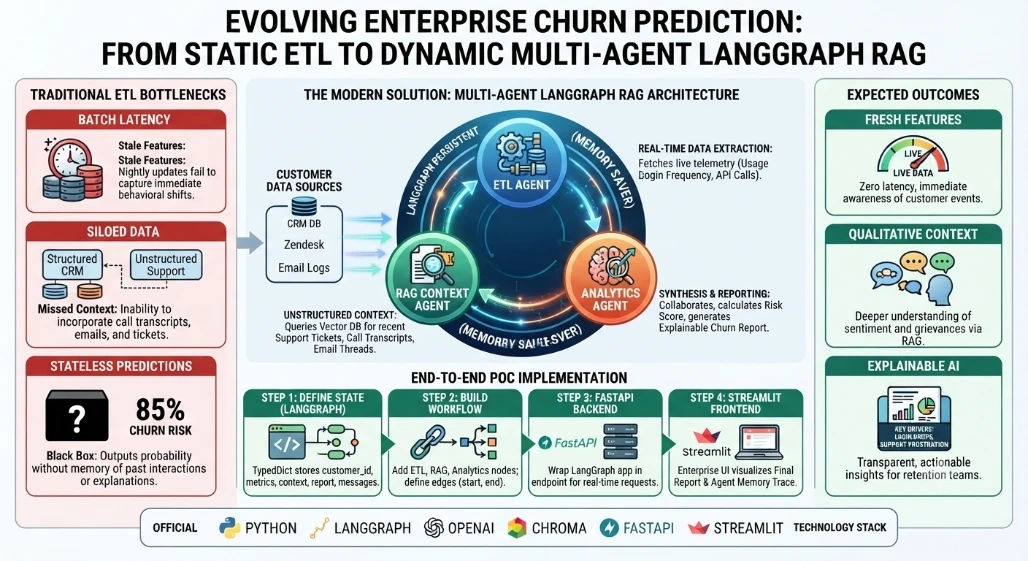
When building churn prediction models, data engineering teams typically face three massive bottlenecks:
Batch Processing Latency (Stale Features): Traditional ETL runs on nightly batches. If a customer has a severe negative interaction at 9 AM, the churn model won't see that feature until the next day.
Siloed Unstructured Data: Structured ETL handles CRM data well, but fails to incorporate unstructured data like support tickets, call transcripts, and email threads—which are often the strongest indicators of churn.
Stateless "Black Box" Predictions: Traditional pipelines output a churn probability (e.g., "85% churn risk") without memory of past interactions or the ability to explain why based on historical context.
How we removed it: We utilized LangGraph’s persistent state and memory, allowing agents to remember previous queries, maintain a running context of the customer's journey, and generate explainable, human-readable insights.
The Solution: Enterprise Multi-Agent LangGraph RAG
Our architecture utilizes a LangGraph StateGraph where specialized agents collaborate:
The ETL Agent: Fetches real-time structured telemetry (usage drops, login frequency).
The RAG Agent: Searches the vector store for recent support tickets to understand qualitative friction.
The Analytics Agent: Synthesizes the structured and unstructured data, utilizing the graph's memory to output a final, explainable churn report.
Step-by-Step POC Implementation
Step 1: Defining the State and Memory (LangGraph)
First, we define the state that will be passed between our agents. We use LangGraph's MemorySaver to persist state across interactions.
# backend/graph_state.py
from typing import TypedDict, List, Annotated
from langgraph.graph import StateGraph, END
from langgraph.checkpoint.memory import MemorySaver

class ChurnState(TypedDict):
    customer_id: str
    structured_metrics: dict
    unstructured_context: List[str]
    final_report: str
    messages: Annotated[List[str], "Memory of agent thoughts"]

# Initialize Memory for State Persistence
memory = MemorySaver()
Step 2: Building the Multi-Agent Workflow
Next, we define the nodes (agents) and the edges (workflow logic).
# backend/agents.py
from .graph_state import ChurnState, memory
import operator

# Mock Vector DB for RAG
MOCK_VECTOR_DB = {
    "CUST-001": ["Ticket #992: User frustrated with new UI update, threatened to cancel."],
    "CUST-002": ["Ticket #104: User happy with recent API improvements."]
}

def etl_agent(state: ChurnState):
    """Simulates real-time structured data extraction and transformation."""
    cid = state["customer_id"]
    # In reality, this queries a real-time feature store or DB
    metrics = {"login_drops_7d": 4, "api_calls_delta": -45, "license_tier": "Enterprise"}
    state["messages"].append("ETL Agent: Fetched real-time structured metrics.")
    return {"structured_metrics": metrics}

def rag_agent(state: ChurnState):
    """Retrieves unstructured context via RAG."""
    cid = state["customer_id"]
    context = MOCK_VECTOR_DB.get(cid, ["No recent support tickets found."])
    state["messages"].append(f"RAG Agent: Retrieved {len(context)} support context vectors.")
    return {"unstructured_context": context}

def analytics_agent(state: ChurnState):
    """Synthesizes data and generates the final explainable report."""
    metrics = state["structured_metrics"]
    context = state["unstructured_context"]

    # Simple heuristic logic for the POC
    risk_score = 0
    if metrics["login_drops_7d"] > 2: risk_score += 40
    if metrics["api_calls_delta"] < 0: risk_score += 30
    if "threatened to cancel" in context[0]: risk_score += 30

    report = f"Customer {state['customer_id']} Churn Risk: {min(risk_score, 100)}%.\n"
    report += f"Key Drivers: Login dropped by {metrics['login_drops_7d']} days. "
    report += f"Context: {context[0]}"

    state["messages"].append("Analytics Agent: Generated final explainable report.")
    return {"final_report": report}

# Build the Graph
workflow = StateGraph(ChurnState)
workflow.add_node("etl", etl_agent)
workflow.add_node("rag", rag_agent)
workflow.add_node("analytics", analytics_agent)

workflow.set_entry_point("etl")
workflow.add_edge("etl", "rag")
workflow.add_edge("rag", "analytics")
workflow.add_edge("analytics", END)

# Compile with Memory
app = workflow.compile(checkpointer=memory)
Step 3: The FastAPI Backend
We wrap the LangGraph application in a FastAPI endpoint to serve the frontend.
# backend/main.py
from fastapi import FastAPI, HTTPException
from pydantic import BaseModel
from .agents import app
from langgraph.checkpoint.memory import MemorySaver

app_api = FastAPI(title="Enterprise Churn POC")

class ChurnRequest(BaseModel):
    customer_id: str
    thread_id: str = "default_thread" # Allows memory persistence across requests

@app_api.post("/predict-churn")
async def predict_churn(req: ChurnRequest):
    config = {"configurable": {"thread_id": req.thread_id}}

    # Initial state
    initial_state = {
        "customer_id": req.customer_id,
        "structured_metrics": {},
        "unstructured_context": [],
        "final_report": "",
        "messages": []
    }

    try:
        # Invoke the multi-agent graph
        final_state = app.invoke(initial_state, config)
        return {
            "report": final_state["final_report"],
            "agent_memory_trace": final_state["messages"]
        }
    except Exception as e:
        raise HTTPException(status_code=500, detail=str(e))
Step 4: The Streamlit Frontend
Finally, a lightweight enterprise UI to interact with the backend and visualize the agent's state and memory.
# frontend/app.py
import streamlit as st
import requests

st.set_page_config(page_title="Churn Prediction Agent", layout="wide")
st.title("  Enterprise Churn Prediction: Multi-Agent RAG")

# Sidebar for configuration
st.sidebar.header("Configuration")
customer_id = st.sidebar.text_input("Customer ID", "CUST-001")
thread_id = st.sidebar.text_input("Memory Thread ID", "session_01")

if st.sidebar.button("Analyze Churn Risk"):
    with st.spinner("Agents are collaborating..."):
        # Call FastAPI Backend
        response = requests.post(
            "http://localhost:8000/predict-churn",
            json={"customer_id": customer_id, "thread_id": thread_id}
        )

        if response.status_code == 200:
            data = response.json()

            col1, col2 = st.columns(2)
            with col1:
                st.subheader("Final Churn Report")
                st.info(data["report"])
            with col2:
                st.subheader("Agent State & Memory Trace")
                for msg in data["agent_memory_trace"]:
                    st.write(f"  {msg}")
        else:
            st.error("Failed to fetch data from backend.")
Conclusion
The transition from traditional, batch-oriented ETL pipelines to dynamic, Multi-Agent LangGraph architectures represents a paradigm shift in enterprise data science. By addressing the core bottlenecks of latency, unstructured data silos, and stateless predictions, we can build churn prediction systems that are not only highly accurate but deeply explainable. In this POC, the ETL Agent ensures features are fresh, the RAG Agent injects vital qualitative context, and the Analytics Agent synthesizes the truth. Crucially, LangGraph’s persistent memory ensures that the system learns and retains context over time, transforming a simple predictive model into an intelligent, conversational enterprise asset.


Join the conversation! Your thoughts help the community grow.