

Introduction
Let us start by creating a new class, and we will leave it without any methods.
public class Employee
{
}
In the next step, we will try to use our class; we will find that our Employee class contains 4 methods which are (Equals, GetHashCode, GetType, and ToString).
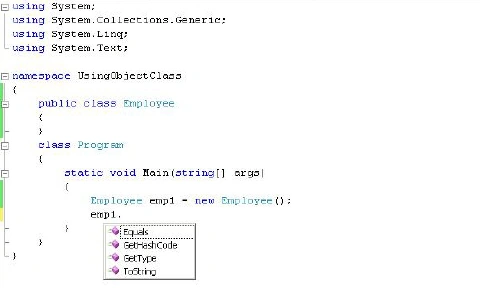
The question now is, from where do these four methods come?
- The answer is easy: any data type in the .Net inherits implicitly from the Object class, which defines a common set of members supported by every type in the .NET, so when we create our new class Employee, it inherits from the Object class.
- The Object base class defines some members that are virtual, so it allows us to redefine the default implementation of these members.
- These virtual members give you good work, but in some cases, you will need a new implementation of these methods to fit your class functionality.
- In the next section, we will see how to use the default implementation of the Object class virtual methods, and then we will try to redefine it by using the override keyword to give it a new behavior.
What is the ToString() Method?
The ToString() method gives you a textual representation of the current state of the object.
Example
namespace UsingObjectClass
{
    public class Employee
    {
        private string firstName;

        public string FirstName
        {
            get { return firstName; }
            set { firstName = value; }
        }
        private string lastName;
        public string LastName
        {
            get { return lastName; }
            set { lastName = value; }
        }
        private int age;
        public int Age
        {
            get { return age; }
            set { age = value; }
        }
        private string employeeID;
        public string EmployeeID
        {
            get { return employeeID; }
            set { employeeID = value; }
        }
    }
    class Program
    {
        static void Main(string[] args)
        {
            Employee emp1 = new Employee();
            emp1.FirstName = "Amr";
            emp1.LastName = "Ashush";
            emp1.Age = 23;
            string s = emp1.ToString();
            Console.WriteLine(s);
        }
    }
}
Output

As you can see, the returned string is the name of the Employee Type (UsingObjectClass.Employee).
What if we want to use the ToString() method to show the current employee data (First Name, Last Name, and Age)?
All we need to do is to override the ToString() Method to give it a new behavior, so in our case, we will redefine it to show the Employee data instead of the name of the object type.
What is the Overriding ToString() Method?
The first step is to use the override keyword to override the method, and then we will redefine its behavior.
Example
public class Employee
{
    // ...
    // Overriding ToString() method
    public override string ToString()
    {
        string s = "First Name: " + firstName + " , " + " last Name: " + lastName + " , " + "and Age: " + age;
        return s;
    }
}
Trying the new behavior of the ToString() method.
Employee emp1 = new Employee();
emp1.FirstName = "Amr";
emp1.LastName = "Ashush";
emp1.Age = 23;
string s = emp1.ToString();
Console.WriteLine(s);
output

As you can see, we now have a good text representation of our object.
We can use also StringBuilder in our ToString() method as follows.
public override string ToString()
{
    StringBuilder sb = new StringBuilder();
    sb.AppendFormat("First Name: {0}, Last Name: {1}, and Age: {2}", firstName, lastName, age);
    return sb.ToString();
}
What is the Equals() Method?
The equals () method is used to compare two objects, and it returns a true if these objects point to the same values on the heap and returns a false if not.
Example
Employee emp1 = new Employee();
emp1.FirstName = "Amr";
emp1.LastName = "Ashush";
emp1.Age = 23;
Employee emp2 = emp1;
We now have two objects that point to the same value on the heap, so if we tried to use Equals() method, it will return true.
// This will return True.
emp1.Equals(emp2);
Now we will create two objects. Each one has its own value on the heap, so when we use the Equals() method, it will return False.
Employee emp3 = new Employee();
emp3.FirstName = "Amr";
emp3.LastName = "Ashush";
emp3.Age = 40;
emp3.EmployeeID = "123A";
Employee emp4 = new Employee();
emp4.FirstName = "Amr";
emp4.LastName = "Ashush";
emp4.Age = 23;
emp4.EmployeeID = "123A";
// This will return False.
emp3.Equals(emp4);
What is the Overriding Equals() Method?
Consider that we want to compare two objects, but we do not want to know if these objects pointing to the same value in the heap; all we need to know that if these two objects have the same data (First Name and Last Name).
Example
// Overriding Equals() method
public override bool Equals(object obj)
{
    if (obj != null && obj is Employee)
    {
        Employee emp = (Employee)obj;
        if (emp.firstName == this.firstName &&
            emp.lastName == this.lastName &&
            emp.employeeID == this.employeeID)
        {
            return true;
        }
    }
    return false;
}
Now when we try to use the Equals() method, it will compare the firstName, lastName, and employeeID of the two objects, and it will return true if these values are the same and false if not.
Example
Employee emp1 = new Employee();
emp1.FirstName = "Amr";
emp1.LastName = "Ashush";
emp1.Age = 23;
emp1.EmployeeID = "123A";
Employee emp2 = new Employee();
emp2.FirstName = "Amr";
emp2.LastName = "Ashush";
emp2.Age = 23;
emp2.EmployeeID = "123A";
// This will return True.
emp1.Equals(emp2);
If we have two objects with different data Equals method will return false.
Employee emp3 = new Employee();
emp3.FirstName = "Jack";
emp3.LastName = "Baher";
emp3.Age = 40;
emp3.EmployeeID = "1254B";
Employee emp4 = new Employee();
emp4.FirstName = "James";
emp4.LastName = "Bond";
emp4.Age = 23;
emp4.EmployeeID = "007";
// This will return False.
emp3.Equals(emp4);
What is the GetHashCode() Method?
The GetHashCode() method is used to return a numerical value that identifies an object based on its internal data.
Example
Employee emp1 = new Employee();
emp1.FirstName = "Amr";
emp1.LastName = "Ashush";
emp1.Age = 23;
emp1.EmployeeID = "125";
Employee emp2 = new Employee();
emp2.FirstName = "Amr";
emp2.LastName = "Ashush";
emp2.Age = 23;
emp2.EmployeeID = "125";
Console.WriteLine("emp 1 hash code: {0}", emp1.GetHashCode());
Console.WriteLine("emp 2 hash code: {0}", emp2.GetHashCode());
Output
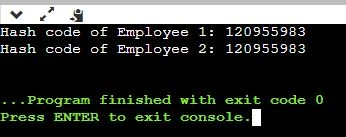
As you can see, instead of the two objects having the same data, each one has a different hash code because each object points to a different place on the heap.
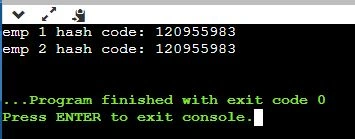
So if we create two objects that point to the same value, when we call the GetHashCode() method from anyone, we will get the same hash code.
Example
Employee emp1 = new Employee();
emp1.FirstName = "Amr";
emp1.LastName = "Ashush";
emp1.Age = 23;
emp1.EmployeeID = "125";
Employee emp2 = emp1;
Console.WriteLine("emp 1 hash code: {0}", emp1.GetHashCode());
Console.WriteLine("emp 2 hash code: {0}", emp2.GetHashCode());
Output
What is the Overriding GetHashCode() Method?
We need to override the GetHashCode() method so that if we have two objects with identical data, we will obtain the same hash code.
The String class has its own implementation of the GetHashCode() method based on the string's character data.
We can use the string that returns from the overridden ToString() method and use it to call the GetHashCode() method. So if we have two objects with the same First Name, Last Name, and Age, we will obtain the same hash code.
// Overriding the GetHashCode method
public override int GetHashCode()
{
    return ToString().GetHashCode();
}
Example
Employee emp1 = new Employee();
emp1.FirstName = "Amr";
emp1.LastName = "Ashush";
emp1.Age = 23;
emp1.EmployeeID = "125";
Employee emp2 = new Employee();
emp2.FirstName = "Amr";
emp2.LastName = "Ashush";
emp2.Age = 23;
emp2.EmployeeID = "125";
Console.WriteLine("emp 1 hash code: {0}", emp1.GetHashCode());
Console.WriteLine("emp 2 hash code: {0}", emp2.GetHashCode());
Output
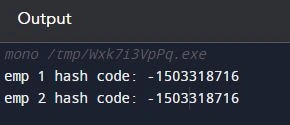
As you can see, we get the same hash code, although we have two objects that point to different values on the heap.
Another option is to identify a string field that should be unique among objects and then return its hash code.
In our case, EmployeeID should be unique, so if we have two objects with the same EmployeeID, we will get the same hash code.
// Overriding the GetHashCode method
public override int GetHashCode()
{
    return EmployeeID.GetHashCode();
}
Note. Overriding the GetHashCode() method is only useful when you want to store your object in a hash-based collection such as Hashtable because the Hashtable type calls the Equals() and GetHashCode() methods of the contained objects under the hood to determine the correct object to return to the caller. and the Object class has no idea about the data on its subclasses.
Note. If you override the Equals() method and do not override the GetHashCode() method, you will get a compiler warning.
We are done for now.
Thank you for reading, see you next article.
Arun KumarPosted Aug 5, 2011, 4:27 AM
I'm overriding Equals() method and not overriding GetHashCode() method but not getting any compile time error. Can you explain when this error occure.
Fatima SadiaPosted Jul 2, 2010, 2:37 PM
Hi Mr Amr Monjid i'm doing BS in computer science and i'm learning c# language. My question is about events that how the events work, and how we can declare customize ( our own ) events in .net framework.