

You may have searched the Internet and still not understand what Ansible is and what it is used for, or how it can benefit your organization and fit into your DevOps workflow. Then you are in the right place!
Let’s start with a real-life example in which you have been asked to provision 3 servers either on a public cloud provider such as Microsoft Azure or AWS or on-premises data center, configure each server’s environment for the application, and put a load-balancer over them.
Now probably the most tedious and time-consuming tasks for you while configuring these servers could be,
- SSH into the server
- Add runtime’s PPA
- Install the latest version of the runtime
- Configure any other server settings such as changing host in Apache\Nginx
You have to repeat those steps for each server and suppose if those were 10 or more servers instead of 3, how painful it could be. This is where we use a Software Configuration Management (SCM) tool and one of the most popular is Red Hat’s Ansible which we’re going to see next.
Ansible Automation & Architecture
Ansible is an SCM tool and is used to automate repetitive tasks that are usually done on a server. Ansible SCM tool consists of 3 core subsystems: ACS (Ansible Control Server), Ansible Inventory and Ansible Playbooks. Before seeing a live example, it would be better to understand these Ansible terms and architecture a bit so can go with it.
At first, ACS or Ansible Control Server is the component which does the main configuration tasks on one or more servers. ACS server can be located on your own local machine or somewhere else on the Internet. Ansible Inventory (As the name suggests) is the inventory of Servers where ACS will perform the configuration steps and finally Ansible Playbooks are those required steps that ACS will perform on that inventory of servers. Ansible interacts with servers via SSH protocol which is a secure way of managing and configuring servers; i.e., all the operations and file transfers are encrypted in every session.
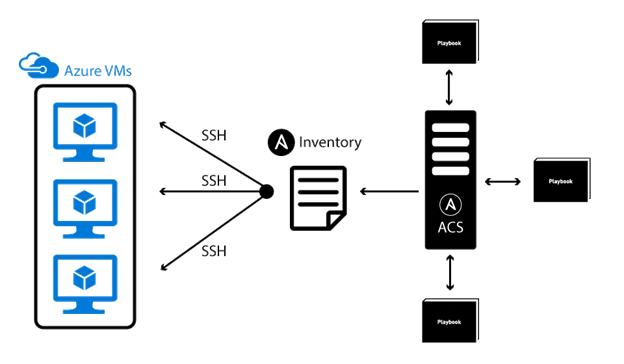
As illustrated in the above image the servers are in one of the Azure regions (see next), ACS interacts with the server through the Inventory file (as those servers are defined in the inventory file) and apply the configurations defined in the Playbooks. It is important to note that ACS does not use any database which makes it super light-weight to download, install and configure. Let’s see an example to see Ansible in action.
It is expected that you have installed Ansible on your machine. If you didn’t, take a look at this documentation to see how to install Ansible. It’s easy!
Using Ansible
Suppose you provisioned 3 raw web servers (Virtual machines) in a cloud provider such as AWS or Microsoft Azure (In our case). While provisioning virtual machines, a public IP address will be assigned to each VM so we can access them via the Internet. First we need to add these IP addresses to Ansible Inventory file.
Adding Servers to Ansible Inventory
Ansible Inventory is a file where you describe your targeted servers. In Linux (Debian-based systems), the default location of inventory file is /etc/ansible/hosts directory but you can create this file somewhere else and use the -i flag in the Ansible CLI to specify the inventory file.
Join the conversation! Your thoughts help the community grow.