

Objective of the Module
- Introduction
- Arrays Overview
- Declaration of Arrays
- Reference Type
- Array Exception Handling
- Multi-Dimension Arrays
Introduction
Arrays are powerful data structures for solving many programming problems. You saw during the creation of variables of many types that they have one thing in common, they hold information about a single item, for instance, an integer, float and string type, and so on. So what is the solution if you need to manipulate sets of items? One solution would be to create a variable for each item in the set, but again this leads to a different problem. How many variables do you need?
So in this situation, Arrays provide mechanisms that solve the problem posed by these questions. An array is a collection of related items, either value or reference type. In C#, arrays are immutable such that the number of dimensions and size of the array are fixed.
Arrays Overview
An array contains zero or more items called elements. An array is an unordered sequence of elements. All the elements in an array are of the same type (unlike fields in a class that can be of different types). The elements of an array are accessed using an integer index that always starts from zero. C# supports single-dimensional (vectors), multidimensional and jagged arrays.
Elements are identified by indexes relative to the beginning of the arrays. An index is also commonly called an indices or subscript and is placed inside the indexing operator ([]). Access to array elements is by their index value that ranges from 0 to (length-1).
Array Properties
- The length cannot be changed once created.
- Elements are initialized to default values.
- Arrays are reference types and are instances of a System. Array.
- Their number of dimensions or ranks can be determined by the Rank property.
- An array length can be determined by the GetLength() method or Length property.
Simple Arrays
In the following example, at line 10, we are declaring an Integer type array variable arrays with length 5. This means the array variable can hold 5 integer elements. From line 15, we are accessing each element using a for loop and doing an even number of calculations over them. Finally, in line 21, we display each element.
using System;
namespace Arrays
{
    class Program
    {
        static void Main(string[] args)
        {
            // Integer type array with length 5 (range 0 to 4)
            int[] myArray = new int[5];
            Console.WriteLine("Simple Array Example");
            // Array initialization
            for (int i = 0; i < myArray.Length; i++)
            {
                // Even number manipulation
                myArray[i] = i * 2;

                // Print array element
                Console.WriteLine(myArray[i]);
            }
            Console.ReadKey();
        }
    }
}
Once we compile this program, it displays 5 even numbers on the screen because we have configured the arrays variable to hold up to 5 elements only, as in the following.
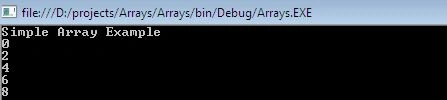
Figure 1. Simple array output
Declaration Arrays
An array is a contiguous memory allocation of same-sized data type elements. After declaring an array, memory must be allocated to hold all the elements of the array. An array is a reference type, so memory on the heap must be allocated.
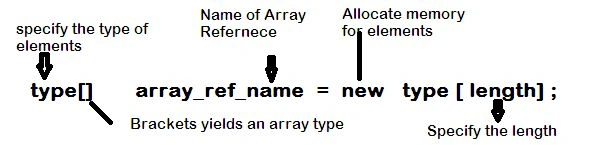
Figure 2. Array Declaration
The preceding figure shows the array declaration and allocation syntax for a single-dimension array having a specific type and length. The declaration begins with the array element type. The element of an array can be a value type or reference type. The element is followed by a set of empty brackets. Single-dimension arrays use one set of brackets. The element type, plus the brackets, yields an array type. This array type is followed by an identifier that declares the name of the array.
To actually allocate memory for an array, use the new operator followed by the type of elements the array can contain followed by the length of the array in brackets.
For example, the following line of code declares and allocates memory for a single-dimension array of integers having a length of 3.
int[] myArrays = new int[3];
The following line of code would simply declare an array of floats.
float[] myArrays;
And this code would allocate memory (initialize) to hold 6 float values.
myArrays=new float[6];
The following line of code would simply declare an array of strings.
String[] arry = new String[8];
You can also assign values to every array element using an array initializer.
int[] arry = new int[5] { 15, 3, 7, 8, 9 };
Example.Finding an Array type, Rank, and Total elements.
The following example calculates an integer type array length, type, and rank (dimension).
using System;
namespace Arrays
{
    class Program
    {
        static void Main(string[] args)
        {
            // Integer type array with length 5 (range 0 to 4)
            int[] arry = new int[5];

            Console.WriteLine("Type=" + arry.GetType());
            Console.WriteLine("Rank=" + arry.Rank);
            Console.WriteLine("Length=" + arry.Length);
            Console.ReadKey();
        }
    }
}
Vector Array using Literal Values
Up to this point, you have seen how memory for an array can be allocated using the new operator. Another way to allocate memory for an array and initialize its elements at the same time is to specify the contents of an array using array literal values.
int[] arry = {1,2,3,4,5};
The length of an array is determined by the number of literal values appearing in the declaration.
string[] arry = {"A", "J", "A", "Y"};
bool[] arry = {true, false};
Example.Concatenation of Two Strings
The following example shows the concatenation of two words.
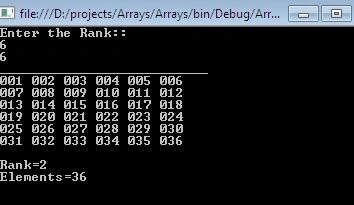
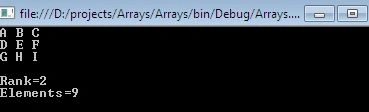
Gowtham RajamanickamPosted Mar 27, 2015, 8:50 AM
nice,...
Anil KumarPosted Mar 8, 2015, 3:19 AM
well explained.. thanks
RakeshPosted Mar 5, 2015, 10:38 AM
great work..keep it up
Shaili DashoraPosted Mar 2, 2015, 10:54 AM
Nice one sir
Tom MohanPosted Mar 1, 2015, 7:56 PM
Good effort
Vithal WadjePosted Feb 28, 2015, 1:05 PM
nice
Sourabh SomaniPosted Feb 28, 2015, 1:56 AM
gr8 article, well explained
Rahul KrPosted Feb 27, 2015, 8:10 AM
nice one!!
Sibeesh VenuPosted Feb 27, 2015, 3:26 AM
Nice one!!!
Hussain AhmedPosted Feb 27, 2015, 12:42 AM
Nice
Rahul Kumar SaxenaPosted Feb 26, 2015, 11:40 PM
nice..
Prasham SabadraPosted Feb 26, 2015, 6:42 PM
Thanks! Well explained.