

ListView
The ASP.NET ListView control binds and displays the data item returned from a data source. The ListView control displays the data in a format that we define using various templates and styles. If the data item is very large then sometimes we need to display data item in pages. To display the data item in pages (for paging) we use another ASP.NET control DataPager with ListView control.
DataPager
The DatePager control provides paging for data-bound ASP.NET controls that implement the IPageableItemContainer interface, such as the ListView control.
Example
- Create a sample ASP.NET Website, add a new ASPX page.
- Add a ListView control to the page and modify the markup in the following way:
- <asp:ListView ID="ListView1" runat="server">
- <ItemTemplate>
- <div style="background: lightGray">
- <asp:Label runat="server" ID="Label3" Text='<%#Eval("ID") %>'></asp:Label>
- <asp:Label runat="server" ID="Label1" Text='<%#Eval("Name") %>'></asp:Label>
- <asp:Label runat="server" ID="Label2" Text='<%#Eval("Mobile") %>'></asp:Label>
- <asp:Label runat="server" ID="lblName" Text='<%#Eval("College") %>'></asp:Label>
- <br />
- </div>
- </ItemTemplate>
- <AlternatingItemTemplate>
- <div>
- <asp:Label runat="server" ID="Label3" Text='<%#Eval("ID") %>'></asp:Label>
- <asp:Label runat="server" ID="Label1" Text='<%#Eval("Name") %>'></asp:Label>
- <asp:Label runat="server" ID="Label2" Text='<%#Eval("Mobile") %>'></asp:Label>
- <asp:Label runat="server" ID="lblName" Text='<%#Eval("College") %>'></asp:Label>
- <br />
- </div>
- </AlternatingItemTemplate>
- </asp:ListView>
- Add a DataPager control to the page and modify the markup in the following way:
We add the DataPager control, add the PageSize property (want to display at a time) and associate it with the ListView1 control. We define a <field> where we use the field type as NumericPagerField and ButtonType as Link.- <asp:DataPager ID="DataPager1" PagedControlID="ListView1" PageSize="4" runat="server">
- <Fields>
- <asp:NumericPagerField ButtonType="Link" />
- </Fields>
- </asp:DataPager>
- The following is the C# code for adding the custom DataTable (you can bind the data from the data source).
- DataTable dt;
- protected void Page_Load(object sender, EventArgs e)
- {
- if (!IsPostBack)
- {
- BindListView();
- }
- }
- protected void BindListView()
- {
- dt = new DataTable();
- dt.Columns.Add("Id", typeof(int));
- dt.Columns.Add("Name", typeof(string));
- dt.Columns.Add("Mobile", typeof(string));
- dt.Columns.Add("College", typeof(string));
- dt.Rows.Add(1,"Rahul", "8505012345", "MITRC");
- dt.Rows.Add(2,"Pankaj", "8505012346", "MITRC");
- dt.Rows.Add(3,"Sandeep", "8505012347", "MITRC");
- dt.Rows.Add(4,"Sanjeev", "8505012348", "MITRC");
- dt.Rows.Add(5,"Neeraj", "8505012349", "MITRC");
- dt.AcceptChanges();
- ListView1.DataSource = dt;
- ListView1.DataBind();
- }
Now run the Website and see that only the first four items will be shown. The DataPager has two pages (1 and 2) and you will be able to click the second page to see the last item.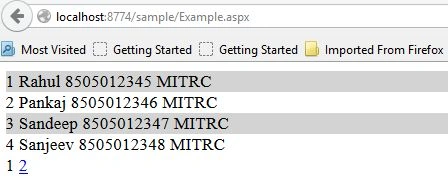
Now if we click on page 2, you will see it won't display the second page automatically, you will need to click again on the page 2 link. After double clicking on page 2 you will encounter another problem, the data is not displayed correctly.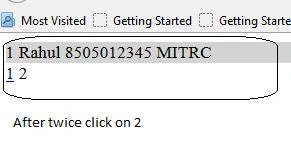
To resolve this problem we need to set the DataPager Page Properties in the ListViews.PagePropertiesChanging event.
First add onpagepropertieschanging events to the ListView control.
- <asp:ListView ID="ListView1" runat="server" OnPagePropertiesChanging="ListView1_PagePropertiesChanging">
- <ItemTemplate>
- protected void ListView1_PagePropertiesChanging(object sender, PagePropertiesChangingEventArgs e)
- {
- // set current page startindex,max rows and rebind to false
- DataPager1.SetPageProperties(e.StartRowIndex, e.MaximumRows, false);
- // Rebind the ListView1
- BindListView();
- }
Neeraj KumarPosted Jul 5, 2015, 8:34 AM
Good Rahul...
Santhakumar MunuswamyPosted Jul 5, 2015, 4:35 AM
Thanks for sharing
Rahul PrajapatPosted Jul 5, 2015, 2:04 AM
thanks Narasimha sir
Narasimha Reddy ChennupalliPosted Jul 5, 2015, 1:29 AM
Good one Rahul...
Pankaj Kumar ChoudharyPosted Jul 4, 2015, 8:33 PM
Nice Start Rahul................