

Introduction
Using Node.js, it is possible to write a JavaScript application directly on Server. Node.js is written in C++ and built on Google’s V8 JavaScript runtime.
NPM stands for Node Package Manager. It's an online repository of node packages that can be quickly and programmatically installed from the command line, with the npm command line interface that comes with Node.
NPM can install packages in local or global mode. In local mode, it installs the packages in npm_modules directory in the root of current working directory. Global packages are installed in C:\Users\{user}\AppData\Romaing\npm\node_modules under Windows OS or in usr/local/lib/node_modules under Linux.
Note - The following examples are developed in Node JS, on Windows.
Change location of Global Packages
The below command gives information about the current location of global packages.
- npm config get prefix

The location of prefix needs to be changed in order to change the location of global packages.
- npm config set prefix c:\npm_global

With this configuration change, we can change the location where the global packages are installed. It also creates .npmrc file in C drive.
List Global packages
The below command gives information about the installed global packages.
- npm list
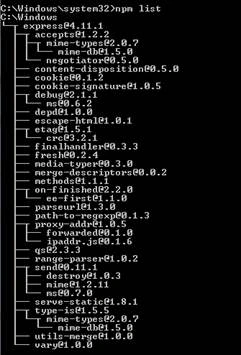
The above output is very detailed. This can be changed using --depth 0 option.

Insall packages in Global mode
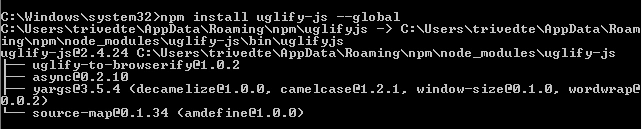
--global flag is used to install package in global mode. This can be abbreviated to –g. Below command will install UglifyJS (JavaScript Minification Tool).






Prasanna MuraliPosted Oct 9, 2016, 10:15 AM
Nice post..
Tejas TrivediPosted Oct 6, 2016, 8:30 AM
Thanks Anupam
Anupam SinghPosted Oct 6, 2016, 8:02 AM
Very useful npm commands, everybody should know who is using npm. nice share.