

Introduction
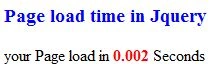
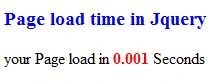
In this article, I explain how to show page load time using jQuery.
First we download the file and then add it to our project; the file is:
Use the following procedure.
Step 1
Open Visual Studio 2012 and click "File" -> "New" -> "Web Site...". A window is opened. In this window, click "Empty Web Site" under Visual C#.
Give the name of your application as "Page_Load_Time_in_Jquery" and then click "Ok". Then add "HTML page" and write the following code.
Program Coding
Page_LoadTime.htm
<html xmlns="http://www.w3.org/1999/xhtml">
<head>
<title>Page load time</title>
<script src="jquery-1.8.2.js"></script>
<script type="text/javascript">
$(function ()
{
var befretime = new Date().getTime();
window.onload = gettimeload;
function gettimeload()
{
Vithal WadjePosted Sep 30, 2014, 2:18 PM
useful trick
Ravikumar GPosted May 26, 2013, 11:32 PM
very good ..