

Introduction
In this article, we are going to learn about pagination in Flutter using Firebase Cloud Firestore database. As we know that accessing data in small pieces rather than the whole bunch is a better approach in terms of application performance and bandwidth cost, I would like to include that Firebase Firestore bills you according to the number of reads, writes, and delete operations so, this article will be very crucial to those developers who want to use Firebase Cloud Firestore database as backend for their app.
We are going to implement the scroll to load feature for loading more data in the below example. Initially, we will load 15 records and then after, whenever the user reaches the end of the list or bottom of the list, we will load another 15 records and so on. So, let’s begin our step by step example tutorial for pagination in Flutter using Firebase Cloud Firestore database.
Prerequisites
- Created New Project named as “flutter_firebase_pagination”.
- I am assuming that you are familiar with how to create a Firebase project and initialize the Firestore database in it. If you are a beginner and don’t have an idea about Firestore, you can check my article Firebase Firestore CRUD Operation In Flutter.
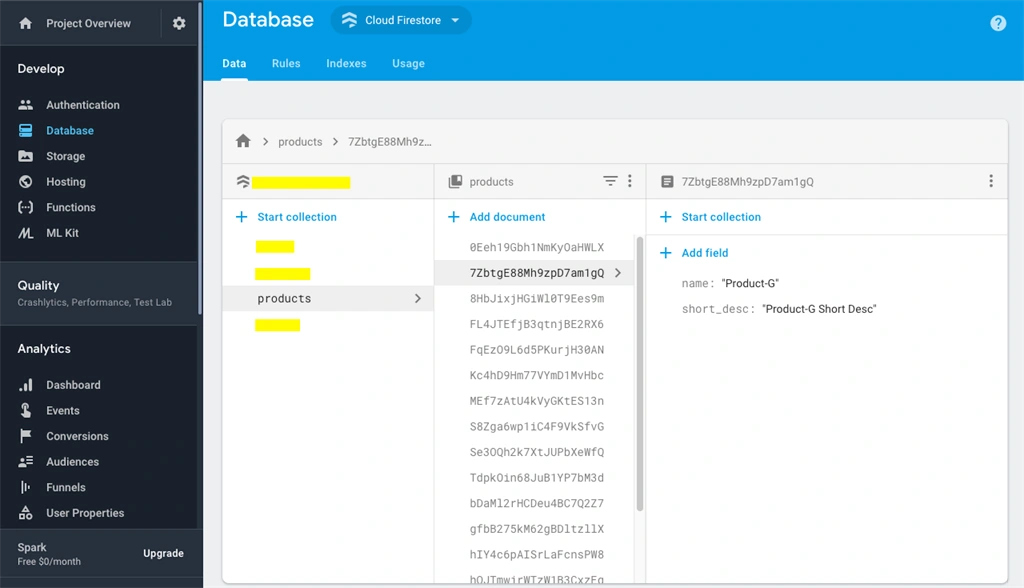
- After creating the Firebase database, create a collection named “products” and add 25 documents manually in products collection. I have attached a screenshot that will make you easily understand how to structure our collection. There are two fields in the document - “name” and “short_desc”.
Programming Steps
Step 1
Open the pubspec.yaml file in your project and add the following dependencies into it.
- dependencies:
- flutter:
- sdk: flutter
- cupertino_icons: ^0.1.2
- cloud_firestore: ^0.12.7
Step 2
Open the main.dart file and import Firestore package.
- import 'package:cloud_firestore/cloud_firestore.dart';
Step 3
Initialize the Firestore instance in the state class.
- Firestore firestore = Firestore.instance;
Step 4
Define another variable for storing data and tracking the load progress.
- List<DocumentSnapshot> products = []; // stores fetched products
- bool isLoading = false; // track if products fetching
- bool hasMore = true; // flag for more products available or not
- int documentLimit = 10; // documents to be fetched per request
- DocumentSnapshot lastDocument; // flag for last document from where next 10 records to be fetched
- ScrollController _scrollController = ScrollController(); // listener for listview scrolling
Step 5
Define the getProducts() function to get initial 10 documents.
- getProducts() async {
- if (!hasMore) {
- print('No More Products');
- return;
- }
- if (isLoading) {
- return;
- }
- setState(() {
- isLoading = true;
- });
- QuerySnapshot querySnapshot;
- if (lastDocument == null) {
- querySnapshot = await firestore
- .collection('products')
- .orderBy('name')
- .limit(documentLimit)
- .getDocuments();
- } else {
- querySnapshot = await firestore
- .collection('products')
- .orderBy('name')
- .startAfterDocument(lastDocument)
- .limit(documentLimit)
- .getDocuments();
- print(1);
- }
- if (querySnapshot.documents.length < documentLimit) {
- hasMore = false;
- }
- lastDocument = querySnapshot.documents[querySnapshot.documents.length - 1];
- products.addAll(querySnapshot.documents);
- setState(() {
- isLoading = false;
- });
- }
Step 6
Define the Scrolling Listener. If the user scroll reacts to 20% of the device height, we will fetch more documents. We have defined the login in the listener.
- _scrollController.addListener(() {
- double maxScroll = _scrollController.position.maxScrollExtent;
- double currentScroll = _scrollController.position.pixels;
- double delta = MediaQuery.of(context).size.height * 0.20;
- if (maxScroll - currentScroll <= delta) {
- getProducts();
- }
- });
Step 7
Generated UI in build method.
- @override
- Widget build(BuildContext context) {
- return Scaffold(
- appBar: AppBar(
- title: Text('Flutter Pagination with Firestore'),
- ),
- body: Column(children: [
- Expanded(
- child: products.length == 0
- ? Center(
- child: Text('No Data...'),
- )
- : ListView.builder(
- controller: _scrollController,
- itemCount: products.length,
- itemBuilder: (context, index) {
- return ListTile(
- contentPadding: EdgeInsets.all(5),
- title: Text(products[index].data['name']),
- subtitle: Text(products[index].data['short_desc']),
- );
- },
- ),
- ),
- isLoading
- ? Container(
- width: MediaQuery.of(context).size.width,
- padding: EdgeInsets.all(5),
- color: Colors.yellowAccent,
- child: Text(
- 'Loading',
- textAlign: TextAlign.center,
- style: TextStyle(
- fontWeight: FontWeight.bold,
- ),
- ),
- )
- : Container()
- ]),
- );
- }
Step 8
Great! You are done with Flutter pagination using Firebase Cloud Firestore database. For the full example code, you can download the zip or pull my repository.
NOTE
PLEASE CHECK OUT GIT REPO FOR FULL SOURCE CODE. YOU NEED TO ADD YOUR google-services.json FILE IN ANDROID => APP FOLDER.
Possible ERRORS
Error: import androidx.annotation.NonNull;
SOLUTION
Add the below lines in android/gradle.properties file,
android.useAndroidX=true
android.enableJetifier=true
Conclusion
In this article, we have learned how to implement pagination in Flutter using Firebase Cloud Firestore database and how we can improve our app performance and reduce bandwidth usage.
Join the conversation! Your thoughts help the community grow.