

You can enter any word, number, or sentence(without punctuation marks) and this will give the output yes or no.
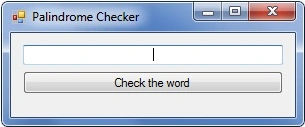
// My palindrome code
// Please enter the input sentence without any symbols like ,.? etc
using System;
using System.Collections.Generic;
using System.ComponentModel;
using System.Data;
using System.Drawing;
using System.Linq;
using System.Text;
using System.Windows.Forms;

namespace Palindrome
{
    public partial class Form1 : Form
    {
        int i, startchar, lastchar;

        public Form1()
        {
            InitializeComponent();
        }

        private void button1_Click(object sender, EventArgs e)
        {
            // Convert input to lowercase to avoid case sensitivity issues
            string low = textBox1.Text.ToLower();

            // Remove spaces from input sentence to check palindromes correctly
            low = low.Replace(" ", "");

            char[] character = new char[100];
            character = low.ToCharArray();
            startchar = 0;
            lastchar = character.Length - 1;

            while (startchar < lastchar)
            {
                if (character[startchar] == character[lastchar])
                {
                    startchar++;
                    lastchar--;
                }
                else
                {
                    // Display message if not a palindrome
                    label1.Visible = true;
                    label1.Text = "It is not a Palindrome";
                    button1.Text = "Try Again";
                    textBox1.Focus();

                    // Set a flag to prevent closing the application after breaking the loop
                    // Allows user to try again
                    i = 2;
                    break;
                }
            }

            if (i < 2)
            {
                // Display message if it's a palindrome
                label1.Visible = true;
                label1.Text = "It is a Palindrome";
                button1.Text = "Try Another";
                textBox1.Focus();
            }
            else
            {
                // Reset flag value to 0 to prevent application from getting stuck
                i = 0;
            }
        }
    }
}
uses an array, first index, and last index.
this is the one and only GUI version of Palindrome available online checking words and sentences
Read Comments in C# for more details
Timepass project by me
@D@R$|-|
Praveen SPosted Apr 23, 2012, 6:23 AM
mmmmmmmmmmm
Praveen SPosted Apr 23, 2012, 6:23 AM
mmmmmmmmmmm
Adarsh AcharyaPosted Jan 26, 2012, 8:23 AM
i have added a small intro about this project as demanded by mentors @D@R$|-|
Amit MaheshwarieditedPosted Nov 28, 2011, 12:05 PMEdited Nov 28, 2011, 12:07 PM
It's a great effort keep it up but you should write some description about the code in brief thanks.
Manish TewatiaPosted Mar 16, 2011, 11:32 PM
Nice coding Adarsh but I think if you also write some theory, its good to understand for the reader...
Manuel KorrmannPosted Mar 14, 2011, 6:24 AM
Good idea, but I see some problems in your code. First, if a word is longer than 60 chars, it crashes: char[] character = new char[60]; Second, the readability of your code suffers. I would suggest a method GetReverseString ( string input ). Then your logic may look like this: if (input == GetReverseString (input)) Console.WriteLine ("{0} is a Palindrom", input); else Console.WriteLine ("{0} is not a Palindrom", input); I think this will improve the readability. Inside GetReverseString() I thought about something like this: static string GetReverseString (string inputString) { string result = ""; foreach (char charInString in inputString.ToArray ()) { result = charInString + result; } return result; } What do you think?