

These days nearly all computers are assembled with multicore processors. Now the time is different from when you had simple single-core processors processing a single instruction at a time of your program. If you are creating an application that has to be installed on a multicore CPU machine, then the application should be able to utilize as many CPUs as it can to provide improved performance. But to develop such an application you need to be quite skilled in multithreaded programming techniques.
With the .Net 4.0, you are provided with the brand new parallel programming language library called "Task Parallel Library" (TPL). Using the classes in the System.Threading.Tasks namespace, you can build fine-grained, scalable parallel code without having to work directly with threads.
The Task Parallel Library API
The primary class of the TPL is System.Threading.Tasks.Parallel. This class provides you a number of methods that allow you to iterate over a collection of data, (specifically which implements the IEnumerable<T>) in a parallel fashion. Main two static methods of this class are Parallel.For() and Parallel.ForEach(), each of which defines numerous overloaded versions.
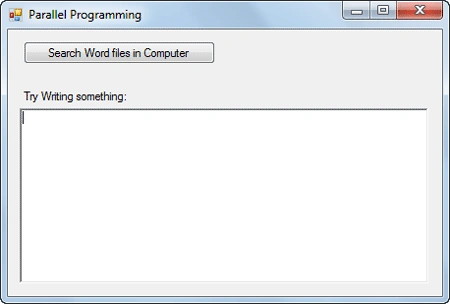
- private void btnSearch_Click(object sender, EventArgs e)
- {
- DateTime startTime = DateTime.Now;
- DateTime endTime;
- string[] dirs = Directory.GetDirectories(path);
- List<string> lstFiles = new List<string>();
- foreach (string dir in dirs)
- {
- this.Text = "Searching " + dir;
- try
- {
- lstFiles.AddRange(Directory.GetFiles(dir, "*.doc*", SearchOption.AllDirectories));
- }
- catch(Exception ex)
- {
- continue;
- }
- }
- endTime = DateTime.Now;
- TimeSpan ts = endTime.Subtract(startTime);
- MessageBox.Show("Search Complete!! \n Time elapsed:"+ts.Minutes+":"+ts.Seconds+":"+ts.Milliseconds);
- }
OUTPUT:
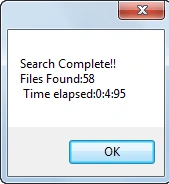
- private void btnSearch_Click(object sender, EventArgs e)
- {
- DateTime startTime = DateTime.Now;
- DateTime endTime;
- string[] dirs = Directory.GetDirectories(path);
- List<string> lstFiles = new List<string>();
- Parallel.ForEach(dirs, dir =>
- {
- try
- {
- lstFiles.AddRange(Directory.GetFiles(dir, "*.doc*", SearchOption.AllDirectories));
- }
- catch
- {
- // do nothing
- }
- });
- endTime = DateTime.Now;
- TimeSpan ts = endTime.Subtract(startTime);
- MessageBox.Show("Search Complete!! \nFiles Found:"+lstFiles.Count+"\n Time elapsed:"+ts.Minutes+":"+ts.Seconds+":"+ts.Milliseconds);
- }
OUTPUT
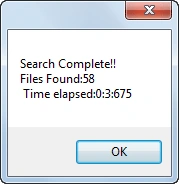
- private void SearchDirectory()
- {
- DateTime startTime = DateTime.Now;
- DateTime endTime;
- string[] dirs = Directory.GetDirectories(path);
- List<string> lstFiles = new List<string>();
- Parallel.ForEach(dirs, dir =>
- {
- try
- {
- lstFiles.AddRange(Directory.GetFiles(dir, "*.doc*", SearchOption.AllDirectories));
- }
- catch
- {
- // do nothing
- }
- });
- endTime = DateTime.Now;
- TimeSpan ts = endTime.Subtract(startTime);
- MessageBox.Show("Search Complete!! \nFiles Found:" + lstFiles.Count + "\n Time elapsed:" + ts.Minutes + ":" + ts.Seconds + ":" + ts.Milliseconds);
- }
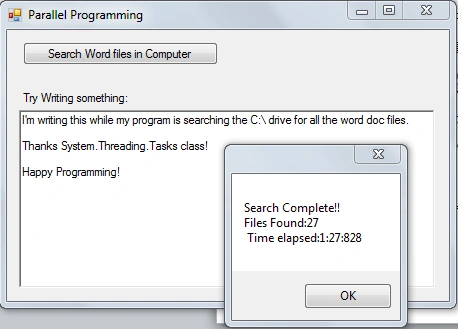
To make the UI you can use async delegates but this time we're going to use a little easier approach than writing the whole code to make an Async call.
- private void btnSearch_Click(object sender, EventArgs e)
- {
- //Start a task to process a file
- Task.Factory.StartNew(() => SearchDirectory());
- }
The Factory property of the Task Class returns a TaskFactory object. When you call its StartNew() method, you pass in an Action<T> delegate (Here lambda expression is hiding the expression). Now your UI will be able to receive input and will not block.
OUTPUT
 The Parallel.Foreach() and Paralled.For() both support the cancellation through the Cancellation tokens. When you invoke the methods on Parallel, you can pass in a ParallelOptions object, which in turn contains a CalcellationTokenSource object.
To add this functionality in your application, first of all, define a new private member variable in your form derived from a class of time CancellationTokenSource named cancelToken:
The Parallel.Foreach() and Paralled.For() both support the cancellation through the Cancellation tokens. When you invoke the methods on Parallel, you can pass in a ParallelOptions object, which in turn contains a CalcellationTokenSource object.
To add this functionality in your application, first of all, define a new private member variable in your form derived from a class of time CancellationTokenSource named cancelToken:
Including Cancellation Request for a background process
- //Cancellation token for canceling the invoke
- private CancellationTokenSource cancelTOken = new CancellationTokenSource();
To cancel the task just add a cancel button and write a single line in it:
- cancelToken.Cancel();
Add the Parallel option instance to store the Cancellation Token:
- ParallelOptions parOpts = new ParallelOptions();
- parOpts.CancellationToken = cancelToken;
- parOpts.MaxDegreeOfParallelism = Environment.ProcessorCount;
- try
- {
- Parallel.ForEach(dirs, dir =>
- {
- parOpts.CancellationToken.ThrowIfCancellationRequested();
- try
- {
- lstFiles.AddRange(Directory.GetFiles(dir, "*.doc*", SearchOption.AllDirectories));
- }
- catch
- {
- // do nothing
- }
- });
- endTime = DateTime.Now;
- TimeSpan ts = endTime.Subtract(startTime);
- MessageBox.Show("Search Complete!! \nFiles Found:" + lstFiles.Count + "\n Time elapsed:" + ts.Minutes + ":" + ts.Seconds + ":" + ts.Milliseconds);
- }
- catch (OperationCanceledException ex)
- {
- MessageBox.Show(ex.Message, "Message", MessageBoxButtons.OK, MessageBoxIcon.Warning);
- }
Within the scope of the looping logic, you make a call to ThrowIfCancellationRequested () on the token, which will ensure that if the user clicks the cancel button, all threads will stop and you will be notified via a runtime exception.
I hope you enjoyed reading this. Please comment if you liked it and spread the word about it.
Anant VernekarPosted Jun 23, 2019, 8:26 AM
Nice article and few correction to be done in posted source code. In yellow highlighted parOpts.CancellationToken = cancelToken.Token; and Parallel.ForEach(dirs, parOpts, dir => =>
Asif IqbalPosted Mar 19, 2019, 7:47 AM
Very nice, simple and much informative thank you for writing this article :)