

There are hundreds of editors to choose from out on the market(SlickEdit, CodeWright, Visual Studio, SharpDevelop), so the goal of this article is not to replace them, but to show you how to manipulate the RichEditBox to create color syntax as well as show you one way to print the RichEditBox to the printer. For some reason, I got caught up doing some PHP coding, so I decided to focus coloring this editor according to PHP, a popular and efficient language for scripting inside of HTML.
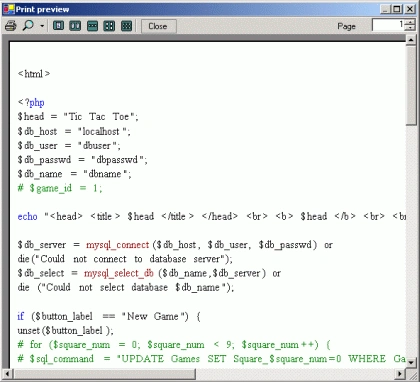
Figure 1 Print Preview of RichTextBox ColorSyntax Editor
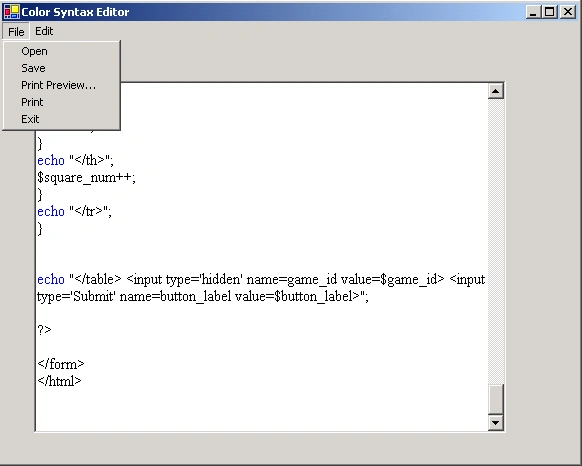
Figure 2 The Color Syntax Editor Application
The Application is a simple Windows Form program that allows you to open and save the text files edited in the rich edit control, as well as print them out. The program takes advantage of a syntax text file for PHP which lists the functions and keywords contained in the PHP language. Below is a sample of the syntax file. The file consists of 3 headers: KEYWORDS, FUNCTIONS, and COMMENTS. The Application assigns colors to the keywords based on their specified category:
[KEYWORDS]
echo
int
integer
real
php
...
[FUNCTIONS]
sort
strlen
debugger_on
debugger_off
error_log
phpinfo
[COMMENTS]
//
#
The file is read in using the ColorSyntaxEditor class shown as part of the design below.As seen in figure 3, the design consists of a Form class containing the GUI and FlickerFreeRichEditTextBox, a SyntaxReader class for reading language syntax from a file, and a WordAndPosition class used to hold information about words and positions of those words in the RichTextBox:
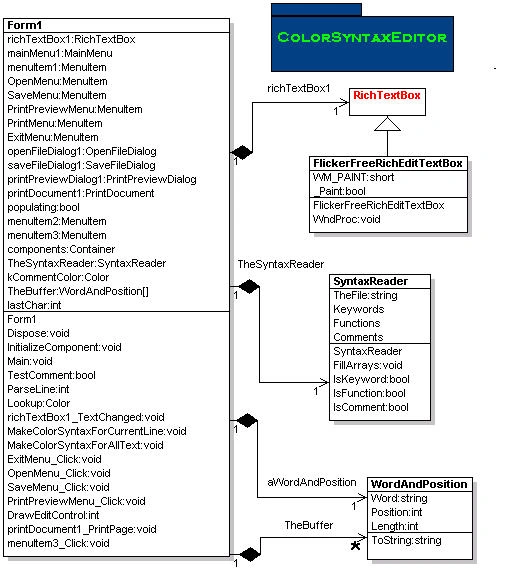
Figure 3 UML Design of Color Syntax Editor reverse engineered using WithClass UML Tool for C#
One thing you may be curious about is how do we assign different colors to individual words inside the RichTextBox?.The way this is done is through a trick that selects the word we are interested in coloring and then assigns a color to the selection (you can also assign a font to the selection if you wish):
Listing 1 Coloring in a Selection in the RichTextBox
- Color c = Lookup(wp.Word);
- richTextBox1.Select(wp.Position, wp.Length);
- richTextBox1.SelectionColor = c;
- Event Handler traps that the RichTextBox text has changed
- Parse the current line of text that the cursor is sitting on
- Parse each word in the line using a Regular Expression object and save words in an array.
- Select each parsed word and color according to the ColorSyntaxEditor.
Below is the method that implements this use case:
Listing 2 Coloring in words and symbols on the current line
- private void MakeColorSyntaxForCurrentLine()
- {
- // Store current cursor position
- int CurrentSelectionStart = richTextBox1.SelectionStart;
- int CurrentSelectionLength = richTextBox1.SelectionLength;
- // find start of line
- int pos = CurrentSelectionStart;
- while ((pos > 0) && (richTextBox1.Text[pos - 1] != '\n'))
- pos--;
- // find end of line
- int pos2 = CurrentSelectionStart;
- while ((pos2 < richTextBox1.Text.Length) && (richTextBox1.Text[pos2] != '\n')) pos2++;
- string s = richTextBox1.Text.Substring(pos, pos2 - pos);
- // Parse the line into individual symbols and words
- int count = ParseLine(s);
- // Loop through each word, select, and color according to
- // Lookup function which calls the SyntaxReader
- for (int i = 0; i < count; i++)
- {
- WordAndPosition wp = TheBuffer[i];
- Color c = Lookup(wp.Word);
- richTextBox1.Select(wp.Position + pos, wp.Length);
- richTextBox1.SelectionColor = c;
- }
- // Restore Cursor
- if (CurrentSelectionStart >= 0)
- richTextBox1.Select(CurrentSelectionStart, CurrentSelectionLength);
- }
- TextChanged Event Handler traps RichTextBox event
- Extract the current line that the cursor sits on
- if next symbol is a comment, color the entire line to the comment color
The code for coloring the comment is shown below:
Listing 3 Coloring in comments in the RichTextBox
- // check if its a C++ style comment
- if (wp.Word == "/" && previousWord == "/")
- {
- // color until end of line
- int posCommentStart = wp.Position - 1;
- posCommentEnd = pos2;// pos2 was determined in the previous
- // code as being the last char position
- // in the line
- richTextBox1.Select(posCommentStart + pos, posCommentEnd -
- (posCommentStart + pos));
- richTextBox1.SelectionColor = this.kCommentColor;
- }
Listing 4 A regular expression for parsing words and symbols
- Regex r = new Regex(@"\w+|[^A-Za-z0-9_ \f\t\v]",
- RegexOptions.IgnoreCase|RegexOptions.Compiled);
The code for parsing a line into words and symbols and their corresponding positions is shown below:
Listing 5 Matching the regular expression against the words in the line of code
- private int ParseLine(string s)
- {
- // Clear out the Array of code words
- TheBuffer.Initialize();
- int count = 0;
- // Create the regular expression object to match against the string
- Regex r = new Regex(@"\w+|[^A-Za-z0-9_ \f\t\v]", RegexOptions.IgnoreCase | RegexOptions.Compiled);
- Match m;
- // Loop through the string and continue to record
- // words and symbols and their corresponding positions and lengths
- for (m = r.Match(s); m.Success; m = m.NextMatch())
- {
- TheBuffer[count].Word = m.Value;
- TheBuffer[count].Position = m.Index;
- TheBuffer[count].Length = m.Length;
- // Console.WriteLine("Next Word = " + m.Value);
- count++;
- }
- // return the number of symbols and words
- return count;
- }
A few individuals have been kind enough to e-mail me a solution on how to reduce the flicker in this application (Mark Mihevc & JACK DUNN) and I just wanted to take the opportunity in this article to thank them. In order to reduce the flicker of the RichTextBox, we simply subclass the RichTextBox class with our own called FlickerFreeRichEditTextBox. Then we override the WndProc method in this class to give us control over when the WM_PAINT message is passed into the class. The entire subclass of the rich text box control is shown below:
Listing 6 Subclassing the RichTextBox to reduce flicker in the control
- using System;
- using System.Windows.Forms;
- namespace ColorSyntaxEditor
- {
- /// <summary>
- /// Summary description for FlickerFreeRichEditTextBox - Subclasses the RichTextBox to allow control over flicker
- /// </summary>
- public class FlickerFreeRichEditTextBox : RichTextBox
- {
- const short WM_PAINT = 0x00f;
- public FlickerFreeRichEditTextBox()
- {
- }
- public static bool _Paint = true;
- protected override void WndProc(ref System.Windows.Forms.Message m)
- {
- // Code courtesy of Mark Mihevc
- // sometimes we want to eat the paint message so we don't have to see all the
- // flicker from when we select the text to change the color.
- if (m.Msg == WM_PAINT)
- {
- if (_Paint)
- base.WndProc(ref m); // if we decided to paint this control, just call the RichTextBox WndProc
- else
- m.Result = IntPtr.Zero; // not painting, must set this to IntPtr.Zero if not painting therwise serious problems.
- }
- else
- base.WndProc(ref m); // message other than WM_PAINT, jsut do what you normally do.
- }
- }
- }
To use the control above, simply change the static _Paint variable to false when we select and color the text and turn it back to true when we are done. Walla! The flicker disappears. Below are the calls in our code that toggles the _Paint flag in the RichTextBox's TextChanged Event Handler inside our Form.
Listing 7 Toggling the _Paint flag of the subclassed RichTextBox to reduce flicker
- private void richTextBox1_TextChanged(object sender, System.EventArgs e)
- {
- if (populating)
- return;
- ColorSyntaxEditor.FlickerFreeRichEditTextBox._Paint = false; // turn off flag to ignore WM_PAINT messages
- MakeColorSyntaxForCurrentLine();
- ColorSyntaxEditor.FlickerFreeRichEditTextBox._Paint = true; // restore flag so we can paint the control
- }
We can some of the same techniques previously mentioned in this article to help us in printing out the rich text box. Remember from previous articles in C# Corner on printing that all printing is performed from the PrintPage EventHandler produced by double clicking on the printDocument1 component. (See Printing in C#). From the PrintPage event handler, we can get a handle to the device context of the printer. We then pass this Graphics object to our GDI+ method that prints the RichEditControl.
- private void printDocument1_PrintPage(object sender, System.Drawing.Printing.PrintPageEventArgs e)
- {
- // Get device context for the printer
- Graphics g = e.Graphics;
- // Pass the device context to the function that
- // draws the RichTextBox to the printer
- lastChar = DrawEditControl(g, lastChar);
- if (lastChar != -1)
- e.HasMorePages = true;
- else
- {
- e.HasMorePages = false;
- lastChar = 0;
- }
- }
- private int lastChar = 0;
- private int DrawEditControl(Graphics g, int lastChar)
- // draw the control by selecting each character and deterimining its
- // color
- int xPos = 10;
- int yPos = 40;
- int kMargin = 50;
- // start from the last position of the previous page
- for (int c = lastChar; c<richTextBox1.Text.Length; c++)
- {
- // Select a single character and retrieve the color and font
- richTextBox1.Select(c,1);
- char nextChar = richTextBox1.Text[c];
- Color theColor = richTextBox1.SelectionColor;
- Font theFont = richTextBox1.SelectionFont;
- // Determine the character height from the font
- int height = theFont.Height;
- // if the next character is a return character, increment the Y
- // Position
- if (nextChar == '\n')
- {
- // add to height on return characters
- yPos += (height + 3);
- xPos = 10;
- // Get the height of the default print page
- int paperHeight = printDocument1.PrinterSettings. DefaultPageSettings.PaperSize.Height;
- // Test to see if we went past the bottom margin of the page
- if (yPos > paperHeight - kMargin)
- return c;
- }
- // if the next character is a space or tab, increment the horizontal
- // position by half the height
- else if ((nextChar == ' ') || (nextChar == '\t'))
- {
- xPos += theFont.Height/2;
- }
- else
- {
- Regex r = new Regex(@"\w", RegexOptions.IgnoreCase | RegexOptions.Compiled);
- Match m;
- string nextWord = "";
- bool reduceAtEnd = false;
- m = r.Match(nextChar.ToString());
- // Determine if next character is alpha numeric
- if (m.Success)
- reduceAtEnd = true;
- else
- nextWord = nextChar.ToString();
- // use a regular expression matching alphanumerics
- // until a whole word is formed
- // by printing the whole word, rather than individual
- // characters, this way the characters will be spaced
- // better in the printout
- while (m.Success)
- {
- nextWord += nextChar;
- c++;
- nextChar = richTextBox1.Text[c];
- m = r.Match(nextChar.ToString());
- }
- if (reduceAtEnd)
- {
- c--;
- }
- // Draw the string at the current x position with the current font
- // and current selection color
- g.DrawString(nextWord, theFont, new SolidBrush(theColor),xPos, yPos);
- // Measure the length of the string to see where to advance the next
- // horizontal position
- SizeF thesize = g.MeasureString(nextWord, theFont);
- // Increment the x position by the size of the word
- xPos += (int) thesize.Width - 4;
- }
- }
- // All characters in the RichTextBox have been visited, return -1
- return -1;
Conclusions and Observations
The color syntax editor for PHP is a simple tool to help you understand how to utilize the RichTextBox control. You can edit the syntax file read by the SyntaxReader class to support C#, C++, Java, VB or any language you want. It would be nice to have a way of setting a characters color in the rich edit control according to position rather than selection. I noticed also that the rich edit control can be streamed out into a file that maintains its color and font information. This probably would be a nice future feature for this app.
irfan_umeditedPosted Feb 1, 2011, 10:36 AMEdited Apr 5, 2011, 8:31 AM
a
Mike GoldPosted Sep 5, 2010, 6:40 PM
Microsoft published a knowledge base article on a better way to do this. I tried it, and its much faster because it uses the underlying Win SDK. Here is the link http://support.microsoft.com/kb/812425
HosseineditedPosted Nov 19, 2009, 12:10 PMEdited Nov 27, 2009, 10:19 PM
first of all Thanks a billion for your great tutorial on Syntax Highliting , and second , i have a favor to ask , and that is would you help me extend the capabilities of this syntax highliter by adding the string ("string") support ? i have already done this in a different way , but i like your style and im seeking to find a way how to make it your way here is my code : public Regex strKeyWords = new Regex("(\".*\")|('.*')"); ... private void ExtraSyntax() { try { LockWindowUpdate(richTextBox.Handle); int CurrentSelectionStart = richTextBox.SelectionStart; int CurrentSelectionLength = richTextBox.SelectionLength; foreach (Match strKeyWordMatch in strKeyWords.Matches(richTextBox.Text)) { richTextBox.Select(strKeyWordMatch.Index, strKeyWordMatch.Length); richTextBox.SelectionColor = Color.Brown; richTextBox.Select( CurrentSelectionStart , CurrentSelectionLength); richTextBox.SelectionColor = Color.Black; } } finally { LockWindowUpdate(IntPtr.Zero); } } thanks in advance
nizam ahmedPosted Jun 8, 2009, 7:28 AM
thank u very much.. the best article i ve seen for syntax highlighting.. in the whole google world,ur article taught me to avoid flickering in my editor.. hats off to u Mr.Mike!
fast rabbitPosted Mar 9, 2008, 7:26 AM
nice one :)
fast rabbitPosted Mar 9, 2008, 7:23 AM
nice one :)
Amir SaniyaneditedPosted Feb 16, 2008, 8:05 AMEdited Feb 16, 2008, 8:07 AM
Hi, To solve Redo/Undo problem: Use TextEditorControl_KeyUp event instead of TextEditorControl_TextChanged or TextEditorControl_KeyPress events. Now, Redo/Undo works. To bypass Redo/Undo selections step, REWRITE a NEW Undo/Redo and DO base.Undo/base.Redo until Text property changes.
Jithu JosePosted Feb 5, 2008, 5:27 PM
I am a newbie in programming! So if i want to do this syntax highlighting from the menustrip? I mean, if i don't want that the syntax highlighting is selected by default. I am creating a text editor with multiple language selections. I want that when the user select a lang the richtextbox must change color. Thanks again!
zsikicPosted Dec 20, 2007, 12:04 AM
Hi, I found your article on the web and it’s really good. It helped me a lot to paint SQL query in rich text box. I hoped you can help me with Undo / Redo issue I have. After paining of the text in RTC Undo and Redo calls are becoming useless. I was hoping to be able to disable Undo buffering with CanUndo = false but it’s read only property. If you can help me to find a way to do it that would be fantastic. Thanks, Jake [email protected]
AndreweditedPosted Jul 24, 2007, 8:52 PMEdited Jul 24, 2007, 8:57 PM
Thanks, this was a big help. One question, if you don't mind, how would I go about changing only the middle part of a line? For instance, like if I have a string value, and I only want to change the color of the text in the "". Again, thanks.