Introduction
In this article we will learn how to use partial class instead of Model Class in MVC using entity framework
First understand what is partial class
A partial class is one that can be split among multiple physical files. This feature came in C# 2.0. The partial class break the definition of class two or more than two class files, but it will be together at compile time as one class.
Now here we will be using partial concept in MVC using entity framework
Database structure
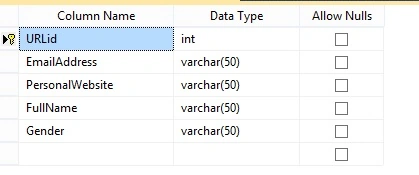
Create a table in the database with the name TBurl.
The following is my table design.
Create MVC Application
Step 1: Go to File, New, then Project.
Step 2: Go to File, New, Project. Choose "ASP.NET MVC 4 Web Application" from the list, then provide the application name as you wish and set the path in the location input where you want to create the application.
Step 3: Now choose the Project Template "Basic".
Adding a ADO.Net Entity Data Model
Step 1: Right-click on the project and select "Add new item", then select Data from the templates.
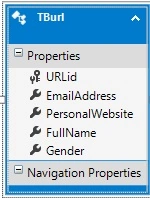
Step 2: Choose "ADO.Net Entity Data Model" from the list and provide a name. Now, after clicking on Add, you can see the .edmx file in the project.
Step 3:
Create Model Class
The MVC model contains all the application logic validation, business logic and data access logic. We can create a TBurl class under the Model Folder.
- using System;
- using System.Collections.Generic;
- using System.ComponentModel.DataAnnotations;
- using System.Linq;
- using System.Web;
-
- namespace urlhyperlink
- {
- [MetadataType(typeof(urlmetadata))]
- public partial class TBurl
- {
- }
- public class urlmetadata
- {
- public int URLid { get; set; }
- [DataType(DataType.EmailAddress)]
- public string EmailAddress { get; set; }
- [DataType(DataType.Url)]
- public string PersonalWebsite { get; set; }
- public string FullName { get; set; }
- public string Gender { get; set; }
-
- }
- }
In the above code I am created partial class with name TBurl, and I have same class inside our sampleDtataModel that is created automatically if I am using entity Framework using wizard. In this class I am not adding model validation, since in future if I want to override the table inside sampleDtataModel, all the validations in the class will lost. This is the reason we need to create partial class here.
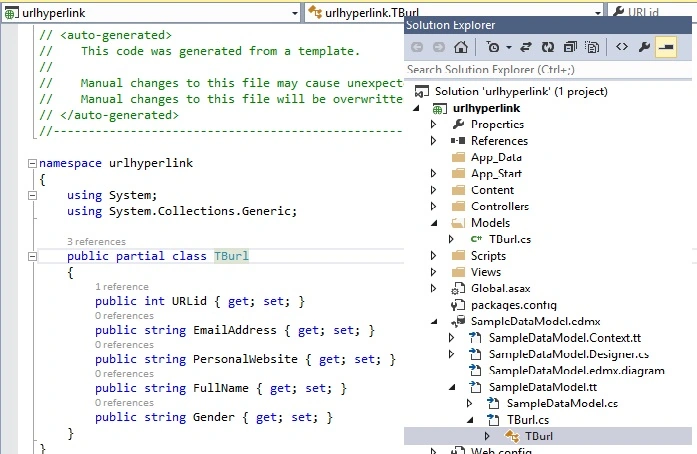
In above figure I have not added any model validation, I have used all the validations in partial class Tburi.
Create Homecontroller
- using System;
- using System.Collections.Generic;
- using System.Linq;
- using System.Web;
- using System.Web.Mvc;
-
- namespace urlhyperlink.Controllers
- {
- public class HomeController : Controller
- {
-
- public ActionResult Detail(int id)
- {
- informationEntities rf = new informationEntities();
-
- TBurl tb = rf.TBurls.Single(p => p.URLid == id);
-
- return View(tb);
-
- }
-
- }
- }
Create Detail View
- @model urlhyperlink.TBurl
-
- @{
- ViewBag.Title = "Detail";
- }
-
- <h2>Detail</h2>
-
- <div style=" font-family:Arial">
- @Html.DisplayForModel();
-
- </div>
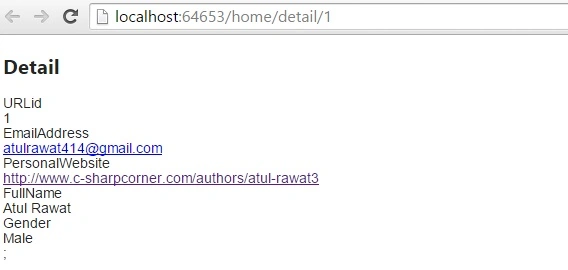
Run your Application by pressing F5 key.
Output
Summary
In this article we learned about partial class in MVC using entity framework.


heszarPosted Aug 22, 2017, 4:24 AM
Thank you for your sharing, but what if I want more control over my inputs? For example, lets say that I want to use RegEx to validate Email field, therefore I need to put some logic in EamilAddress property, how could I achieve this?
Santhakumar MunuswamyPosted Oct 18, 2015, 3:52 AM
Good one
Shridhar SharmaPosted Oct 12, 2015, 2:03 PM
good work Atul
Mohammed IbrahimPosted Oct 12, 2015, 12:11 PM
nice
RakeshPosted Oct 12, 2015, 11:43 AM
Good share sir
Sibeesh VenuPosted Oct 12, 2015, 3:13 AM
Nice Share
Muhammad Aqib ShehzadPosted Oct 12, 2015, 3:08 AM
good article
Mukesh KumarPosted Oct 12, 2015, 3:03 AM
Great work
Nilesh JadavPosted Oct 12, 2015, 2:58 AM
Nice one sir