

Introduction
A partial view is same as user control in ASP.NET MVC that is used for code reusability. Partial views help us to reduce code duplication. Hence, partial views can be used for views like Header and Footer views. In web form application, we use user control for creating reusable elements. The same way in MVC, we will use a partial view.
Description
Here, I have created an MVC application and built some views including normal view and partial view. Here is the step-by-step description of how to implement partial view instead of writing a whole bunch of code of partial view how to access properties of partial view only by mentioning partial view file name in other views. Also in this module, I used Entity Framework to fetch data from the database and will show the result using a partial view.
In Which Scenario Using Partial View
A partial view is used to display user comments, module category, site bookmarks buttons, a dynamic ticker, calendar, like count status of blogs etc.
Download Source Code
Steps To Be Followed
A partial view has extension .cshtml as a regular view. To create a partial view right click on the shared folder (\Views\Shared) in solution explorer and click on "Add New View" option and then give the name for a partial view and also, check the "Create a partial view" option.
It is best practice to create partial view in the shared folder and partial view name is preceded by "_". The "_" before view name specifies that it is a reusable component i.e. partial view. A partial view is rendered by using the ViewUserControl class that is inherited from the ASP.NET UserControl class. The Partial, RenderPartial, RenderAction helper methods are used to render partial view in mvc3 razor.
- <div> @Html.Partial("_status") </div>
- div> @{Html.RenderPartial("_status");} </div>
- <div> @{Html.RenderAction("_MyView","Profile");} </div>
- <script type="text/jscript">
- $('#satyapopup').load('/shared/_MyView’);
- </script>
Note
In online news to show Twitter comments we would like to use Partial or RenderPartial methods since aTwitter section information is already populated in the model.To category list of menus on each and every page we would like to use RenderAction method since the list of category is populated by different model.
Different ways for calling a partial view in MVC,
| Html.RenderPartial | Html.RenderAction | Html.Partial | Html.Action |
| This method returns void. | We need to create a child action for rendering the partial view. | Renders the partial view as an HTML-encoded string. | Renders the partial view as an HtmlString . |
| The method result will be directly written to the HTTP response stream which means it used the same TextWriter object as used in the current webpage/template. No need to create any action.
|
This method result will be directly written to the HTTP response stream which means it used the same TextWriter object as used in the current webpage/template. RenderAction method is useful when the displaying data in the partial view is independent from corresponding view model. | Result can be stored in a variable, since it returns string type value. Simple to use and no need to create any action. | We need to create a child action for rendering the partial view. This method result can be stored in a variable, since it returns string type value. |
| This method is faster than Partial method since its result is directly written to the response stream. RenderPartial method is useful when the displaying data in the partial view is already in the corresponding view model. | This method is the best choice when you want to cache a partial view. This method is faster than Action method since its result is directly written to the HTTP response stream which makes it fast. | Like RenderPartial method, Partial method is also useful when the displaying data in the partial view is already in the corresponding view model. | Action method is useful when the displaying data in the partial view is independent from corresponding view model. |
Build A Sample MVC Application Using Partial View
Step-1
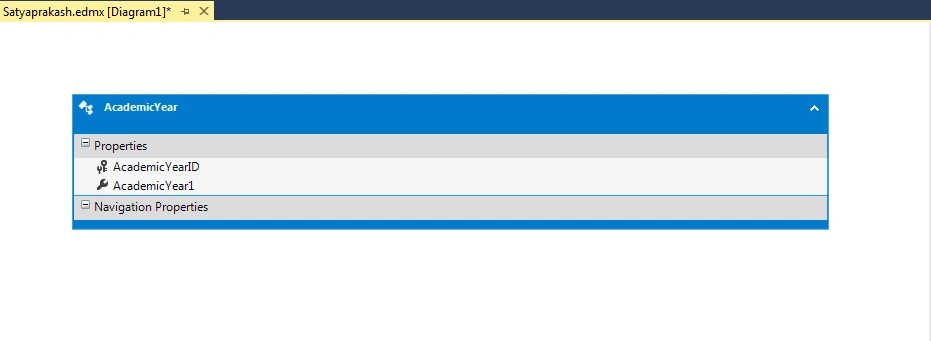
Added a Entity Data Model named Satyaprakash.edmx and check the created table structure . I inserted some dummy data.
Step-2
In HomeController.cs file add the below code.
- using System;
- using System.Collections.Generic;
- using System.Linq;
- using System.Web;
- using System.Web.Mvc;
- namespace MVCPartialView.Controllers
- {
- public class HomeController : Controller
- {
- public ActionResult ViewWithPartial()
- {
- return View();
- }
- public ActionResult SatyaAcademicYear()
- {
- using (SatyaprakashEntities dc = new SatyaprakashEntities())
- {
- var v = dc.AcademicYears.OrderByDescending(a => a.AcademicYear1).ToList();
- return PartialView("_AcademicYear", v);
- }
- }
- public ActionResult ViewWithPartialtwo()
- {
- return View();
- }
- }
- }
- return PartialView("_AcademicYear", v);
Create a Partial View named _AcademicYear.cshtml.
- @model IEnumerable<MVCPartialView.AcademicYear>
- @{
- ViewBag.Title = "_AcademicYear";
- }
- <h2>Academic Year List</h2>
- <style>
- table {
- font-family: arial, sans-serif;
- border-collapse: collapse;
- width: 100%;
- }
- td, th {
- border: 1px solid #dddddd;
- text-align: left;
- padding: 8px;
- }
- tr:nth-child(even) {
- background-color: #dddddd;
- }
- </style>
- <table border="1" cellpadding="4" cellspacing="4">
- <tr>
- <th style="background-color: Yellow;color: blue">
- AcademicYearID
- </th>
- <th style="background-color: Yellow;color: blue">
- AcademicYearName
- </th>
- </tr>
- @foreach (var item in Model) {
- <tr>
- <td>
- @Html.DisplayFor(modelItem => item.AcademicYear1)
- </td>
- <td>
- @Html.DisplayFor(modelItem => item.AcademicYearID)
- </td>
- </tr>
- }
- </table>
- @foreach (var item in Model) {
- <tr>
- <td>
- @Html.DisplayFor(modelItem => item.AcademicYear1)
- </td>
- <td>
- @Html.DisplayFor(modelItem => item.AcademicYearID)
- </td>
- </tr>
- }
Add a View named ViewWithPartial.cshtml.
- @{
- ViewBag.Title = "ViewWithPartial";
- }
- <fieldset>
- <legend style="font-family:Arial Black;color:blue">Normal View Content and Partial View Content</legend>
- <table>
- <tr>
- <td>
- <b>Normal View Content One</b>
- <p>
- <a href="http://www.c-sharpcorner.com/members/satyaprakash-samantaray">
- <img src="http://www.c-sharpcorner.com/members/satyaprakash-samantaray/flair.png" width="260" height="58" alt="profile for Satyaprakash C# Corner - A Social Community of Developers and Programmers" title="profile for Satyaprakash at C# Corner - A Social Community of Developers and Programmers" />
- </a>
- <br />
- <br />
- I'm a C# Corner MVP , Software Developer, Designer.
- I enjoy developing Microsoft .NET technology stuffs.
- I am passionate about Microsoft .NET technology and like to contribute my skills to the .NET developers community.
- My Contribution will let me step towards to be a future entrepreneur.
- </p>
- </td>
- <td width="400px">
- <b>Partial View Content</b>
- @{Html.RenderAction("SatyaAcademicYear", "Home");}
- </td>
- </tr>
- </table>
- </fieldset>
- <footer>
- <p style="background-color: Yellow; font-weight: bold; color:blue; text-align: center; font-style: oblique">© @DateTime.Now.ToLocalTime()</p> @*Add Date Time*@
- </footer>
- <td width="400px">
- <b>Partial View Content</b>
- @{Html.RenderAction("SatyaAcademicYear", "Home");}
- </td>
- @{
- ViewBag.Title = "ViewWithPartialTwo";
- }
- <fieldset>
- <legend style="font-family:Arial Black;color:blue">Normal View Content and Partial View Content</legend>
- <table>
- <tr>
- <td>
- <b>Normal View Content Two</b>
- <p>
- <a href="http://www.c-sharpcorner.com/members/satyaprakash-samantaray">
- <img src="http://www.c-sharpcorner.com/members/satyaprakash-samantaray/flair.png?theme=dark" width="260" height="58" alt="profile for Satyaprakash C# Corner - A Social Community of Developers and Programmers" title="profile for Satyaprakash at C# Corner - A Social Community of Developers and Programmers" />
- </a>
- <br />
- <br />
- I'm a C# Corner MVP , Software Developer, Designer.
- I enjoy developing Microsoft .NET technology stuffs.
- I am passionate about Microsoft .NET technology and like to contribute my skills to the .NET developers community.
- My Contribution will let me step towards to be a future entrepreneur.
- </p>
- </td>
- <td width="400px">
- <b>Partial View Content</b>
- @{Html.RenderAction("SatyaAcademicYear", "Home");}
- </td>
- </tr>
- </table>
- </fieldset>
- <footer>
- <p style="background-color: Yellow; font-weight: bold; color:blue; text-align: center; font-style: oblique">© @DateTime.Now.ToLocalTime()</p> @*Add Date Time*@
- </footer>
Step-6
In RouteConfig.cs file I set the start page .
- routes.MapRoute(
- name: "Default",
- url: "{controller}/{action}/{id}",
- defaults: new { controller = "Home", action = "ViewWithPartial", id = UrlParameter.Optional }
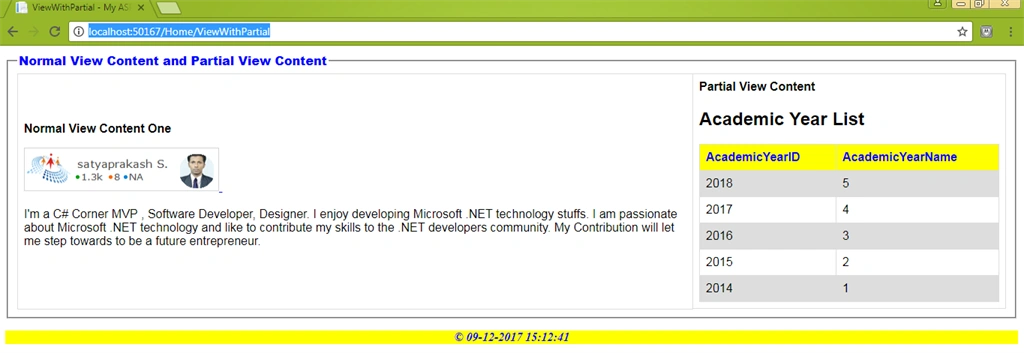
On page load first time the ViewWithPartial.cshtml show the UI result to the end-user.
OUTPUT
For First View:
http://localhost:50167/Home/ViewWithPartial
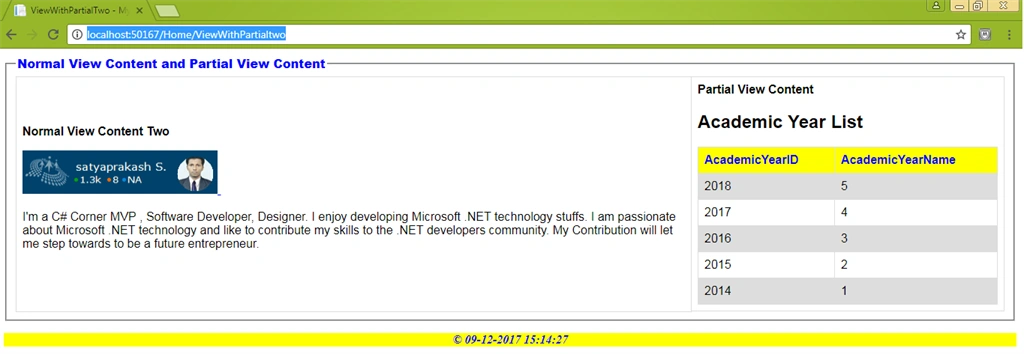
For Second View
http://localhost:50167/Home/ViewWithPartialtwo

Gif Image For Better Understanding,
SUMMARY
- What is partial view in MVC.
- Implement partial view in multiple pages in MVC.
- Avoid Duplication of code using Partial View.
- Partial View using Entity Framework.
Tridip BhattacharjeePosted Dec 11, 2017, 3:19 AM
If we load partial view $('#satyapopup').load('/shared/_MyView’); this way then how view will get model data to populate its controls?