

Initial chamber
Step 1: Open Visual Studio 2010, Go to File, New, Projects and Under Visual C# select Windows.
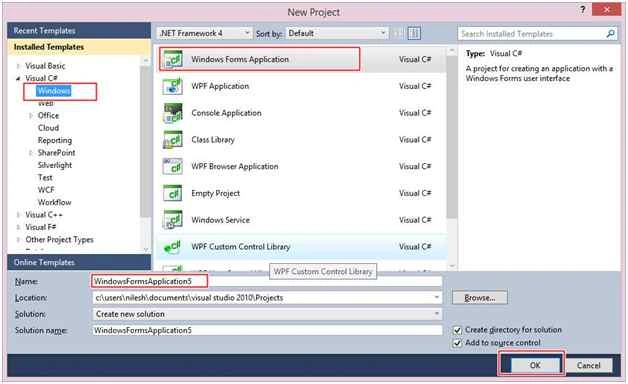
You can change the name of the project and browse your project to different location too. And then press – OK.
Design chamber
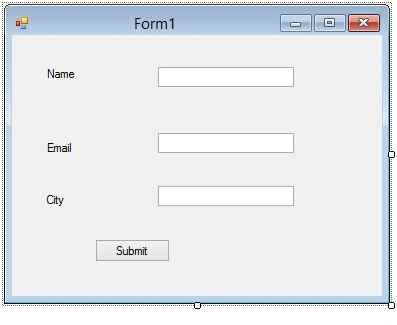
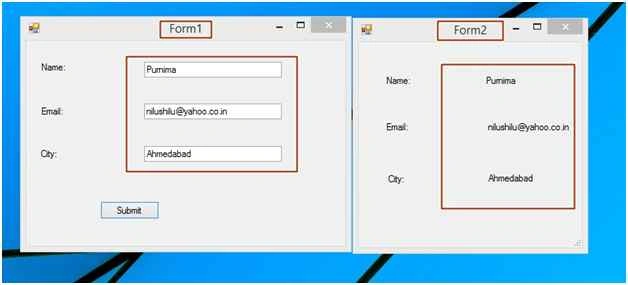
Step 2: Now open your Form1.cs file, where we create our design for form 1, take three label change its text to name, email, city and then take three textboxes and a button. See the following image.
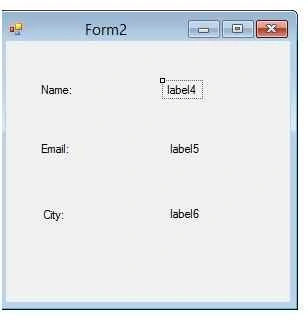
Now add one more Form to your project by going to your project- Right Click, Add New Item, then Window Form.
Make its design like the following image. Here we have to take label control only to show the data from form1.
Code chamber
Right click on the blank part of Form1.cs and View Code. You will see you are entered in the code part of the form. Write the following code for Form1.cs
Form1.cs
- using System;
- using System.Collections.Generic;
- using System.ComponentModel;
- using System.Data;
- using System.Drawing;
- using System.Linq;
- using System.Text;
- using System.Windows.Forms;
- namespace WindowsFormsApplication3
- {
- public partial class Form1 : Form
- {
- public Form1()
- {
- InitializeComponent();
- }
- private void button1_Click(object sender, EventArgs e)
- {
- Form2 frm2 = new Form2();
- frm2.passingvalue = textBox1.Text;
- frm2.passingvalue1 = textBox2.Text;
- frm2.passingvalue2 = textBox3.Text;
- frm2.ShowDialog();
- }
- }
- }
Muhammad BootaPosted Apr 22, 2019, 12:24 PM
I am passing id form 1 to 2nd form, but its giving me 0 Value????
Adnan DelicPosted Nov 5, 2016, 3:54 PM
If you already declare field as public you don't need public get-set accessor for that field.
Mohammed AshrafPosted Jun 13, 2016, 11:24 AM
Good
Arul RPosted Oct 28, 2015, 5:26 AM
Good one !!!
Santhakumar MunuswamyPosted Oct 25, 2015, 11:25 AM
Good one
Sibeesh VenuPosted Oct 24, 2015, 3:31 AM
Nice Share
ShehzadPosted Oct 24, 2015, 1:52 AM
Useful...Thanks
NitinPosted Oct 24, 2015, 12:58 AM
Good one
Harshad PansuriyaPosted Oct 24, 2015, 12:00 AM
Nice one
Gowtham KPosted Oct 23, 2015, 10:12 PM
Good One
Mukesh KumarPosted Oct 23, 2015, 1:16 PM
Great one sir!
Mohammed IbrahimPosted Oct 23, 2015, 12:28 PM
nice