

Factory
In AngularJS, Services are reusable singleton objects that are used to organize and share code across your app.
They can be injected into the controllers, filters, or directives.
Step 1
Create an empty ASP.Net project and in this project, create two folder pages (in this we kept all HTML pages) and Scripts (in this we kept all JS Pages).
We add three HTML Pages,
- Index.html - In this, all child pages are included.
- Show.html - In this page, data shows from the controller.
- Edit.html - After clicking on the edit button in Show.html, data transfers from this page to Edit.html with the help of a Factory.
We add three Js files,
- Angular.js - To access angular functionality.
- Angular-ui-router - For UI routing.
- myApp.js - In this, we kept all our js code.

Step 2
Create module in myApp.js file.

Step 3
Create Routing.

Step 4
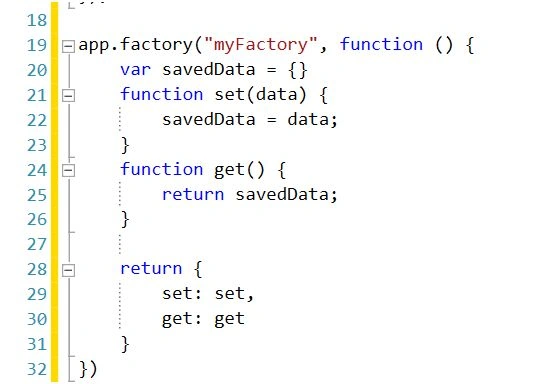
Create a Factory to store the data at the time of redirecting to other page
Step 5
Now, in Index.html, add all related js files and Inject myApp.
We are using <div ui-view></div>
In this portion, all the child pages are entered.

Step 6
Create myCtrl controller for index page and from this controller, we redirect page to Show.html

Step 7
In Show.html page, it shows data with the help of ShowCtrl controller, as shown below:

We are using ng-click=Edit (data) with this we are calling a function into showCtrl controller.
Step 8
Create showCtrl Controller and in this, we set dummy data to Students Scope, as shown below:

We can see in this controller that we are injecting myFactory and in edit function, we are assigning data to this Service.
We also injecting $location Service with the help of this, when we click the edit button i.e routing redirect to EditData routing and Edit.html page.
Step 9
Now, create Edit.html in this and for this page, we are creating EditCtrl controller. In this controller, we are receiving data from my factory.


Step 10
Now, set Index.html as a start page and run the Application. We will get output, as shown below:

Step 11
When we click the edit button, the data shown in Edit.html page will look as shown below:

Step 6
Create myCtrl controller for index page and from this controller, we redirect page to Show.html
Step 7
In Show.html page, it shows data with the help of ShowCtrl controller, as shown below:
We are using ng-click=Edit (data) with this we are calling a function into showCtrl controller.
Step 8
Create showCtrl Controller and in this, we set dummy data to Students Scope, as shown below:
We can see in this controller that we are injecting myFactory and in edit function, we are assigning data to this Service.
We also injecting $location Service with the help of this, when we click the edit button i.e routing redirect to EditData routing and Edit.html page.
Step 9
Now, create Edit.html in this and for this page, we are creating EditCtrl controller. In this controller, we are receiving data from my factory.
Step 10
Now, set Index.html as a start page and run the Application. We will get output, as shown below:
Step 11
When we click the edit button, the data shown in Edit.html page will look as shown below:
pradeep kumarPosted Sep 23, 2017, 2:09 PM
Routing throws "Uncaught Error: [$injector:modulerr]" any idea?
Sathiesh PalanisamyPosted May 13, 2017, 4:21 AM
Data's are showing in show.html and click on Edit in show.html page, it fetch data to edit.html, but I can't modify the data after click on Edit in edit.html but redirects to show.html As per my understanding, the datas which are editing in edit.html is saved in myFactory but we read students from showCtrl in show.html so the editions only made in myFactory not in html.. How it can solve
SubashPosted Jul 14, 2016, 3:57 AM
Good
Rahul Pushpendu BhaskarPosted Jun 13, 2016, 8:35 AM
great job...
Vignesh ManiPosted Jun 11, 2016, 4:41 PM
Good one
Thiruppathi RPosted Jun 11, 2016, 9:22 AM
Nice Sharing..
Bhuvanesh MohankumarPosted Jun 10, 2016, 1:00 AM
Nice
Debasis SahaPosted Jun 10, 2016, 12:18 AM
Good one..
Santhakumar MunuswamyPosted Jun 9, 2016, 11:58 PM
Thank you for sharing