

Background
Many times we need to post a list of records to controller instead of a single record to controller such as dynamically added html table records etc . Also I have learned on many forum posts regarding the problem in posting a list of records to controller, as many are saying while posting list of records we are getting only one record at controller instead of list of records . So by considering this requirement I have decided to write this article . Now let's learn step by step which helps beginners to learn how to get list of records into ASP.NET MVC controller.
Scenario
Let's consider we have a requirement in which a single user can add multiple orders of products at a time instead of ordering one by one. So in this scenario we need to create one single view from a complex model that is from multiple models where one model can be used to hold customer information and the second model used to hold the list of records.
So let's demonstrate the preceding scenario by creating one simple ASP.NET MVC application.
Step 1. Create an MVC Application.
Now let us start with a step by step approach from the creation of a simple MVC application as in the following.
- "Start", then "All Programs" and select "Microsoft Visual Studio 2015".
- "File", then "New" and click "Project", then select "ASP.NET Web Application Template", then provide the Project a name as you wish and click OK. After clicking, the following window will appear.
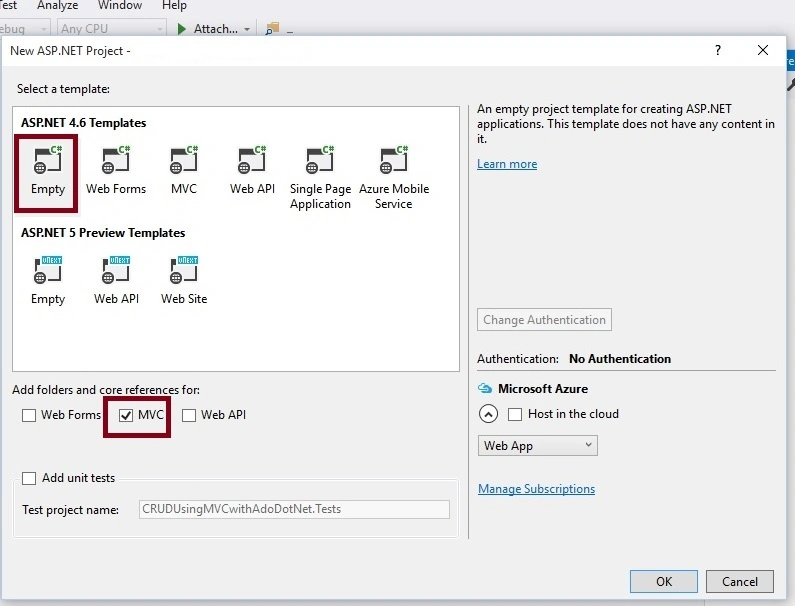
Step 2. Create Model Class.
Now let us create the model class file named OrderModel.cs by right clicking on model folder as in the following screenshot.
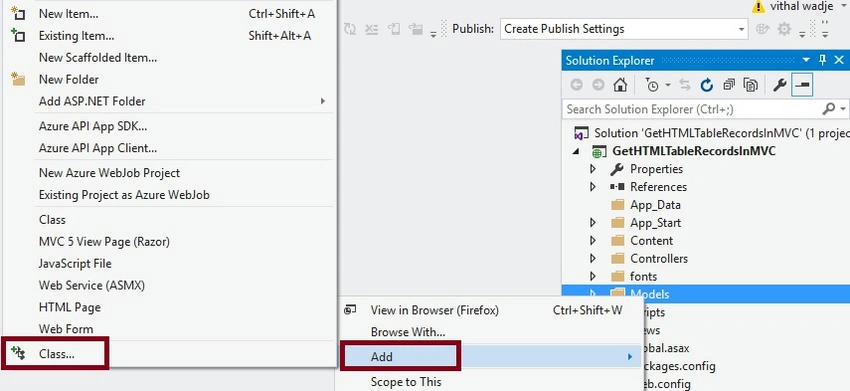
Note: It is not mandatory that Model class should be in Models folder, it is just for better readability; you can create this class anywhere in the solution explorer. This can be done by creating different folder names or without folder name or in a separate class library.
OrderModel.cs class file code snippet
/// <summary>
/// To hold order details
/// </summary>
public class OrderModel
{
    public string ProductCode { get; set; }
    public string ProductName { get; set; }
    public Int16 Qty { get; set; }
    public double Price { get; set; }
    public double TotalAmount { get; set; }
}

public class OrderDetail
{
    /// <summary>
    /// To hold list of orders
    /// </summary>
    public List<OrderModel> OrderDetails { get; set; }
}
Step 3: Add Controller Class.
Now let us add the MVC 5 controller as in the following screenshot.
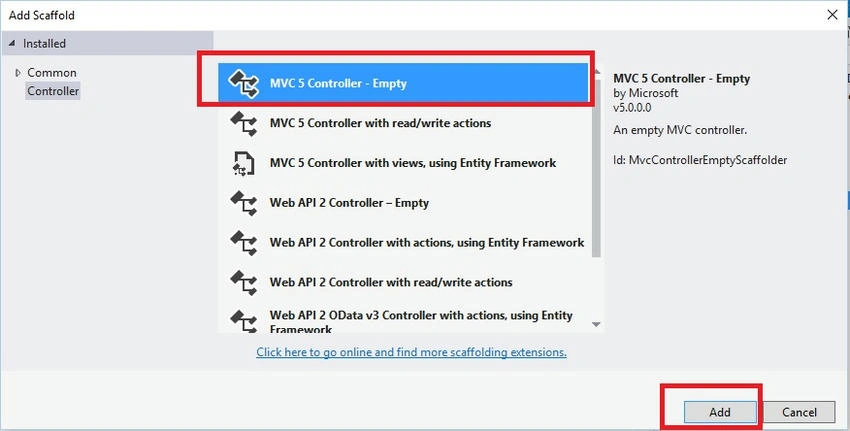
After clicking on Add button it will show the window. Specify the Controller name as Order with suffix Controller.
Note: The controller name must be having suffix as 'Controller' after specifying the name of controller. Now modify the default code in OrderController.cs class file to bind HTML table in view from strongly typed model class with list of records and getting those list of records into controller, after modifying code will look like as follows.
OrderController.cs
public class OrderController : Controller
{
    /// <summary>
    /// Get list of records with View
    /// </summary>
    /// <returns></returns>
    public ActionResult PlaceOrder()
    {
        List<OrderModel> objOrder = new List<OrderModel>()
        {
            new OrderModel { ProductCode = "AOO1", ProductName = "Windows Mobile", Qty = 1, Price = 45550.00, TotalAmount = 45550.00 },
            new OrderModel { ProductCode = "A002", ProductName = "Laptop", Qty = 1, Price = 67000.00, TotalAmount = 67000.00 },
            new OrderModel { ProductCode = "A003", ProductName = "LCD Television", Qty = 2, Price = 15000.00, TotalAmount = 30000.00 },
            new OrderModel { ProductCode = "A004", ProductName = "CD Player", Qty = 4, Price = 10000.00, TotalAmount = 40000.00 }
        };

        OrderDetail ObjOrderDetails = new OrderDetail();
        ObjOrderDetails.OrderDetails = objOrder;
        return View(ObjOrderDetails);
    }

    /// <summary>
    /// Get list of records from view
    /// </summary>
    /// <param name="Order"></param>
    /// <returns></returns>
    [HttpPost]
    public ActionResult PlaceOrder(OrderDetail Order)
    {
        return View();
    }
}
Step 4. Creating strongly typed view named PlaceOrder using OrderDetail class. Right click on View folder of created application and choose add view, select OrderDetail model class and scaffolding template List as.
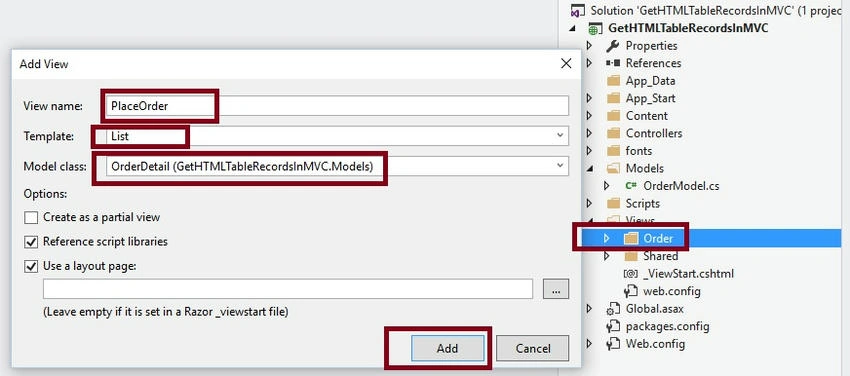
Click on Add button then it will create the view named PlaceOrder , Now open the PlaceOrder.cshtml view, Then some default code you will see which is generated by MVC scaffolding template, Now modify default code to make as per our requirements, After modifying the code it will look like the following.
PlaceOrder.cshtml
@model GetHTMLTableRecordsInMVC.Models.OrderDetail

@{
    ViewBag.Title = "www.cpmpilemode.com";
}

<hr />

@using (Html.BeginForm())
{
    @Html.AntiForgeryToken()

    <div class="form-horizontal">
        <div class="form-group">
            <div class="col-md-offset-2 col-md-10 text-right">
                <input type="button" value="Add Product" class="btn btn-primary" />
            </div>
        </div>

        <div class="form-group">
            <div class="col-md-12">
                <table class="table table-condensed table-hover">
                    <tr>
                        <th>Product Code</th>
                        <th>Product Name</th>
                        <th>Quantity</th>
                        <th>Price</th>
                        <th>Total Amount</th>
                    </tr>
                    @{
                        // To make unique Id
                        int i = 0;
                        foreach (var item in Model.OrderDetails.ToList())
                        {
                            <tr>
                                <td>
                                    @Html.EditorFor(o => o.OrderDetails[i].ProductCode, new { @id = "ItemCode_" + i })
                                </td>
                                <td>
                                    @Html.EditorFor(o => o.OrderDetails[i].ProductName, new { @id = "ProductName_" + i })
                                </td>
                                <td>
                                    @Html.EditorFor(o => o.OrderDetails[i].Qty, new { @id = "Qty_" + i })
                                </td>
                                <td>
                                    @Html.EditorFor(o => o.OrderDetails[i].Price, new { @id = "Price_" + i })
                                </td>
                                <td>
                                    @Html.EditorFor(o => o.OrderDetails[i].TotalAmount, new { @id = "TotalAmount_" + i })
                                </td>
                            </tr>
                            i++;
                        }
                    }
                </table>
            </div>
        </div>

        <hr />

        <div class="form-group">
            <div class="col-md-offset-2 col-md-10 text-center">
                <input type="submit" value="Place Order" class="btn btn-primary" />
            </div>
        </div>
    </div>
}
Common issues
While binding list of records your control Id's must be unique , otherwise same first record will repeat in all lists. So to avoid this we need to maintain unique id's for control. As we have maintained in preceding view manually by using incremental i counter and model properties.
Now after adding the Model, View and controller into our project. The solution explorer will look like as follows.
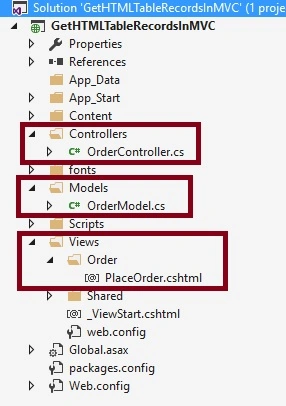
Now we have done all coding to upload files.
Step 5. Now run the application. After running the application initial screen will look like as follows.
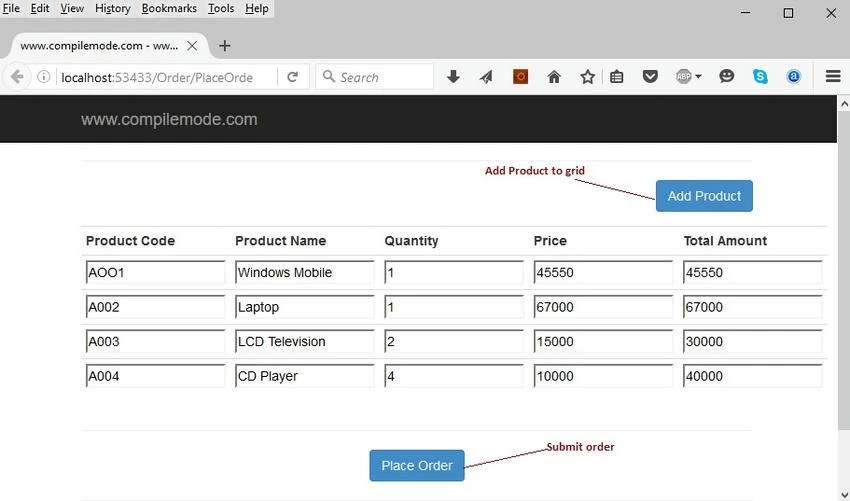
In preceding table we are adding orders (records) dynamically. Put break point on PlaceOrder action result method and click on Place Order button. Now the reference variable Order of OrderDetail class will show the four records in debug mode as.
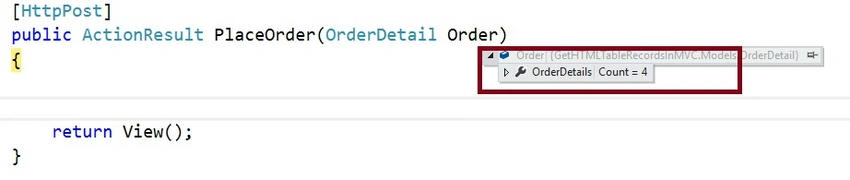
In the preceding image you can see that four records list count which is coming from view because we have added four records into the table . Now Expand the OrderDetails node it will show the following records,
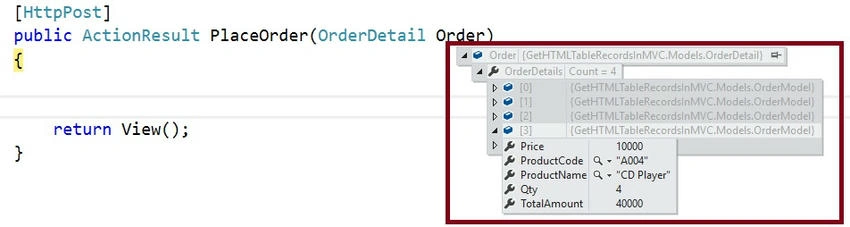
I hope from all preceding examples we have learned how to pass dynamically added HTML table records list to controller in ASP.NET MVC.
Note
- Download the Zip file of the sample application for a better understanding.
- Add product button is just for scenario purpose , In next article I will explain how to add dynamic records into html table .
- Since this is a demo, it might not be using proper standards, so improve it depending on your skills.
Summary
I hope this article is useful for all readers. If you have any suggestions please contact me.
Read more articles on ASP.NET
Zeeshan AzimPosted Jun 6, 2023, 9:00 AM
I give you medal for this brilliant article. I was looking for this solution since many days and you saved my days. Thanks
paulo cesar rufinogoncalvesPosted Aug 18, 2021, 4:54 PM
Hello Vithal, do you already posted the next step of this article?
Ashish AhujaPosted Jan 18, 2021, 3:36 PM
I have an extended problem to this given the existing solution above implemented as we are fetching the table (multiple rows) from the Database but some columns in the table are editable. Now, I want to post only the edited rows in the table back to the controller to be saved to avoid sending every record in the list to be updated. Any suggestions for that Vithal Wadje?
Sajidur RahmanPosted Aug 26, 2020, 3:14 AM
Please provide the ZIp file.
Surendra SagarPosted May 7, 2020, 8:57 AM
Hi vithal, this article is useful , please provide the the code of this article or else zip file of this article
Mallik APosted Jan 16, 2020, 1:42 PM
Thank you so much for your kind update Vithal...
Mallik APosted Jan 15, 2020, 9:32 PM
Good On Vithal..... Can you please provide the link where we can get the source code.... your help would be greatly appreciated.
Aliya khanPosted Sep 3, 2019, 6:13 AM
If the data is enter by the user in page then how to assign the index?
jethro santosPosted Aug 27, 2019, 11:50 PM
How can I download the zip file?
Narayan BhosalePosted Jun 28, 2019, 12:10 AM
I think if data comes from user and calculate dynamically than its better
Shanah SupingPosted May 4, 2019, 3:46 PM
Where is the ZIP file? I cant seem to find it.
Mehmet Cem YarasPosted Apr 18, 2019, 1:37 PM
This article is totally useless, People curious about passing dynamic list from view to controller but your article tells us only sending list from controller to view so your article doesnt tell the important things
Nithin GupthaPosted Dec 12, 2018, 2:31 AM
Populate backend list ,Dynamic Add, Delete and bind list to action, follow this stackoverflow answer: https://stackoverflow.com/questions/42861336/mvc-dynamic-list-binding/53738752#53738752
Tauhidul IslamPosted Feb 7, 2018, 5:26 AM
Not completed you did not show add product, Ajax control etc, Can you show this fro user inputted data please??
jayalaxmi bashettyPosted Jun 30, 2017, 5:11 AM
If possible plz provide src code
souvik settPosted Mar 1, 2017, 10:53 PM
This is very basic and only helps in some scenario. What I was finding is, user will type the order details in textboxes and click add button which will add table row with the entered data in textboxes. No practical application allows user to directly enter data to grid (how you'll manage if they have to add long data instead of just name/price?). So how can I pass the table data to controller, this is my concern.
Arun PandianPosted Jan 24, 2017, 7:18 AM
I need Dynamic add and delete
Manav PandyaPosted Oct 30, 2016, 4:15 AM
Provide source code if possible sir Vithal Wadje
Manav PandyaPosted Oct 30, 2016, 4:15 AM
Nice share .
Michael CuestaPosted Oct 12, 2016, 3:44 AM
I can't seem to find the article of yours about how to add dynamic records into html table. Kindly give us the link please
Vithal WadjePosted Sep 2, 2016, 11:23 AM
Yes , Search in article list
Virender MehtaPosted Sep 2, 2016, 5:49 AM
In next article I will explain how to add dynamic records into html table .Did you come up with this ?
Manoj SethiPosted Aug 22, 2016, 3:14 PM
Vithal Wadje Can you please share the code.
Vithal WadjePosted Aug 21, 2016, 1:16 PM
Yes I have uploaded but may be some technical issues or something its reflecting , I will upload same here again
sanju raoPosted Aug 21, 2016, 7:35 AM
Hi. Did you uploaded the sample code? I to dont find though. Can you please upload the code and share it to me on [email protected]
Vithal WadjePosted Aug 20, 2016, 10:42 PM
I have already uploaded need to check .
Syed Md. KamruzzamanPosted Aug 19, 2016, 9:12 PM
I am not getting downloadable file. help
Vithal WadjePosted Apr 17, 2016, 2:04 PM
thanks
Debasis SahaPosted Apr 17, 2016, 1:21 PM
Good One..
Vithal WadjePosted Apr 17, 2016, 7:30 AM
Thanks
Kuppurasu NagarajPosted Apr 17, 2016, 4:11 AM
Nice Sharing..\
Vithal WadjePosted Apr 17, 2016, 4:01 AM
Thanks
Vignesh ManiPosted Apr 17, 2016, 3:24 AM
nice
Vithal WadjePosted Apr 17, 2016, 2:58 AM
Thanks
Humayun Kabir MamunPosted Apr 17, 2016, 1:45 AM
Nice...
Vithal WadjePosted Apr 17, 2016, 12:23 AM
Thanks sir
Sourabh SomaniPosted Apr 16, 2016, 11:46 PM
Nice Sir :)