

Introduction
Here is my first article about Android on c-sharpcorner.com.
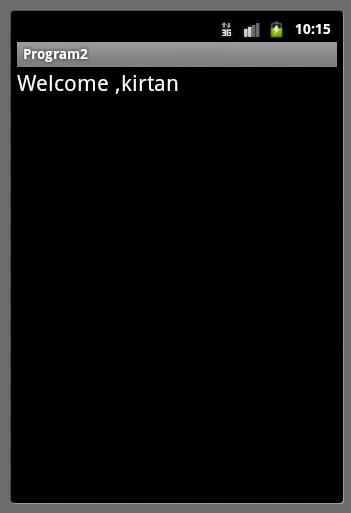
We will pass a username and a password in the EditView Control and if they match correctly then we need to move to another Intent else show a message box saying it is invalid. Also if the user successfully logins then we will show a Welcome , {username} message in TextView.
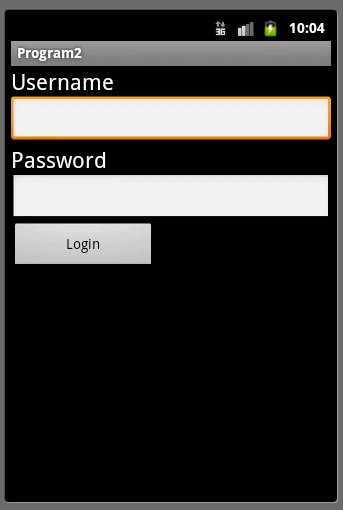
The main logic used here is very simple, wherein you just need to use the putExtra Method to pass the data across multiple program screens.
The putExtra method accepts many kinds of data, such as String, int, float, byte etc..
- package com.Program2;
- import android.app.Activity;
- import android.content.Intent;
- import android.os.Bundle;
- import android.view.View;
- import android.view.View.OnClickListener;
- import android.widget.Button;
- import android.widget.EditText;
- import android.widget.Toast;
- public class Main extends Activity {
- /** Called when the activity is first created. */
- @Override
- public void onCreate(Bundle savedInstanceState)
- {
- super.onCreate(savedInstanceState);
- setContentView(R.layout.main);
- /* Get button Text1 Text2 */
- final EditText edUsername = (EditText) findViewById(R.id.editText1);
- final EditText edPassword = (EditText)findViewById(R.id.editText2);
- Button btnValidate = (Button)findViewById(R.id.button1);
- btnValidate.setOnClickListener(new OnClickListener()
- {
- public void onClick(View arg0)
- {
- String uname = edUsername.getText().toString();
- String pass = edPassword.getText().toString();
- if(uname.equals("kirtan") && pass.equals("12345"))
- {
- Intent intent = new Intent(Main.this,Success.class);
- intent.putExtra("username",edUsername.getText().toString());
- startActivity(intent);
- }
- else
- {
- Toast.makeText(Main.this, "Invalid Usename password pair.", Toast.LENGTH_LONG).show();
- }
- }
- });
- }
- }
Success.Java
- package com.Program2;
- import android.app.Activity;
- import android.os.Bundle;
- import android.widget.TextView;
- public class Success extends Activity
- {
- protected void onCreate(Bundle savedInstanceState)
- {
- // TODO Auto-generated method stub
- super.onCreate(savedInstanceState);
- setContentView(R.layout.success);
- TextView tv = (TextView) findViewById(R.id.textView1);
- tv.setText("Welcome ,"+getIntent().getExtras().getString("username"));
- }
- }
Manav PandyaPosted Oct 4, 2016, 1:04 PM
How can we get same functionality using different intent ???
Manav PandyaPosted Oct 4, 2016, 1:03 PM
Nice share ...
kalu singh raoPosted Jul 12, 2016, 6:24 AM
Nice...
mehri mPosted Jul 9, 2014, 5:19 AM
thank u , i want an example like your program in MonoDroid, can u help me ?
sarath kumarPosted Nov 29, 2012, 5:13 AM
nice example thank you...
VenuGopal SriramadasuPosted Oct 17, 2012, 11:23 AM
thank you for the example... its very helped lot thank you Kirtan Patel...
vs vankhedePosted Oct 2, 2012, 12:52 AM
thanks a lot for this tutorial. i get this one very helpfull.
vs vankhedePosted Oct 2, 2012, 12:52 AM
thanks a lot for this tutorial. i get this one very helpfull
LaraPosted Aug 18, 2012, 9:46 PM
Nice and simple!! Thanks alot :)
Vena KhayaPosted Aug 1, 2012, 11:15 AM
That help me a lot I was still thinking how should I implement that.
Manoj PalPosted Apr 20, 2012, 2:24 AM
Hi, Its working properly for me. Thanks
Nic RochePosted Jul 25, 2011, 5:01 PM
Hi Kirtan, Thanks for the article. I think it is worth mentioning there are many ways of doing this. For instance: Complex structures implementing Parcelable/Serializable, SharedPreferences... Nice work. Regards, Nic Roche
Mahesh ChandPosted Jul 25, 2011, 1:03 PM
Good stuff. Is your school done?
Abhimanyu K VatsaPosted Jul 23, 2011, 5:24 AM
congrats on your very first article, you are a best coder that I know. Keep it up!!
Dinesh BeniwaleditedPosted Jul 23, 2011, 2:20 AMEdited Jul 23, 2011, 2:21 AM
Very useful article, thanks for sharing