

Introduction
Microsoft Windows services enable you to create long-running executable applications that run in their own Windows sessions. These services (e.g. SQL server Service) can be automatically started when the computer boots, can be paused and restarted, and do not show any user interface. Whenever you need long-running functionality that does not interfere with other users who are working on the same computer, you should go for windows service
You create windows service in C# as a Microsoft Visual Studio .NET project; defining code within it that controls what commands can be sent to the service and what actions should be taken when those commands are received. Commands that can be sent to a service include starting, pausing, resuming, and stopping the service, and executing custom commands.
After you create and build the application, you can install it by InstallUtil.exe/making setup project/ServiceInstaller.exe and passing the path to the service's executable file
We will create a windows service here which will make a log file and append that log file after specified time interval, we will pass two parameters to windows service, first is the name of the log file to be created and second is time interval in seconds after which new entry will be logged into log file
Creating Windows Service
To create a windows service, in visual studio click on new project and select windows service as shown in following figure.
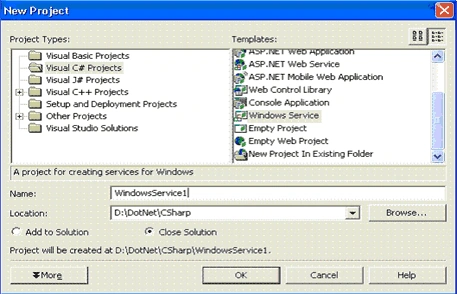
- Rename project name to AnandService
- Add one class and rename it to AnandServiceMain.cs.
- Rename service.cs class to AnandServiceHandler.cs. Note the main method of services.cs, later on we will move this method to AnandServiceMain.cs
- Add one more class and rename it to AnandServiceInstaller.cs
- Add reference to System.Configuration.Install and
- Right click on project, select properties and change assemble name to AnandService.
Now project explorer should look like this.
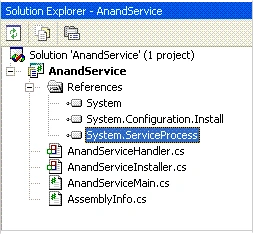
Now open AnandServiceMain.cs and paste the following code on it
using System;
using System.Collections;
using System.ComponentModel;
using System.Diagnostics;
using System.ServiceProcess;
using System.IO;
namespace AnandService
{
/// <summary>
/// Summary description for EventLogWriter.
/// </summary>
public class AnandServiceMain
{
public string _strLogPath;
public int _intSleepTime;
public AnandServiceMain()
{
//
// TODO: Add constructor logic here
//
}
public static void
{
AnandServiceMain anandServiceMain = new AnandServiceMain();
anandServiceMain._strLogPath = args[0];
anandServiceMain._intSleepTime = Convert.ToInt32(args[1]);
System.ServiceProcess.ServiceBase.Run(new AnandServiceHandler(anandServiceMain));
}
}
}
Now open AnandServiceHandler.cs and paste the following code on it
using System;
using System.Collections;
using System.ComponentModel;
using System.Diagnostics;
using System.ServiceProcess;
using System.IO;
namespace AnandService
{
public class AnandServiceHandler : System.ServiceProcess.ServiceBase
{
/// <summary>
/// Required designer variable.
/// </summary>
private System.ComponentModel.Container components = null;
AnandServiceMain m_AnandSvs = null;
System.Threading.Thread AnandThread = null;
int i = 0;
public AnandServiceHandler(AnandServiceMain AnandSvs)
{
m_AnandSvs = AnandSvs;
// This call is required by the Windows.Forms Component Designer.
InitializeComponent();
// TODO: Add any initialization after the InitComponent call
}
/// <summary>
/// Required method for Designer support - do not modify
/// the contents of this method with the code editor.
/// </summary>
private void InitializeComponent()
{
components = new System.ComponentModel.Container();
this.ServiceName = "AnandService";
}
/// <summary>
/// Clean up any resources being used.
/// </summary>
protected override void Dispose(bool disposing)
{
if (disposing)
{
if (components != null)
{
components.Dispose();
}
}
base.Dispose(disposing);
}
/// <summary>
/// Set things in motion so your service can do its work.
/// </summary>
protected override void OnStart(string[] args)
{
System.Threading.ThreadStart AnandThreadStart = new System.Threading.ThreadStart(WriteToLog);
AnandThread = new System.Threading.Thread(AnandThreadStart);
AnandThread.Start();
}
/// <summary>
/// Stop this service.
/// </summary>
protected override void OnStop()
{
// TODO: Add code here to perform any tear-down necessary to stop your service.
}
public void WriteToLog()
{
bool blnLog = true;
while (blnLog == true)
{
i = i + 1;
StreamWriter w = File.AppendText(m_AnandSvs._strLogPath);
Log(i.ToString(), w);
System.Threading.Thread.Sleep(m_AnandSvs._intSleepTime);
if (i > 10)
{
blnLog = false;
}
}
}
public void Log(string logMessage, TextWriter w)
{
w.WriteLine("+----------------------------------------------------------------+");
w.Write(" Log Entry " + logMessage + ": " + DateTime.Now.ToLongDateString() + " " + DateTime.Now.ToLongTimeString() + "\r\n");
w.Flush();
w.Close();
}
}
}
You may have noted that we have removed the main from services.cs (now AnandServiceHandler.cs) and make the separate file AnandServiceMain.cs, so that we can handle the parameters in better and clean way. And pass back them back to AnandServiceHandler.cs.
Now open AnandServiceInstaller.cs and paste the following code on it
using System;
using System.Collections;
using System.ComponentModel;
using System.Configuration.Install;
namespace WindowsService1
{
/// <summary>
/// Summary description for ProjectInstaller.
/// </summary>
[RunInstaller(true)]
public class ProjectInstaller : System.Configuration.Install.Installer
{
private System.ServiceProcess.ServiceProcessInstaller serviceProcessInstaller1;
private System.ServiceProcess.ServiceInstaller serviceInstaller1;
/// <summary>
/// Required designer variable.
/// </summary>
private System.ComponentModel.Container components = null;
public ProjectInstaller()
{
// This call is required by the Designer.
InitializeComponent();
// TODO: Add any initialization after the InitializeComponent call
}
/// <summary>
/// Clean up any resources being used.
/// </summary>
protected override void Dispose(bool disposing)
{
if (disposing)
{
if (components != null)
{
components.Dispose();
}
}
base.Dispose(disposing);
}
#region Component Designer generated code
/// <summary>
/// Required method for Designer support - do not modify
/// the contents of this method with the code editor.
/// </summary>
private void InitializeComponent()
{
this.serviceProcessInstaller1 = new System.ServiceProcess.ServiceProcessInstaller();
this.serviceInstaller1 = new System.ServiceProcess.ServiceInstaller();
//
// serviceProcessInstaller1
//
this.serviceProcessInstaller1.Password = null;
this.serviceProcessInstaller1.Username = null;
this.serviceProcessInstaller1.AfterInstall += new System.Configuration.Install.InstallEventHandler(this.serviceProcessInstaller1_AfterInstall);
//
// serviceInstaller1
//
this.serviceInstaller1.ServiceName = "AnandService";
this.serviceInstaller1.AfterInstall += new System.Configuration.Install.InstallEventHandler(this.serviceInstaller1_AfterInstall);
//
// ProjectInstaller
//
this.Installers.AddRange(new System.Configuration.Install.Installer[] {
this.serviceProcessInstaller1,
this.serviceInstaller1});
}
#endregion
private void serviceInstaller1_AfterInstall(object sender, System.Configuration.Install.InstallEventArgs e)
{
}
private void serviceProcessInstaller1_AfterInstall(object sender, System.Configuration.Install.InstallEventArgs e)
{
}
}
}
Now compile the project . You will find AnandService.exe in your bin/debug folder, now our exe is ready to install as windows services
Installing Windows Service
Windows Service exe cannot be run directly from the development environment or by clicking on exe. This is because the service in the project must be installed before the project can run.
You can quickly install your service application by using a command line utility called InstallUtil.exe. You can also create a setup project that contains your project's output and create a custom action with it that will run the installers associated with the project and install your service
But here, I am using the utility program ServiceInstaller.exe. ServiceInstaller.exe is a free utility and easy to use. Open on ServiceInstaller.exe you will prompting to enter text in textboxes
- Service Name - AnandSevice
- Service Label - AnandSevice
- Full Path to Executable - D:\DotNet\CSharp\WindowsService1\bin\Debug\AnandService.exe D:\DotNet\CSharp\WindowsService1\AnandService.log 30
Full Path to Executable consists of following values.
D:\DotNet\CSharp\WindowsService1\bin\Debug\AnandService.exe is the path to service exe
D:\DotNet\CSharp\WindowsService1\AnandService.log is name of the log file to be created
30 is the time interval in seconds
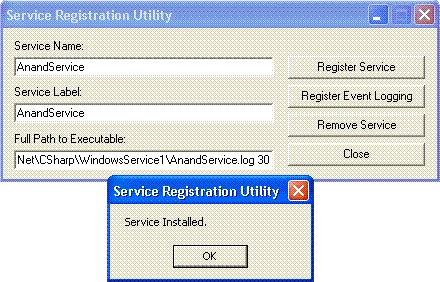
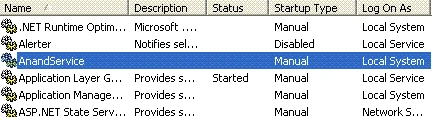
Now click on Register service and you will get the confirmation message. Close ServiceInstaller.exe. Now a service has been installed. Now open on the services from computer management console and you can see the newly created services there. Right click on service and click on Start menu.
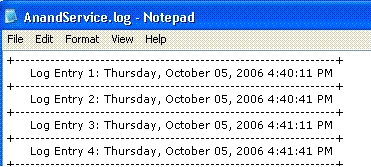
Now go to the folder, which you have passed the parameter to create log file (D:\DotNet\CSharp\WindowsService1\AnandService.log). You will see the log file there. Open log file, you can see the entries like following figure.
Conclusion
Windows service application is designed to be long running which don't required user interface. The .NET framework has a great support for windows services, all the code that is required for building, initializing, running, logging and performance is built into the classes on .NET framework. You can explore System.ServiceProcess and System.Diagnostics further.
Jim JonesPosted Mar 9, 2010, 11:07 AM
Have written several Windows services in C# and they all run fine. Decided to make them multithreaded. Am havin problems with getting it to start as a service, keep getting a TypeInitializationException, which I'm sure comes from the service specific startup. Am using the Environment.UserInteractive property to either start as a service or as a console app. It runs fine as a console app. First, a word on the architecture. The app has a main class which loads work from a database table, spans worker threads, and reloads them. Once the worker threads are cycling through the process, reload, process cycle the main class is idle, it's loadProcessor method is the callback for the threadpoolexecutor when a processor as a thread ends. the loadProcessor method checks the internal work queue each time a processor comes through for reload. If the queue is empty it starts a count. When the count equals the number of worker threads it calls a method that encapsulates the main class in a thread and starts it. The main class run method tries to load the internal queue and if successful loads the processors and goes dormant. If not it sleeps and tries again. My main method looks like this: [code] static void Main() { if(! Environment.UserInteractive) { ServiceBase[] ServicesToRun; ServicesToRun = new ServiceBase[]{new ThreadedUtility()}; ServiceBase.RunIServicesToRun); } else { ThreadedUtility tu = new ThreadedUtility(); tu.createUtility(); tu.startUtility(); } } [/code] Note that in the service section I do not have a reference to the main class so I can't call the other two method there. Unless it's possible to get one somehow? These methods are as follows: [code] public void createUtility() { //Create a locking object to synchronize the loadProcessor method pLock = new Object(); //Initialize the internal work queue this.queue = new Stack<MonitoredFile>(); //Initialize the static data access layer DatabaseImple.setConnectionString(); //Initialize the static logger Logger.setLogs(); // Create the threadpool executor this.executor = new ThreadPoolExecutor(this); createProcessors(); this.count = 0; } [/code] These are all instance variables of the ThreadedUtility class. A reference to the processors is held in an array also an instance property. Each processor has a unique index. The startUtil() method is: [code] public void startUtil() { // utility is an instance variable of type Thread utility = new Thread(new ThreadStart(processFiles)); utility.Start(); } [/code] So my question boils down to where is a good place to put the calls to these methods in the start up sequence. Things I've tried: Putting them in the constructor with InitializeComponent(), no luck error as above. Putting them in the OnStart(string[] args) same result same error. Putting them in the InitializeComponent() method. Did this before and it worked, know that it screws up the Design view, however didn't work this time, same error. Any ideas? Jim
hashufta shaikPosted Dec 28, 2009, 2:38 AM
Hello Anand, Your article is really good. I followed it, but i cant install using InstallUtil. I am trying to pass 2 arguments 1 is a properties file path and the other is time interval in seconds. I am getting the following error with InstallUtil: InstallUtil C:\servicename.exe C:\temp\testProperties2.txt 30 Exception occurred while initializing the installation: System.BadImageFormatException: Could not load file or assembly 'file:///C:\temp \testProperties2.txt' or one of its dependencies. The module was expected to con tain an assembly manifest.. I am not able to find the service installer utility on the net. Please help me. I need to write this service soon. Your help would be really appreciated!
karthi kumarPosted Aug 27, 2008, 4:17 AM
Hi, I couldn't find the serviceinstaller.exe utility. Any one please tell me where i could get that utility. Thanks in advance
Qiming JiPosted Jan 16, 2008, 12:16 AM
Hello. I followed the article and try to see if this is working. However, i couldn't find the mentioned software named ServiceInstaller.exe. Can you provide a link for it? Thanks,
Senthil Rajan MoorthyPosted Oct 6, 2007, 7:31 AM
sir, I Created windows Service in C# .net. the Service contain one dll called "Sample.Dll". through another program i want to load that "Sample.Dll". help me Sir. Thank you, Senthil Rajan
suvarna girijaPosted Sep 18, 2007, 2:41 AM
Hi Anand, I have a windows service, my requirement is the service shouldn't prompt for any username and password during installation and it should prompt for the same, when the user manually starts the service for the first time. Is there any way to do this. Thanks for u r help.
shruthi YeditedPosted Sep 4, 2007, 6:54 PMEdited Sep 4, 2007, 7:14 PM
I have a software in c# 1.1 that must be installed on the system with out rebooting the operating system. If you have any idea please let me know as early as possible.
Irina araRPosted Apr 26, 2007, 3:57 PM
How do you do the same thing in VS 2005. Ther are many examples on how to write Windows Services in 2003, but not in VS 2005. I've spend over a week trying to figure it out, still cannot ...
JPosted Apr 12, 2007, 10:07 AM
In the article you say "You can quickly install your service application by using a command line utility called InstallUtil.exe. You can also create a setup project that contains your project's output and create a custom action with it that will run the installers associated with the project and install your service." I have tried to use the InstallUtil and the ServiceInstaller to create an installation that will pass parameters to my service at startup. I cannot figure out how to do it without resorting to changing the registry keys after the installation. Do you know how to make this work without directly messing with the registry?
JPosted Apr 12, 2007, 9:52 AM
In the article you say "You can quickly install your service application by using a command line utility called InstallUtil.exe. You can also create a setup project that contains your project's output and create a custom action with it that will run the installers associated with the project and install your service." I have tried to use the InstallUtil and the ServiceInstaller to create an installation that will pass parameters to my service at startup. I cannot figure out how to do it without resorting to changing the registry keys after the installation. Do you know how to make this work without directly messing with the registry?
ananth iyerPosted Feb 28, 2007, 9:48 PM
Hello Sir! I am currently trying sql db updation using the windows service. Do you have any example code for that. I am able to update the db in visual studio. Unable to do it after converting into windows service. can you pls post a code or example for this? thanks Ananth
ScottPosted Feb 2, 2007, 12:02 PM
What can I do to correct this compilation error: Missing partial modifier on declaration of type 'AnandService.AnandServiceHandler'; another partial declarion of this type exists. I am using VS 2005. Thanks!