
In this article, we discuss the Path Geometries in WPF. We can create arcs, curves, lines and many more things with the help of this. We use PathFigure to describe the shape in the PathGeometry. And each PathFigure consists of one or more path segment objects.
Here we discuss the types of Segments:
1. Bezier Segment: It creates a cubic Bezier curve between two points.
Example: Here we create a Bezier curve:
<Path Stroke="Red" StrokeThickness="2">
<Path.Data>
<PathGeometry>
<PathGeometry.Figures>
<PathFigureCollection>
<PathFigure StartPoint="0,100">
<PathFigure.Segments>
<PathSegmentCollection>
<BezierSegment Point1="100,0" Point2="200,200" Point3="300,100" />
</PathSegmentCollection>
</PathFigure.Segments>
</PathFigure>
</PathFigureCollection>
</PathGeometry.Figures>
</PathGeometry>
</Path.Data>
</Path>
Output:
2. Arc Segment: It creates an arc between the two points.
Example:
<Path Stroke="Red" StrokeThickness="2">
<Path.Data>
<PathGeometry>
<PathGeometry.Figures>
<PathFigureCollection>
<PathFigure StartPoint="50,100">
<PathFigure.Segments>
<PathSegmentCollection>
<ArcSegment Size="100,80" RotationAngle="90" IsLargeArc="True" SweepDirection="CounterClockwise" Point="200,100" />
</PathSegmentCollection>
</PathFigure.Segments>
</PathFigure>
</PathFigureCollection>
</PathGeometry.Figures>
</PathGeometry>
</Path.Data>
</Path>
Output: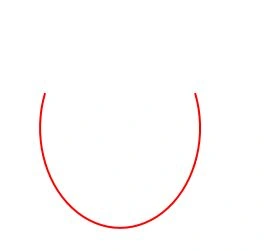
3. Line Segment: It is used to create a line between two points:
Example:
<Path Stroke="Red" StrokeThickness="2">
<Path.Data>
<PathGeometry>
<PathFigure StartPoint="200,90">
<LineSegment Point="100,90" />
</PathFigure>
</PathGeometry>
</Path.Data>
</Path>
Output:
4. PolyBezier Segment: It is used to create one or more Bezier curves:
Example:
<StackPanel>
<Canvas>
<Path Stroke="Red" StrokeThickness="2">
<Path.Data>
<PathGeometry>
<PathGeometry.Figures>
<PathFigureCollection>
<PathFigure StartPoint="0,100">
<PathFigure.Segments>
<PathSegmentCollection>

Path Geometries in WPF
Join the conversation! Your thoughts help the community grow.
Sign in to leave a comment
It is the same account you read, post and publish with — and you will come straight back to this page.


Keyson KeysonPosted Aug 5, 2015, 4:18 PM
How to bind line points with user input in Textboxes?
Emil KosicPosted Dec 29, 2013, 6:52 AM
Mahak Gupta, could you write some examples in C# ? I don't like XAML too much. Thanks !
Gaurav GuptaPosted Apr 27, 2012, 12:07 AM
Hi, How to Draw dashed line in a WPF Path Geometries?
Arjun PanwarPosted Apr 26, 2012, 11:51 PM
HI, I want to know that how do I remove a line segment from a PathGeometry in wpf?