
This is a PDF converter tool which can reads text documents and converts them to PDF documents. You can configure this tool to generate custom PDF reports with different fonts, colors, sizes and so on.
Editors additions
Using application is simple. Just download the attached zip file, unzip it and run the exe or open and compile the project in Visual Studio .NET.
The application would look like the following Figure.
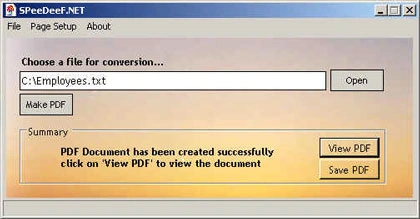
Now use the Open button to open a text file and click Make PDF button to convert a text file to a PDF file. View PDF and Save PDF buttons views and saves the PDF file.
Pretty useful.
HENRY NOAHPosted Mar 31, 2026, 12:11 PM
This sounds really handy for creating custom pdf reports with fonts colors sizes and more you can also use a pdf editor like free pdf editor tool online from ilovepdf2(dot)com to make quick changes add text images or annotations to your pdfs without opening any development environment super simple and fast
sam jdamPosted May 9, 2010, 7:25 AM
Can you please tell me that how to implement this on a web application.....