

Introduction
Today I am going to explain how to perform grouping in a GridView in a Windows Store app. Suppose there is a list of data items in various categories and I want to display these data items according to their category. In other words category 1 displays the data items it indicates and so on. To apply this concept I use a ListBox in which all the data items are displayed and when we click on the group data button then all the data items are displayed in the GridView depending on the selected category.
To see how its works just use the following steps.
Step 1
First open the Visual Studio 2012 and then select File -> New -> Project. A window is shown for selecting Windows Store inside the Visual C# from the left side pane and BlankPage from the center pane. Give the name of your application that you want to give and then click ok.
Step 2
Add a class by right-clicking on the Solution Explorer and click on Add -> Class as: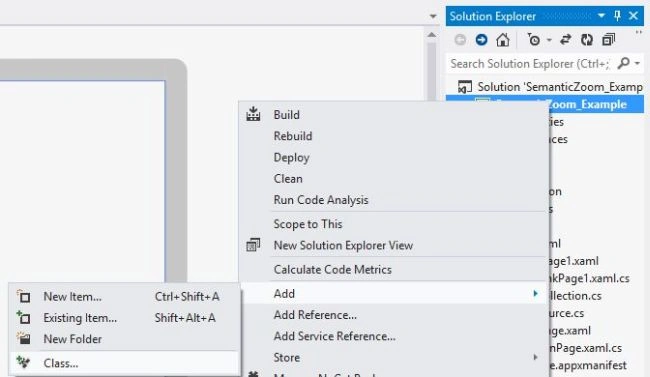
A window is shown for selecting Class from the center pane and give the name of your class that you want to give; I used "ItemSource.cs",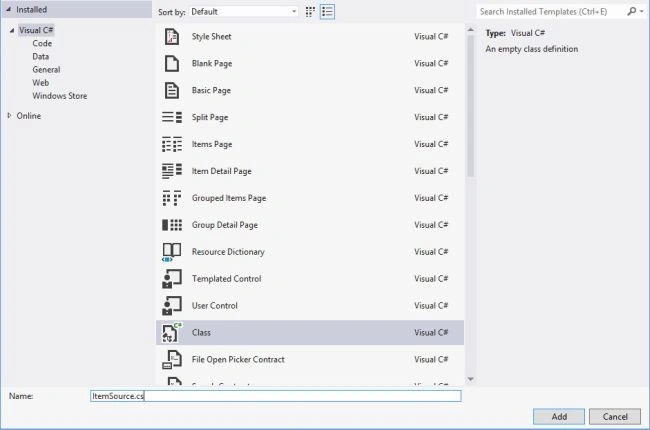
Step 3
In this class add some Data item variables as:
public class ItemSource
{
public string Title { get; set; }
public string Image { get; set; }
public string Category { get; set; }
public string Description { get; set; }
}
Generate one more class in which give the values of these data items as,
public class StoreData
{
public StoreData()
{
ItemSource item;
item = new ItemSource();
item.Title = "C#";
item.Image = "Books/c-sharp.jpg";
item.Category = "Books";
item.Description = "Multi Paradigm Programming Language";
collection.Add(item);
item = new ItemSource();
item.Title = "DotNet Framework";
item.Image = "Books/Dotnet_framework.jpg";
item.Category = "Books";
item.Description = "This Book defines Dotnet Framework";
collection.Add(item);
item = new ItemSource();
item.Title = "Dell-Laptop";
item.Image = "Laptops/Laptop1.jpg";
item.Category = "Laptop";
item.Description = "Windows 7 enabled";
collection.Add(item);
item = new ItemSource();
item.Title = "Comopaq Laptop";
item.Image = "Laptops/Laptop2.jpg";
item.Category = "Laptop";
item.Description = "Windows Vista Enabled";
collection.Add(item);
item = new ItemSource();
item.Title = "Nokia 5555";
item.Image = "Mobile/Mobile1.jpg";
item.Category = "Mobile";
item.Description = "Cheapest Mobile Set";
collection.Add(item);
item = new ItemSource();
item.Title = "Nokia 7677";
item.Image = "Mobile/Mobile2.jpg";
item.Category = "Mobile";
item.Description = "Mostly Used Nokia set";
collection.Add(item);
item = new ItemSource();
item.Title = "DotNet";
item.Image = "Books/net.jpg";
item.Category = "Books";
item.Description = "Very Useful for all beggineer";
collection.Add(item);
item = new ItemSource();
item.Title = "Dotnet Technology";
item.Image = "Books/net_technology.jpg";
item.Category = "Books";
item.Description = "Technology related to dotnet";
collection.Add(item);
item = new ItemSource();
item.Title = "Dell";
item.Image = "Laptops/Laptop3.jpg";
item.Category = "Laptop";
item.Description = "Best Operating System";
collection.Add(item);
item = new ItemSource();
item.Title = "Compaq-HP";
item.Image = "Laptops/Laptop4.jpg";
item.Category = "Laptop";
item.Description = "Most Used and very popular";
collection.Add(item);
item = new ItemSource();
item.Title = "WPF";
item.Image = "Books/wpf.jpg";
item.Category = "Books";
item.Description = "WPF Designing";
collection.Add(item);
}
private ItemCollection collection = new ItemCollection();
}
In the preceding code ItemCollection is an Enumerated type class of which the definition is:
class ItemCollection: IEnumerable<Object>
{
private System.Collections.ObjectModel.ObservableCollection<ItemSource> itemCollection = new System.Collections.ObjectModel.ObservableCollection<ItemSource>();
public IEnumerator<Object> GetEnumerator()
{
return itemCollection.GetEnumerator();
}
System.Collections.IEnumerator System.Collections.IEnumerable.GetEnumerator()
{
return GetEnumerator();
}
public void Add(ItemSource item)
{
itemCollection.Add(item);
}
}
Now write the query for the selection of all the items as:
internal List<GroupInfoList<object>> Getalldata()
{
List<GroupInfoList<object>> groups = new List<GroupInfoList<object>>();
var query = from item in collection
group item by (ItemSource)item into g
select new { GroupName = g.Key, Items = g };
foreach (var g in query)
{
GroupInfoList<object> info = new GroupInfoList<object>();
info.Key = g.GroupName;
foreach (var item in g.Items)
{
info.Add(item);
}
groups.Add(info);
}
return groups;
}
Write the query for the selection of Data items according to its category as:
internal List<GroupInfoList<object>> GetGroupsByCategory()
{
List<GroupInfoList<object>> groups = new List<GroupInfoList<object>>();
var query = from item in collection
orderby ((ItemSource)item).Category
group item by ((ItemSource)item).Category into g
select new { GroupName = g.Key, Items = g };
foreach (var g in query)
{
GroupInfoList<object> info = new GroupInfoList<object>();
info.Key = g.GroupName;
foreach (var item in g.Items)
{
info.Add(item);
}
groups.Add(info);
}
return groups;
}
In both of these queries the definition of GroupInfoList<object> is as:
public class GroupInfoList<T> : List<object>
{
public object Key { get; set; }
public new IEnumerator<object> GetEnumerator()
{
return (System.Collections.Generic.IEnumerator<object>)base.GetEnumerator();
}
}
Now our class is ready.
Step 3
Add a BlankPage to the application by right-clicking on the project in Solution Explorer and then click Add -> New Item.as: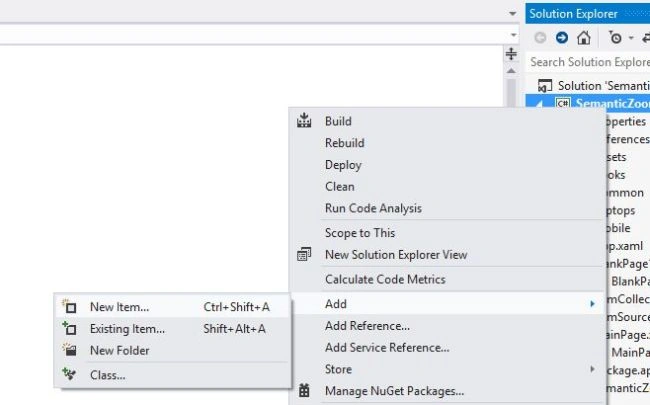
A window is shown for selecting BlankPage and click ok.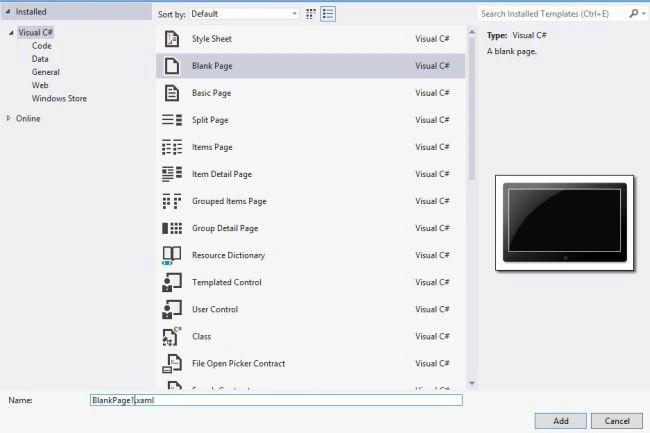
Step 4
Write the XAML code in the BlankPage1.xaml file as:
<Page
x:Class="SemanticZoom_Example.BlankPage1"
xmlns="http://schemas.microsoft.com/winfx/2006/xaml/presentation"
xmlns:x="http://schemas.microsoft.com/winfx/2006/xaml"
xmlns:local="using:SemanticZoom_Example"
xmlns:d="http://schemas.microsoft.com/expression/blend/2008"
xmlns:mc="http://schemas.openxmlformats.org/markup-compatibility/2006"
mc:Ignorable="d">
<Page.Resources>
<CollectionViewSource x:Name="itemsViewSource" IsSourceGrouped="true" />
</Page.Resources>
<Grid Background="{StaticResource ApplicationPageBackgroundThemeBrush}">
<TextBlock Text="Display the list of various items" FontSize="30" HorizontalAlignment="Center" VerticalAlignment="Top" Height="45" Margin="50,50,0,0" Width="650"/>
<ListView x:Name="itemListView" Margin="150,150,850,160" ItemsSource="{Binding Source={StaticResource itemsViewSource}}" >
<ListView.ItemTemplate>
<DataTemplate>
<Grid Height="110" Margin="6">
<Grid.ColumnDefinitions>
<ColumnDefinition Width="Auto"/>
<ColumnDefinition Width="*"/>
</Grid.ColumnDefinitions>
<Border Background="{StaticResource ListViewItemPlaceholderBackgroundThemeBrush}" Width="110" Height="110">
<Image Source="{Binding Image}" Stretch="UniformToFill"/>
</Border>
<StackPanel Grid.Column="1" VerticalAlignment="Top" Margin="10,0,0,0">
<TextBlock Text="{Binding Title}" Style="{StaticResource ItemTitleStyle}" TextWrapping="NoWrap"/>
<TextBlock Text="{Binding Description}" Style="{StaticResource ItemSubtitleStyle}" MaxHeight="60"/>
</StackPanel>
</Grid>
</DataTemplate>
</ListView.ItemTemplate>
</ListView>
<Button Content="Grouped Data" HorizontalAlignment="Center" VerticalAlignment="Bottom" Click="Button_Click_1"/>
</Grid>
</Page>
Step 5
Write the code in the BlankPage1.xaml.cs file as:
namespace Grouping_Example
{
public sealed partial class BlankPage1 : Page
{
public BlankPage1()
{
this.InitializeComponent();
StoreData data = new StoreData();
List<GroupInfoList<object>> dataLetter = data.Getalldata();
itemsViewSource.Source = dataLetter;
}
private void Button_Click_1(object sender, RoutedEventArgs e)
{
this.Frame.Navigate(typeof(MainPage));
}
}
}
Step 6
Navigate to the blank page in App.xaml.cs file as:
if (!rootFrame.Navigate(typeof(BlankPage1), args.Arguments))
Step 7
Add some styles in the App.xaml file as:
<Application
x:Class="SemanticZoom_Example.App"
xmlns="http://schemas.microsoft.com/winfx/2006/xaml/presentation"
xmlns:x="http://schemas.microsoft.com/winfx/2006/xaml"
xmlns:local="using:SemanticZoom_Example">
<Application.Resources>
<ResourceDictionary>
<Style x:Key="ItemTitleStyle" TargetType="TextBlock">
<Setter Property="FontFamily" Value="Segoe UI Light"/>
<Setter Property="FontSize" Value="14.667"/>
</Style>
<Style x:Key="ItemSubtitleStyle" TargetType="TextBlock">
<Setter Property="FontFamily" Value="Segoe UI Light"/>
<Setter Property="FontSize" Value="14.667"/>
</Style>
</ResourceDictionary>
</Application.Resources>
</Application>
Step 8
Add the following code in the MainPage.xaml file:
<Page
x:Class="SemanticZoom_Example.MainPage"
xmlns="http://schemas.microsoft.com/winfx/2006/xaml/presentation"
xmlns:x="http://schemas.microsoft.com/winfx/2006/xaml"
xmlns:local="using:SemanticZoom_Example"
xmlns:d="http://schemas.microsoft.com/expression/blend/2008"
xmlns:mc="http://schemas.openxmlformats.org/markup-compatibility/2006"
mc:Ignorable="d">
<Page.Resources>
<CollectionViewSource x:Name="cvs2" IsSourceGrouped="true" />
</Page.Resources>
<StackPanel>
<TextBlock Text="Create a Grouped GridView" FontSize="30" FontFamily="Times New Roman" HorizontalAlignment="Center" Padding="10"/>
<GridView x:Name="CategoryWiseGrouping" VerticalAlignment="Bottom"
ItemsSource="{Binding Source={StaticResource cvs2}}" BorderBrush="{StaticResource ApplicationForegroundThemeBrush}" BorderThickness="1" Width="850" HorizontalAlignment="Left">
<GridView.Background>
<LinearGradientBrush EndPoint="0.5,1" StartPoint="0.5,0">
<GradientStop Color="Black"/>
<GradientStop Color="#FF8B9397" Offset="1"/>
</LinearGradientBrush>
</GridView.Background>
<GridView.ItemsPanel>
<ItemsPanelTemplate>
<StackPanel Orientation="Horizontal"/>
</ItemsPanelTemplate>
</GridView.ItemsPanel>
<GridView.ItemTemplate>
<DataTemplate>
<Grid HorizontalAlignment="Left" Background="{StaticResource ApplicationPageBackgroundThemeBrush}">
<StackPanel Orientation="Horizontal" Margin="10,10,0,0">
<Image Source="{Binding Image}" Height="60" Width="60" VerticalAlignment="Center" Margin="0,0,10,0"/>
<StackPanel Margin="0,0,0,0" Orientation="Vertical">
<TextBlock TextWrapping="Wrap" Foreground="{StaticResource ApplicationForegroundThemeBrush}" Style="{StaticResource ItemTitleStyle}" Width="200" VerticalAlignment="Center" Text="{Binding Title}" HorizontalAlignment="Left" FontFamily="Segoe UI" />
<TextBlock TextWrapping="Wrap" Foreground="{StaticResource ApplicationForegroundThemeBrush}" Style="{StaticResource ItemSubtitleStyle}" Width="200" MaxHeight="20" VerticalAlignment="Center" Text="{Binding Description}" HorizontalAlignment="Left"/>
</StackPanel>
</StackPanel>
</Grid>
</DataTemplate>
</GridView.ItemTemplate>
<GridView.GroupStyle>
<GroupStyle>
<GroupStyle.HeaderTemplate>
<DataTemplate>
<Grid Background="{StaticResource ApplicationPageBackgroundThemeBrush}" Margin="10">
<TextBlock Text='{Binding Key}' Foreground="{StaticResource ApplicationForegroundThemeBrush}" FontSize="25" Margin="5" />
</Grid>
</DataTemplate>
</GroupStyle.HeaderTemplate>
<GroupStyle.Panel>
<ItemsPanelTemplate>
<VariableSizedWrapGrid Orientation="Vertical" Height="400" />
</ItemsPanelTemplate>
</GroupStyle.Panel>
</GroupStyle>
</GridView.GroupStyle>
</GridView>
</StackPanel>
</Page>
Step 9
Write the code in MainPage.xaml.cs file as:
namespace Grouping_Example
{
public sealed partial class MainPage : Page
{
StoreData storeData;
public MainPage()
{
this.InitializeComponent();
storeData = new StoreData();
List<GroupInfoList<object>> dataLetter = storeData.GetGroupsByCategory();
cvs2.Source = dataLetter;
}
}
}
Step 10
Now Run the application by pressing F5. The output looks like: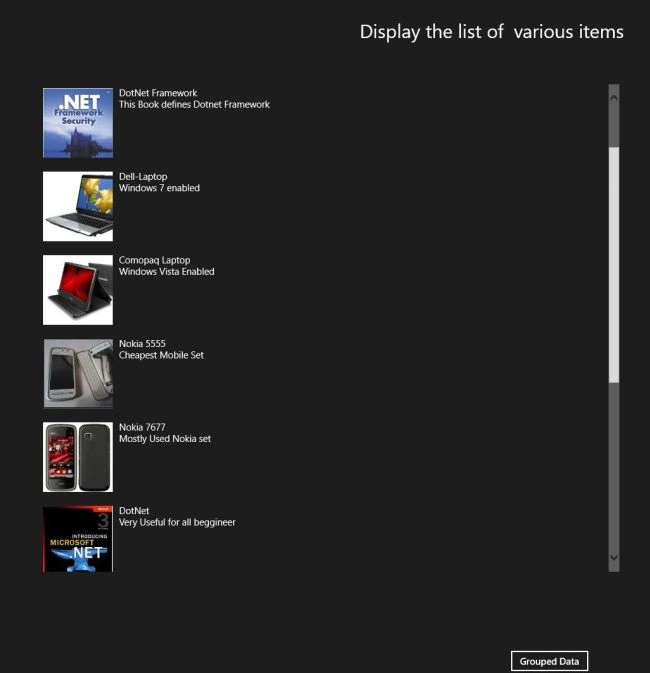
When I click on the Grouped Data Button then the items are displayed by category as: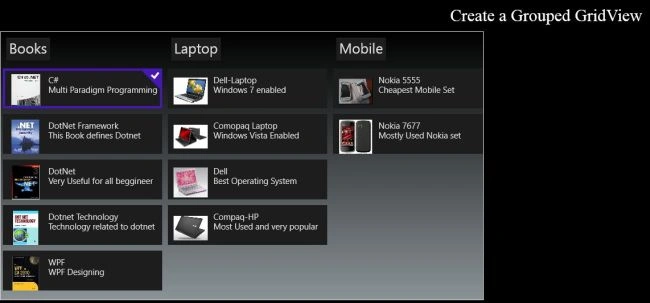
Summary
In this article I explained how we Grouped the items in the GridView using a Windows Store app.
vijaya vilayatkarPosted Jul 24, 2014, 8:47 AM
How to pre select multiple items from grouped gridview?
surya syamalaPosted Mar 6, 2013, 6:35 AM
unable to display images and corresponding descriptions.(which is in StoreData). Can u pls resolve this issue.