

Introduction
I am often asked by some people/colleagues about "which loop is faster?", "Which loop has high performance?" etc. I have heard that the For loop is faster than the Foreach loop, but I have never tried it before. So, I decided to see how big the difference is among all the loops and which one is faster on the array and list in terms of speed and performance.
Let's start to find out the best C# loop. For these, I'll be creating a console application in Visual Studio 2017.
First, I'm going to create one class, namely "CustomStopwatch," which helps to track the starting and ending times of loops.
using System;
using System.Diagnostics;

namespace ConsoleApp2
{
    public class CustomStopwatch : Stopwatch
    {

        public DateTime? StartAt { get; private set; }
        public DateTime? EndAt { get; private set; }


        public void Start()
        {
            StartAt = DateTime.Now;

            base.Start();
        }

        public void Stop()
        {
            EndAt = DateTime.Now;

            base.Stop();
        }

        public void Reset()
        {
            StartAt = null;
            EndAt = null;

            base.Reset();
        }

        public void Restart()
        {
            StartAt = DateTime.Now;
            EndAt = null;

            base.Restart();
        }

    }
}
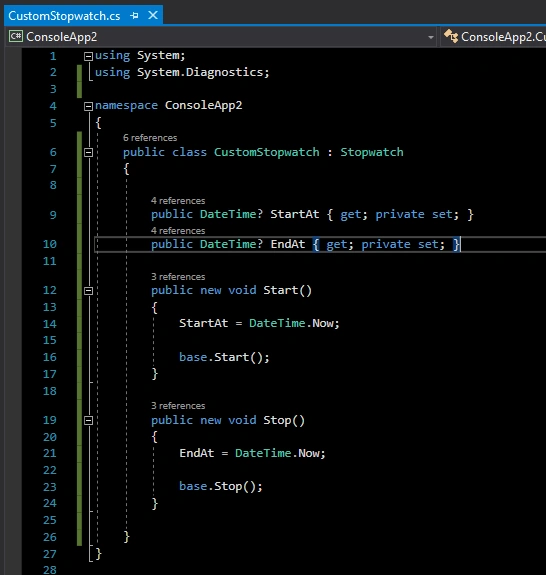
Now, it is time to write code in the Program.cs class. First, I'm going to implement a For loop.
- Single integer
- Array
- List
using System;
using System.Linq;

namespace ConsoleApp2
{
    class Program
    {
        static void Main(string[] args)
        {
            CustomStopwatch sw = new CustomStopwatch();
            sw.Start();
            for (int i = 0; i < 10000; i++) Console.WriteLine(i);
            sw.Stop();

            CustomStopwatch sw1 = new CustomStopwatch();
            int[] array = Enumerable.Range(0, 10000).ToArray();
            sw1.Start();
            for (int i = 0; i < array.Length; i++) Console.WriteLine(array[i]);
            sw1.Stop();

            CustomStopwatch sw2 = new CustomStopwatch();
            var arrList = array.ToList();
            sw2.Start();
            for (int i = 0; i < arrList.Count; i++) Console.WriteLine(arrList[i]);
            sw2.Stop();

            Console.WriteLine($"for Time elapsed: {sw.ElapsedMilliseconds} Milliseconds, StartAt: {sw.StartAt.Value}, EndAt: {sw.EndAt.Value}");
            Console.WriteLine($"for on array Time elapsed: {sw1.ElapsedMilliseconds} Milliseconds, StartAt: {sw1.StartAt.Value}, EndAt: {sw1.EndAt.Value}");
            Console.WriteLine($"for on list Time elapsed: {sw2.ElapsedMilliseconds} Milliseconds, StartAt: {sw2.StartAt.Value}, EndAt: {sw2.EndAt.Value}");
            Console.ReadKey();
        }

    }
}
Output

As per my output, the For loop on the list is faster.
Let's compare the Foreach loop on the list and array.
using System;
using System.Linq;

namespace ConsoleApp2
{
    class Program
    {
        static void Main(string[] args)
        {
            int[] array = Enumerable.Range(0, 10000).ToArray();
            var arrList = array.ToList();

            CustomStopwatch sw1 = new CustomStopwatch();
            sw1.Start();
            foreach (var arr in array) Console.WriteLine(arr);
            sw1.Stop();

            CustomStopwatch sw2 = new CustomStopwatch();
            sw2.Start();
            foreach (var arr in arrList) Console.WriteLine(arr);
            sw2.Stop();

            Console.Clear();
            Console.WriteLine($"for each on array Time elapsed: {sw1.ElapsedMilliseconds} Milliseconds, StartAt: {sw1.StartAt.Value}, EndAt: {sw1.EndAt.Value}");
            Console.WriteLine($"for each on list Time elapsed: {sw2.ElapsedMilliseconds} Milliseconds, StartAt: {sw2.StartAt.Value}, EndAt: {sw2.EndAt.Value}");
            Console.ReadKey();
        }
    }
}
Output

Here, the Foreach loop on the list is faster.
Let's compare a While loop on the list and an array.
using System;
using System.Linq;

namespace ConsoleApp2
{
    class Program
    {
        static void Main(string[] args)
        {
            int[] array = Enumerable.Range(0, 10000).ToArray();
            var arrList = array.ToList();

            CustomStopwatch sw1 = new CustomStopwatch();
            sw1.Start();
            int i = 0;
            while (i != array.Length) Console.WriteLine(array[i++]);
            sw1.Stop();

            CustomStopwatch sw2 = new CustomStopwatch();
            sw2.Start();
            i = 0;
            while (i != arrList.Count) Console.WriteLine(arrList[i++]);
            sw2.Stop();

            Console.Clear();
            Console.WriteLine($"while on array Time elapsed: {sw1.ElapsedMilliseconds} Milliseconds, StartAt: {sw1.StartAt.Value}, EndAt: {sw1.EndAt.Value}");
            Console.WriteLine($"while on list Time elapsed: {sw2.ElapsedMilliseconds} Milliseconds, StartAt: {sw2.StartAt.Value}, EndAt: {sw2.EndAt.Value}");
            Console.ReadKey();
        }
    }
}
Output

Conclusion
This article covers a quick comparison of For, Foreach, and While loop on array and list. As I said before, an Array is faster than a List, but as per my observation (in terms of iteration), a List is faster, as we can see in the outputs. I think it depends on the data and the way you use the data. My personal suggestion is that we should use a list instead of an array for the below reasons.
- In an array, we need to know the array size, and we can't change the array size (we have the Resize() method, but it will change reference), where a list can grow after it's created.
- In the list, we don't need to worry about list size or index out-of-bound exceptions.
- The list provides lots of helpful methods like Add, Find, etc.
- Easy to read.
Please give your valuable feedback/comments/questions about this article below. Please let me know how you like and understand this article and how I could improve it.
Ano MepaniPosted May 26, 2019, 4:21 AM
Very Good Article. Nice Comparision
Tim HoeppnerPosted May 9, 2019, 7:42 AM
Thanks for the article Faisal. However, there's something very suspicious with your findings. Why is the first test run in each program a magnitude longer than the other tests? I tested out your first program but added in a "dummy" test at the beginning which just repeated the first test. The results were more in line with my expectations. The dummy test run for 4645 ms, for Time: 558 ms, for on array time: 543 ms, for on list time: 520 ms.
Talaviya BhavdipPosted May 7, 2019, 10:40 PM
It's a realy good article and more helpful for the website performance, keep it up Faisal Pathan
G.M. PatelPosted May 6, 2019, 10:50 PM
Nice article and thanks for sharing this type of funda with us.
Kaushik DudhatPosted May 6, 2019, 10:48 PM
Interesting article!
Dhiren PatelPosted May 6, 2019, 10:27 PM
Wohh! nice article, thanks for sharing
Abhishek MishraPosted May 6, 2019, 10:01 AM
I had a debate in my team on this. Glad you shared this.