

Introduction
In this article we will create a very simple ASP.NET MVC application step by step. We will use code first approach of entity framework to generate the database and in that application we will use jqGrid and we will perform the CRUD operation using jqGrid.
In this article we will create a very simple ASP.NET MVC application step by step. We will use code first approach of entity framework to generate the database and in that application we will use jqGrid and we will perform the CRUD operation using jqGrid.
jqGrid Introduction
jqGrid is an AJAX enabled grid plugin for the java script which provides complete solutions for representing our data in the tabular format. This provides lots of features to manipulate data. Because it is a jQuery plugin it will work only on client side not on server side but for binding the data which will be on server side it can be loaded dynamically using ajax call. This is a free and open source library, which is distributed under MIT licence.
jqGrid is an AJAX enabled grid plugin for the java script which provides complete solutions for representing our data in the tabular format. This provides lots of features to manipulate data. Because it is a jQuery plugin it will work only on client side not on server side but for binding the data which will be on server side it can be loaded dynamically using ajax call. This is a free and open source library, which is distributed under MIT licence.
Features of jqGrid
- This works fines under IE, Chrome, Mozilla, Safari and Opera
- This is CSS customizable with full Themeroller support
- Its UI comes in 20+ languages
- Supports Paging
- Supports Sorting
- Supports Insertion, Edit, Deletion, Searching, Filtering
- Inline Editing
- AJAX enabled
- Accepts XML/JSON/local array data sources
- Import and Export Data
Example: This example will help you to perform CRUD operation using jqGrid in MVC. Follow the following steps:
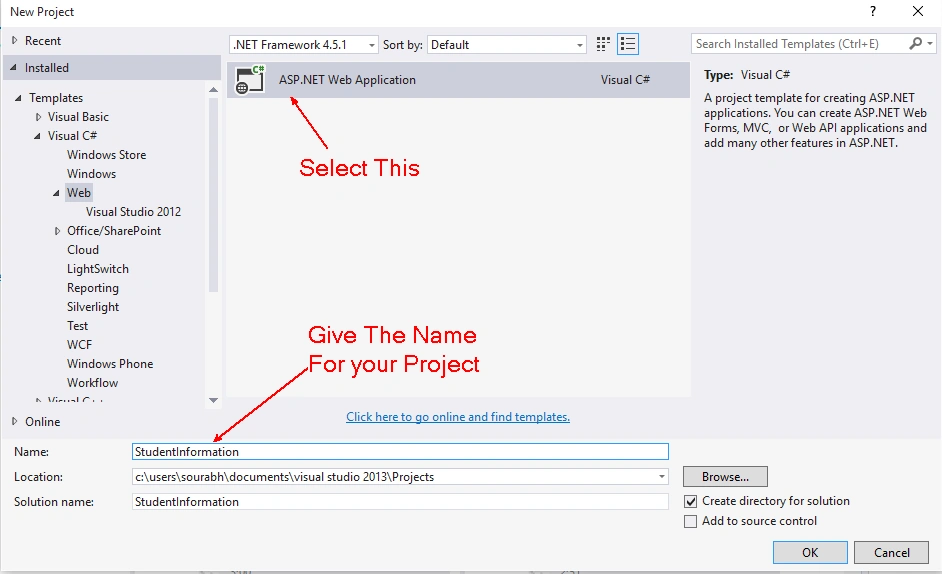
1. Create a new MVC Project and give the name for your project. To create a new MVC project, Click File > New > Project or press CTRL + SHIFT + N.
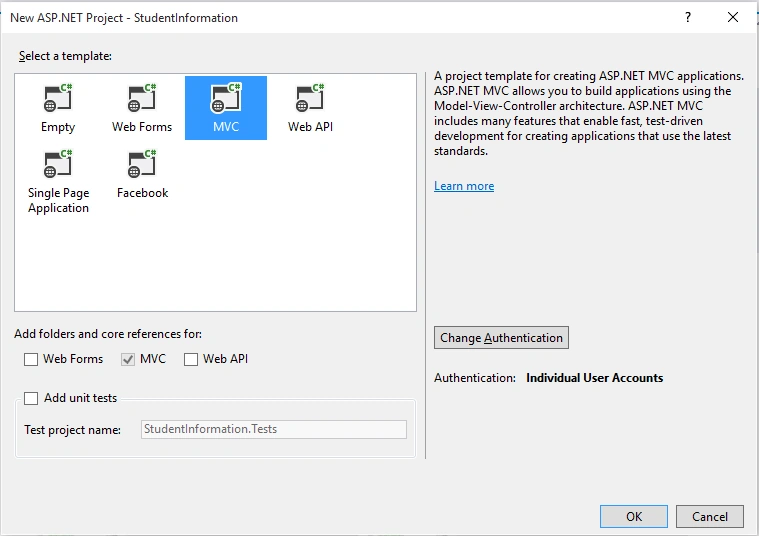
2. Select MVC as a project Template with Individual Authentication.
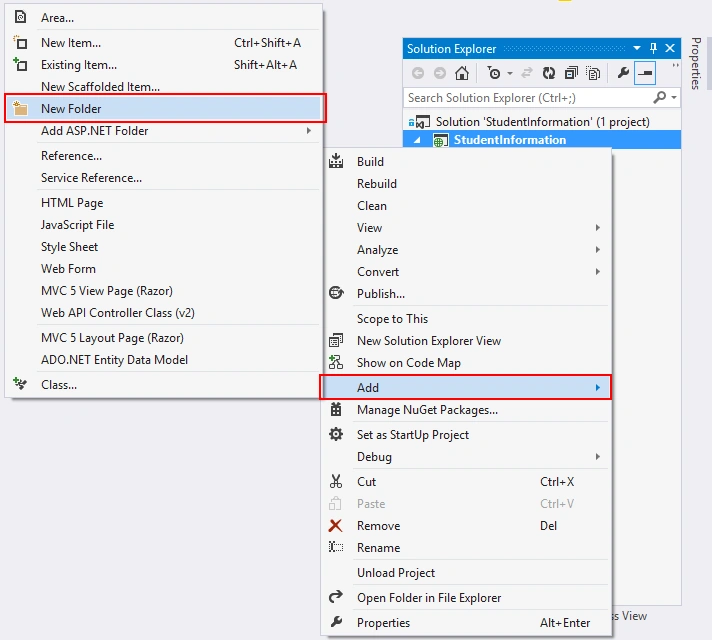
3. Now for creating the table into the database using Code First Approach, I am creating a folder with name "Entities". For creating the folder inside the project right click on the folder and click on Add then click on New Folder.
Now give the name for the folder as "Entities".
4. Add a class inside Entities folder with Name "StudentMaster.cs". You can follow the below figure to add class:
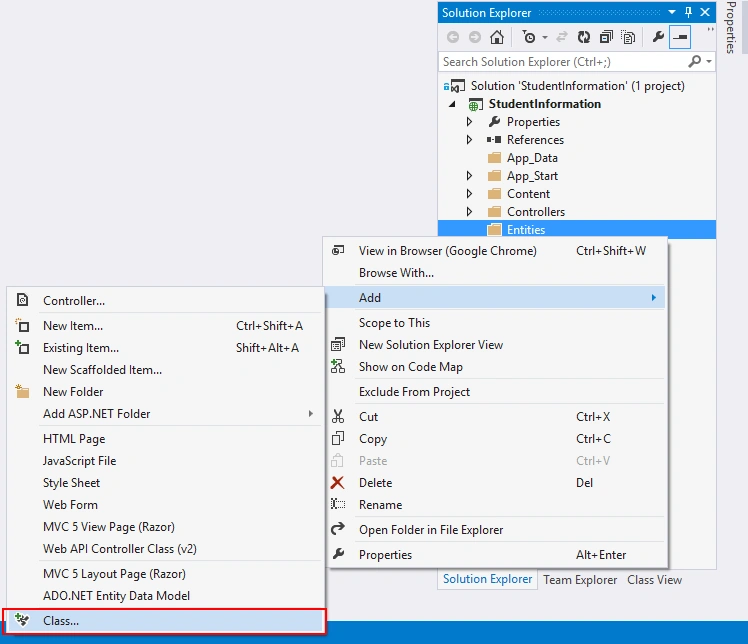
Now one dialog box will be open give the name for that class as "StudentMaster.cs".
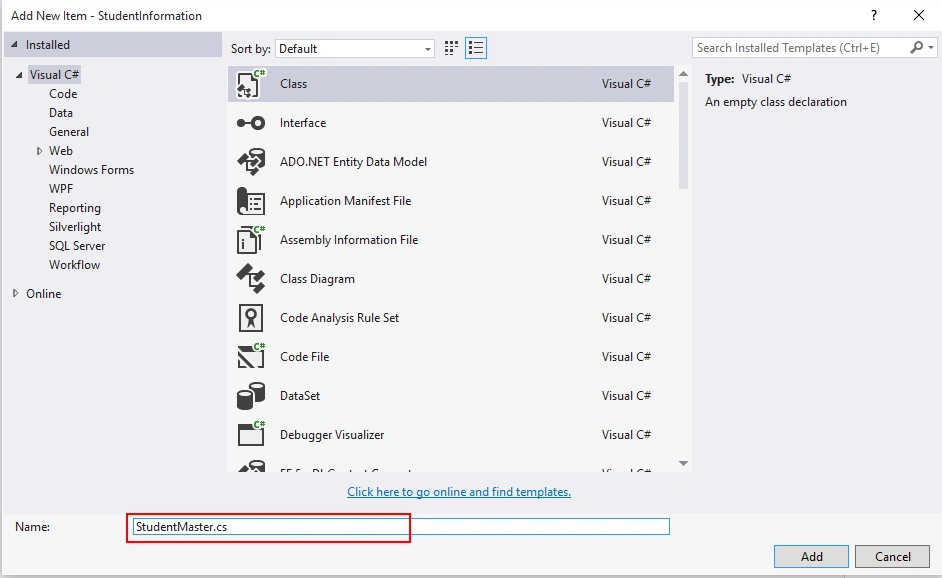
Now one dialog box will be open give the name for that class as "StudentMaster.cs".
5. Now write the following code into "StudentMaster".
- using System;
- using System.Collections.Generic;
- using System.ComponentModel.DataAnnotations;
- using System.Linq;
- using System.Web;
- namespace StudentInformation.Entities
- {
- public class StudentMaster
- {
- [Key]
- public string ID { get; set; }
- [Required]
- public string Name { get; set; }
- [Required]
- public string FatherName { get; set; }
- [Required]
- public string Gender { get; set; }
- [Required]
- public string ClassName { get; set; }
- [Required]
- public DateTime DateOfAdmission { get; set; }
- }
- }
- public DbSet<StudentMaster> Students { get; set; }
- using Microsoft.AspNet.Identity.EntityFramework;
- using StudentInformation.Entities;
- using System.Data.Entity;
- namespace StudentInformation.Models
- {
- // You can add profile data for the user by adding more properties to your ApplicationUser class, please visit http://go.microsoft.com/fwlink/?LinkID=317594 to learn more.
- public class ApplicationUser : IdentityUser
- {
- }
- public class ApplicationDbContext : IdentityDbContext<ApplicationUser>
- {
- public ApplicationDbContext()
- : base("DefaultConnection")
- {
- }
- public DbSet<StudentMaster> Students { get; set; }
- }
- }
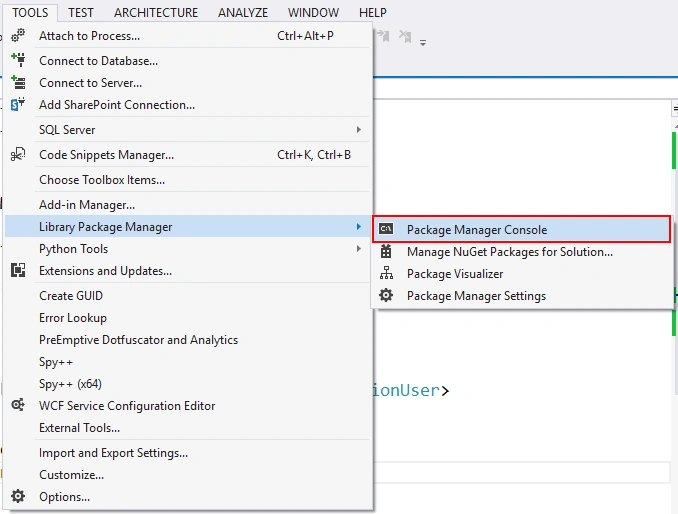
8. Now Enable Migrations for the project by using the following code in package manager console:
- PM> Enable-Migrations
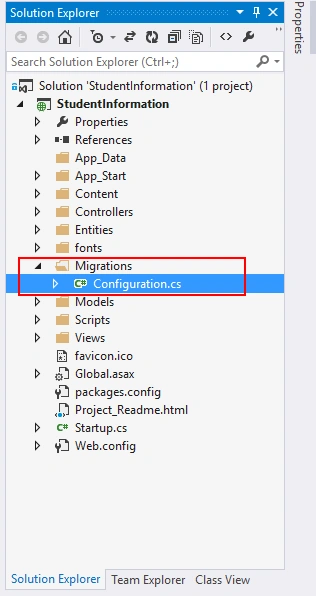
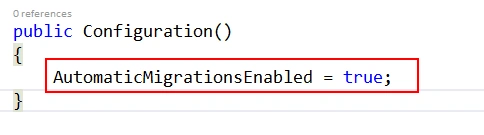
10. Open Configuration.cs file and set AutomaticMigrationsEnabled as true.
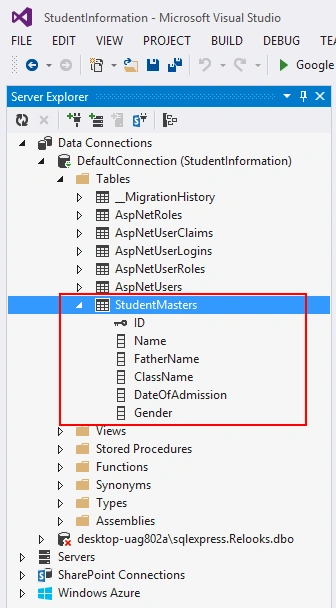
11. Now build your project once and again open Package Manager Console and write the following code to generate tables and database.
- PM> update-database
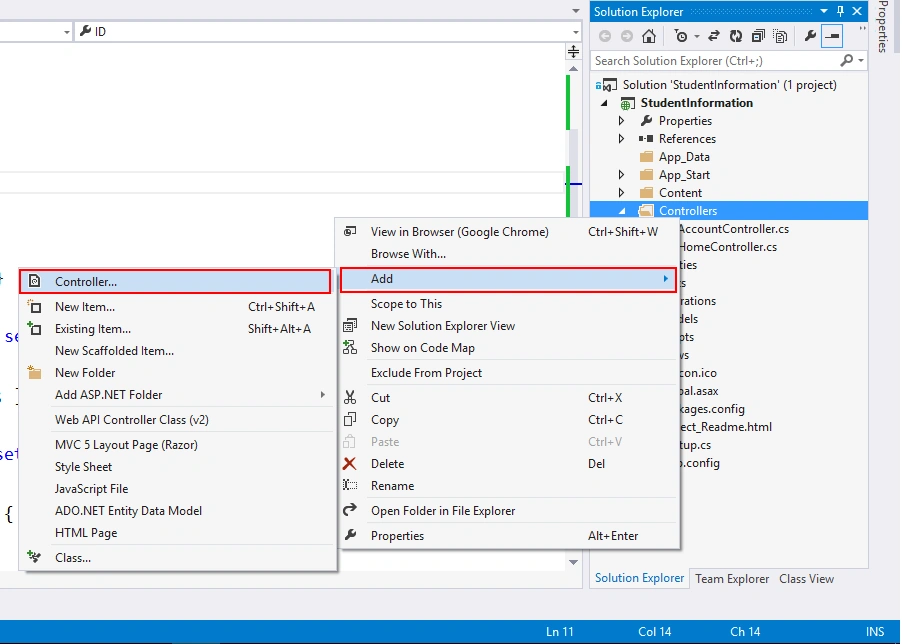
13. Now add Controller with name "StudentController". To add controller in your project right click on Controllers folder, Add, then Controller. Here's the figure to add StudentController.
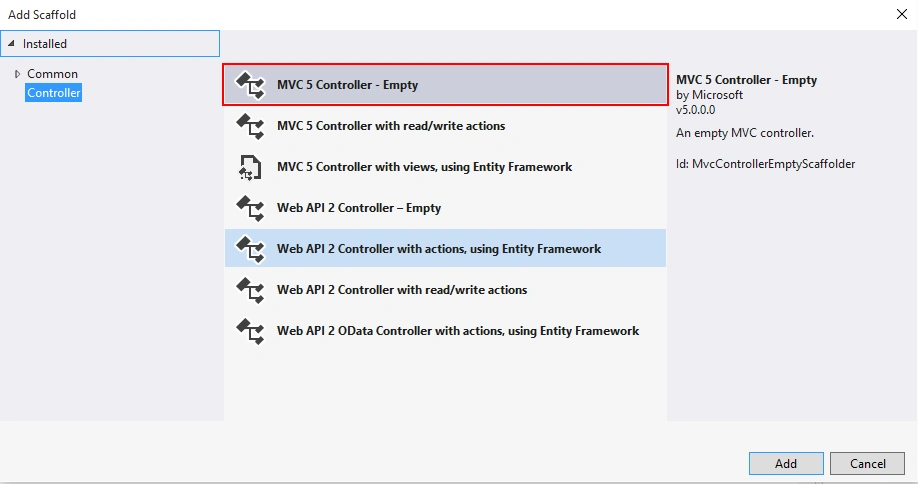
Now add Empty Controller.
Now give the name for the controller.
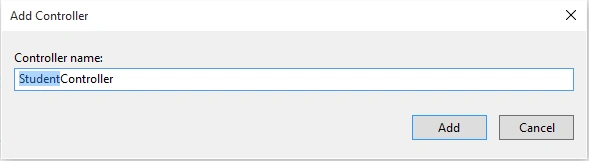
Now give the name for the controller.
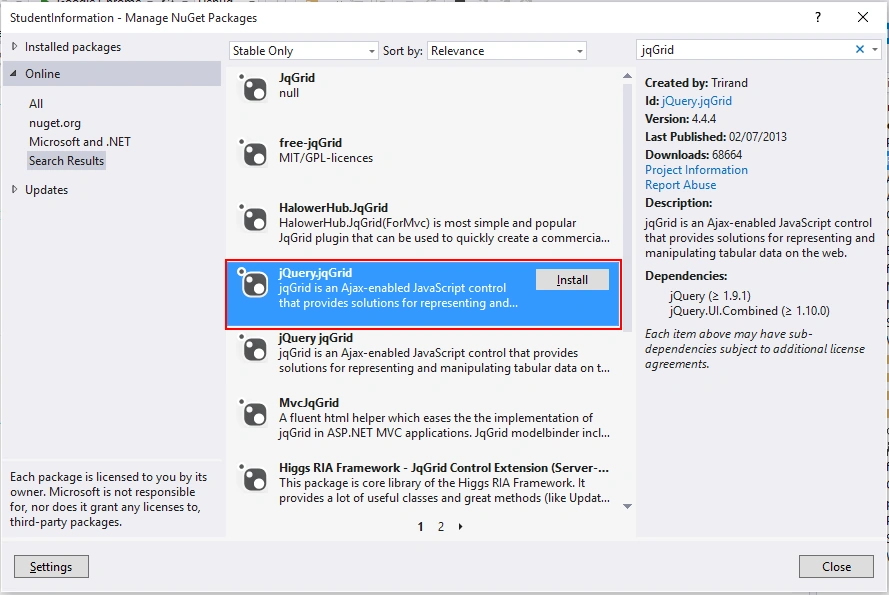
14. Now Install jqGrid Package from the Nuget Package Manager. To add jqGrid package from the Nuget package Manager,
- Right Click on the References and click on Manage Nuget Packages.
- Now search for jqGrid and install jQuery.jqGrid.
15. Now open StudentController and add View by right clicking Index Action Method.
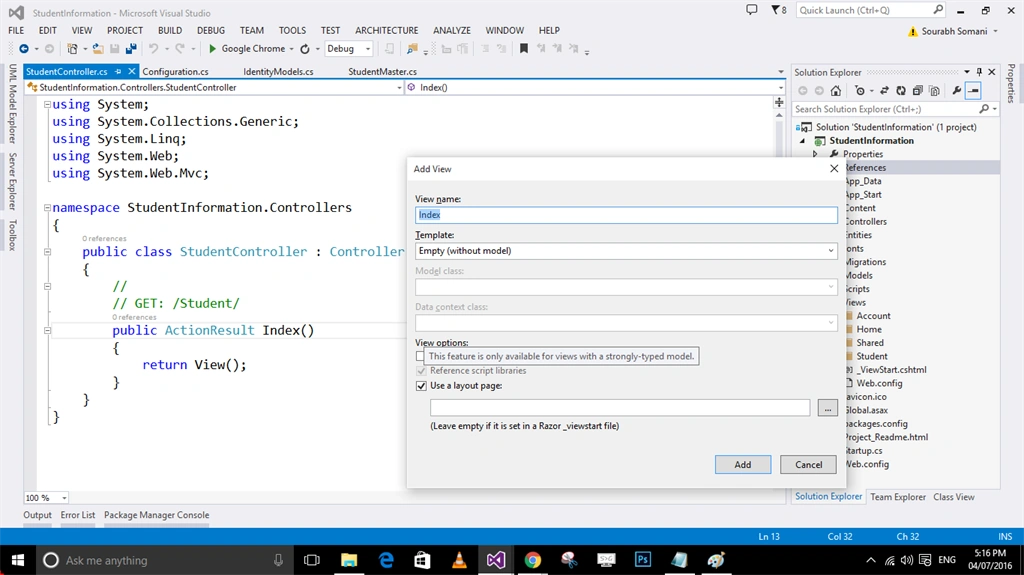
16. Above operation will generate view, write the following code in that view.
- @{
- ViewBag.Title = "Student Information";
- }
- <h2>Student Information</h2>
- <div>
- <table id="jqGrid"></table>
- <div id="jqControls"></div>
- </div>

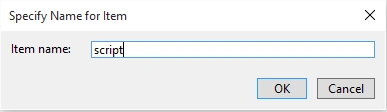
Give the name for the file "script".
18. Now open StudentController and write the following code for getting the student information:
- public JsonResult GetStudents(string sidx, string sort, int page, int rows)
- {
- ApplicationDbContext db = new ApplicationDbContext();
- sort = (sort == null) ? "" : sort;
- int pageIndex = Convert.ToInt32(page) - 1;
- int pageSize = rows;
- var StudentList = db.Students.Select(
- t => new
- {
- t.ID,
- t.Name,
- t.FatherName,
- t.Gender,
- t.ClassName,
- t.DateOfAdmission
- });
- int totalRecords = StudentList.Count();
- var totalPages = (int)Math.Ceiling((float)totalRecords / (float)rows);
- if (sort.ToUpper() == "DESC")
- {
- StudentList = StudentList.OrderByDescending(t => t.Name);
- StudentList = StudentList.Skip(pageIndex * pageSize).Take(pageSize);
- }
- else
- {
- StudentList = StudentList.OrderBy(t => t.Name);
- StudentList = StudentList.Skip(pageIndex * pageSize).Take(pageSize);
- }
- var jsonData = new
- {
- total = totalPages,
- page,
- records = totalRecords,
- rows = StudentList
- };
- return Json(jsonData, JsonRequestBehavior.AllowGet);
- }
- $(function () {
- $("#jqGrid").jqGrid({
- url: "/Student/GetStudents",
- datatype: 'json',
- mtype: 'Get',
- colNames: ['ID', 'Student Name', 'Father Name', 'Gender', 'Class', 'Admission Date'],
- colModel: [
- { key: true, hidden: true, name: 'ID', index: 'ID', editable: true },
- { key: false, name: 'Name', index: 'Name', editable: true },
- { key: false, name: 'FatherName', index: 'FatherName', editable: true },
- { key: false, name: 'Gender', index: 'Gender', editable: true, edittype: 'select', editoptions: { value: { 'M': 'Male', 'F': 'Female', 'N': 'None' } } },
- { key: false, name: 'ClassName', index: 'ClassName', editable: true, edittype: 'select', editoptions: { value: { '1': '1st Class', '2': '2nd Class', '3': '3rd Class', '4': '4th Class', '5': '5th Class' } } },
- { key: false, name: 'DateOfAdmission', index: 'DateOfAdmission', editable: true, formatter: 'date', formatoptions: { newformat: 'd/m/Y' } }],
- pager: jQuery('#jqControls'),
- rowNum: 10,
- rowList: [10, 20, 30, 40, 50],
- height: '100%',
- viewrecords: true,
- caption: 'Students Records',
- emptyrecords: 'No Students Records are Available to Display',
- jsonReader: {
- root: "rows",
- page: "page",
- total: "total",
- records: "records",
- repeatitems: false,
- Id: "0"
- },
- autowidth: true,
- multiselect: false
- });
- });
- @{
- ViewBag.Title = "Student Information";
- }
- <h2>Student Information</h2>
- <div>
- <table id="jqGrid"></table>
- <div id="jqControls"></div>
- </div>
- @section scripts{
- <link href="~/Content/themes/base/jquery-ui.css" rel="stylesheet" />
- <link href="~/Content/jquery.jqGrid/ui.jqgrid.css" rel="stylesheet" />
- <script src="~/Scripts/jquery-ui-1.10.4.js"></script>
- <script src="~/Scripts/i18n/grid.locale-en.js"></script>
- <script src="~/Scripts/jquery.jqGrid.min.js"></script>
- <script src="~/Scripts/script.js"></script>
- }
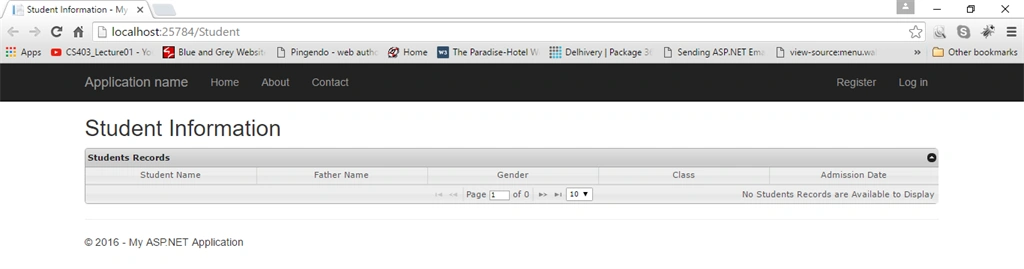
Output:
22. Let's flip to StudentController and write code for create, update and delete.
- For Create
- [HttpPost]
- public string Create([Bind(Exclude = "Id")] StudentMaster Model)
- {
- ApplicationDbContext db = new ApplicationDbContext();
- string msg;
- try
- {
- if (ModelState.IsValid)
- {
- Model.ID = Guid.NewGuid().ToString();
- db.Students.Add(Model);
- db.SaveChanges();
- msg = "Saved Successfully";
- }
- else
- {
- msg = "Validation data not successfully";
- }
- }
- catch (Exception ex)
- {
- msg = "Error occured:" + ex.Message;
- }
- return msg;
- }
- For Update
- public string Edit(StudentMaster Model)
- {
- ApplicationDbContext db = new ApplicationDbContext();
- string msg;
- try
- {
- if (ModelState.IsValid)
- {
- db.Entry(Model).State = EntityState.Modified;
- db.SaveChanges();
- msg = "Saved Successfully";
- }
- else
- {
- msg = "Validation data not successfully";
- }
- }
- catch (Exception ex)
- {
- msg = "Error occured:" + ex.Message;
- }
- return msg;
- }
- For Delete
- public string Delete(string Id)
- {
- ApplicationDbContext db = new ApplicationDbContext();
- StudentMaster student = db.Students.Find(Id);
- db.Students.Remove(student);
- db.SaveChanges();
- return "Deleted successfully";
- }
23. After writing above action methods open script.js file and add functionality for Create, Update, Delete.
script.js File
- $(function () {
- $("#jqGrid").jqGrid({
- url: "/Student/GetStudents",
- datatype: 'json',
- mtype: 'Get',
- colNames: ['ID', 'Student Name', 'Father Name', 'Gender', 'Class', 'Admission Date'],
- colModel: [
- { key: true, hidden: true, name: 'ID', index: 'ID', editable: true },
- { key: false, name: 'Name', index: 'Name', editable: true },
- { key: false, name: 'FatherName', index: 'FatherName', editable: true },
- { key: false, name: 'Gender', index: 'Gender', editable: true, edittype: 'select', editoptions: { value: { 'M': 'Male', 'F': 'Female', 'N': 'None' } } },
- { key: false, name: 'ClassName', index: 'ClassName', editable: true, edittype: 'select', editoptions: { value: { '1': '1st Class', '2': '2nd Class', '3': '3rd Class', '4': '4th Class', '5': '5th Class' } } },
- { key: false, name: 'DateOfAdmission', index: 'DateOfAdmission', editable: true, formatter: 'date', formatoptions: { newformat: 'd/m/Y' } }],
- pager: jQuery('#jqControls'),
- rowNum: 10,
- rowList: [10, 20, 30, 40, 50],
- height: '100%',
- viewrecords: true,
- caption: 'Students Records',
- emptyrecords: 'No Students Records are Available to Display',
- jsonReader: {
- root: "rows",
- page: "page",
- total: "total",
- records: "records",
- repeatitems: false,
- Id: "0"
- },
- autowidth: true,
- multiselect: false
- }).navGrid('#jqControls', { edit: true, add: true, del: true, search: false, refresh: true },
- {
- zIndex: 100,
- url: '/Student/Edit',
- closeOnEscape: true,
- closeAfterEdit: true,
- recreateForm: true,
- afterComplete: function (response) {
- if (response.responseText) {
- alert(response.responseText);
- }
- }
- },
- {
- zIndex: 100,
- url: "/Student/Create",
- closeOnEscape: true,
- closeAfterAdd: true,
- afterComplete: function (response) {
- if (response.responseText) {
- alert(response.responseText);
- }
- }
- },
- {
- zIndex: 100,
- url: "/Student/Delete",
- closeOnEscape: true,
- closeAfterDelete: true,
- recreateForm: true,
- msg: "Are you sure you want to delete Student... ? ",
- afterComplete: function (response) {
- if (response.responseText) {
- alert(response.responseText);
- }
- }
- });
- });
Output
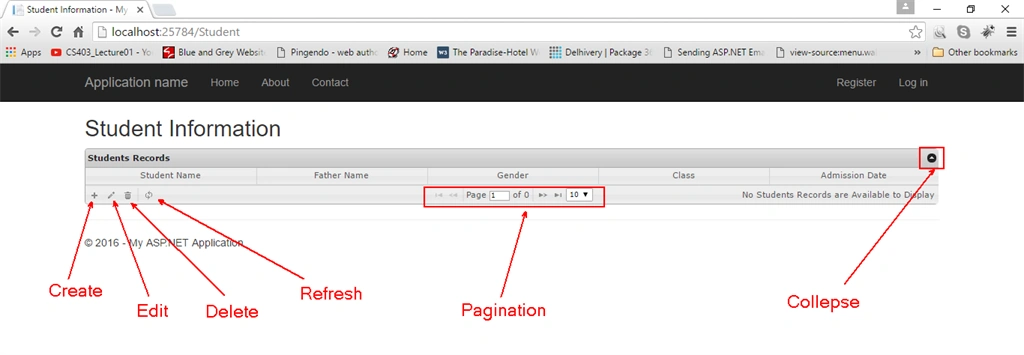
When you click on Create Button
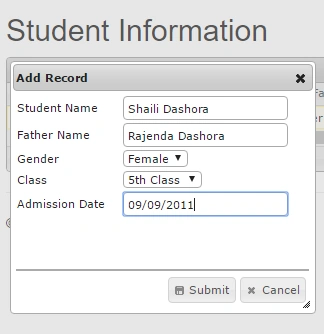
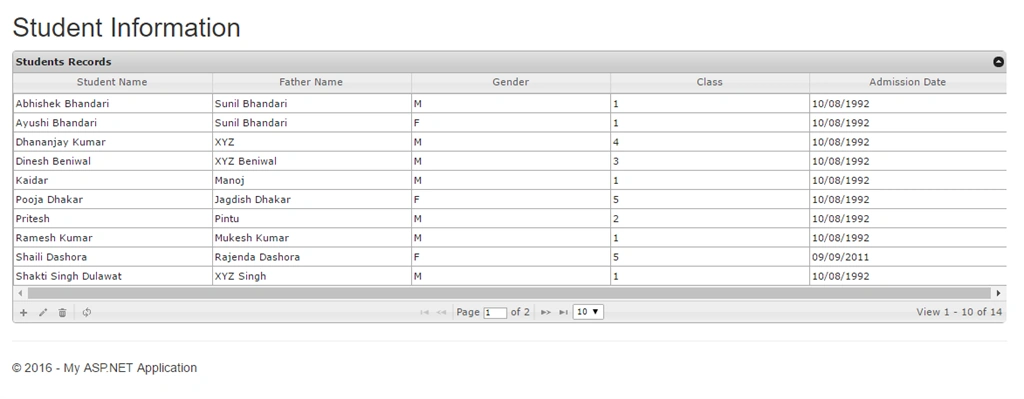
After Adding Students
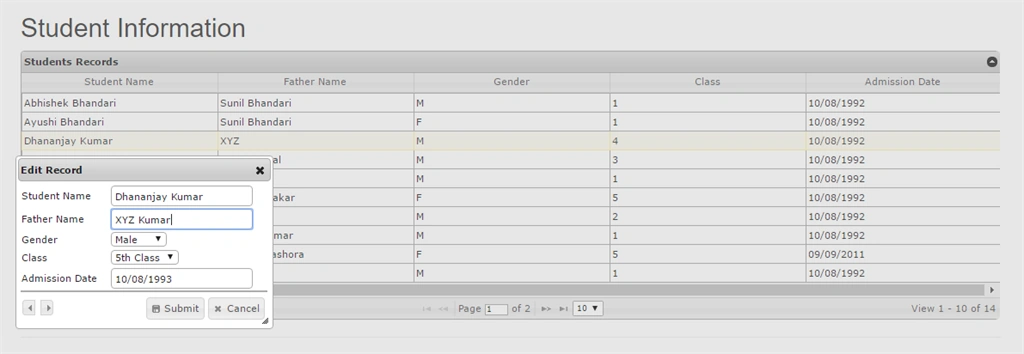
Editing a Record: For Editing a record you have to select one row and click on Edit Button.
After Updating Record
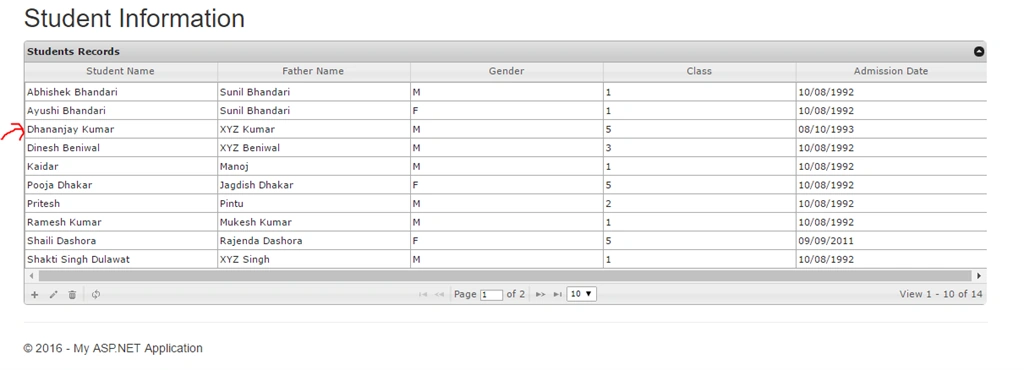
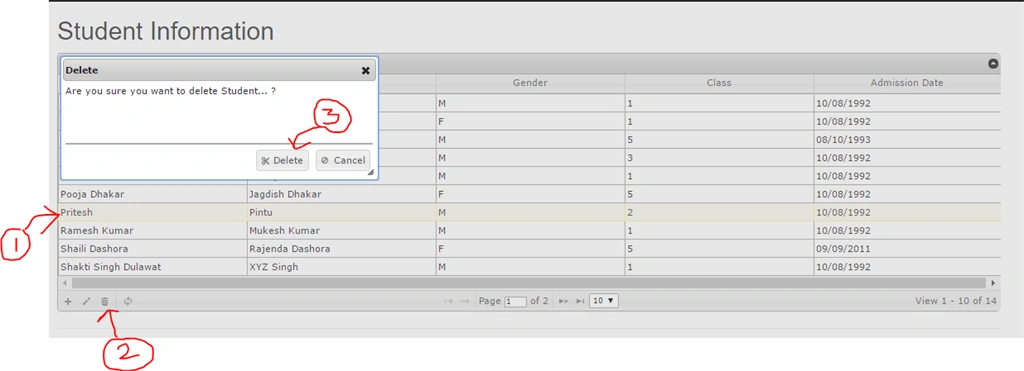
Deleting Record: First of all select a row and press Delete button.
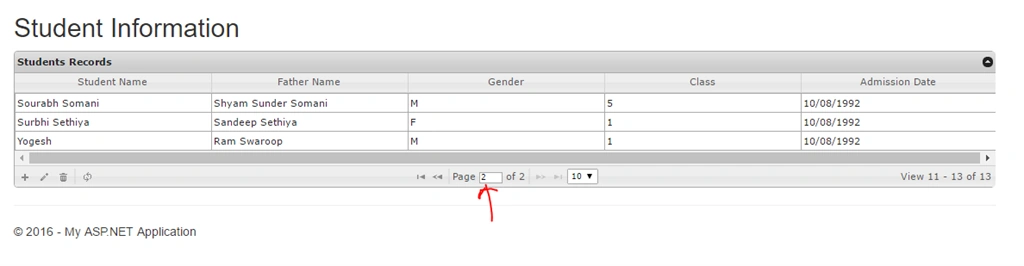
Pagination
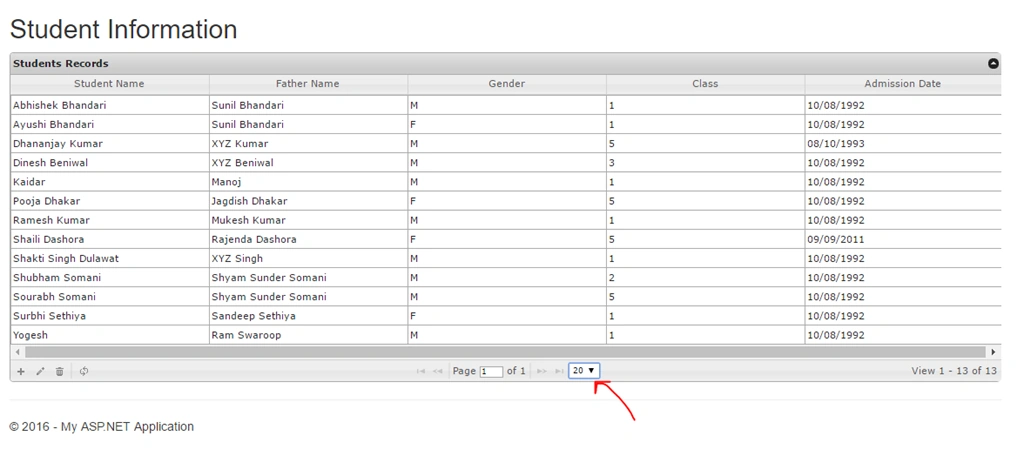
When Row List Change
When Collapse Button is pressed

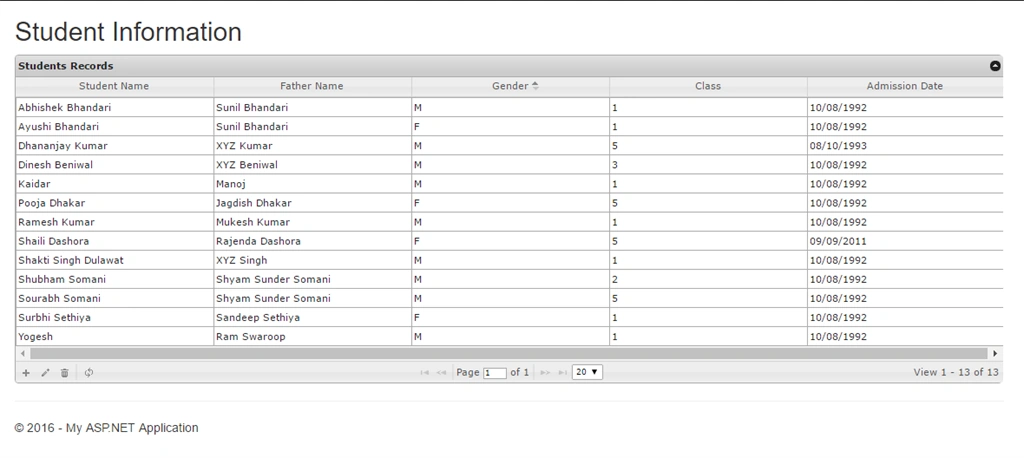
Final Output:
 You can download complete source code of the project from GitHub.
Read more articles on ASP.NET:
sankeerth mPosted Oct 16, 2020, 6:58 AM
Delete functionality is not working. While deleting it is unable to hit the url
Jitendra WaghalePosted Nov 17, 2018, 2:33 PM
Excellent Article, Thanks you very much, Appreciated.!!! 5*****
koteppa madiwalarPosted Aug 25, 2018, 12:45 AM
I writen jquery code same but delete method does not called controler delete method so want solution jquery code zIndex: 100, url: '/Client/SupplierDelete' , datatype: 'json', mtype: 'Post', colModel: [{ key: true, name: 'SupplierID', index: 'SupplierID', editable: false }], closeonescape: true, closeafterdelete: true, recreateform: true, msg: "Are you sure you want to delete Student... ? ", afterComplete: function (response) { if (response.responseText) { alert(response.responseText); } and contoler: [HttpPost] public JsonResult SupplierDelete(int SupplierID) { using (SqlConnection con = new System.Data.SqlClient.SqlConnection(ConfigurationManager.ConnectionStrings["Lagna_Connection"].ConnectionString.ToString())) { using (SqlCommand cmd = new SqlCommand("[mymarat_sandeep].[DeleteSupplier]", con)) { cmd.CommandType = System.Data.CommandType.StoredProcedure; cmd.Parameters.AddWithValue("@supplierid", SupplierID); con.Open(); int result = cmd.ExecuteNonQuery(); return Json(result, JsonRequestBehavior.AllowGet); } } } }
eve titoPosted Nov 27, 2017, 12:50 PM
Hi thanks for the post!, i'm working in a application in MVC 5 EF using database first, by now all view has succefully but don't work with database, edit, create and delete has generated error, can you help me please?
md saiful slamPosted Sep 10, 2017, 2:32 AM
WHERE IS THE DATABASE? i CAN NOT FIND IT.
Md. NasirPosted Apr 26, 2017, 5:43 AM
Helpful Thanks.. Also share code for retrieving data
Kishore MadanapaliPosted Apr 15, 2017, 9:50 AM
Please use ado.net code for this example
Manav PandyaPosted Jan 18, 2017, 12:59 AM
Do you have any other article on gridview in mvc ??
Manav PandyaPosted Jan 18, 2017, 12:58 AM
Thanks for sharing this ....
Vivek KumarPosted Apr 28, 2016, 3:11 PM
Good one
Humayun Kabir MamunPosted Apr 11, 2016, 3:46 AM
Nice...
Debasis SahaPosted Apr 9, 2016, 2:06 AM
Good share..
Vignesh ManiPosted Apr 8, 2016, 5:16 PM
Good one
Rahul Kumar SaxenaPosted Apr 8, 2016, 7:39 AM
Nice Explanation
Shakti Singh DulawatPosted Apr 8, 2016, 6:47 AM
Good Presentations
Shaili DashoraPosted Apr 8, 2016, 3:46 AM
Nice Explanation,good job Sourabh