

Introduction
In my last
article, we looked at Alarms and Reminders, appetizers for the new scheduler
features in the new Mango update. Today we're going to look at the entree:
Background Tasks. More specifically, Periodic and ResourceIntensive Tasks (There
is one for audio and transfers, we'll look at these in the next article(s)).
Differences
Let's first look at the difference between the two types of tasks and where we
should use each. I'm sure by their names, you could fathom a guess as to what
each is meant to do, but here are the constraints for each, summarized from
their full descriptions at MSDNhttp://msdn.microsoft.com/en-us/library/hh202942(v=VS.92).aspx
Constraint | PeriodicTask | ResourceIntensiveTask |
Scheduled Interval | 30 minutes | Run when requirements are met |
Execution duration | 15 seconds | 10 minutes |
Power | Battery Saver mode can prevent execution | External power required Battery must be at 90% |
Other limitations | Per-device periodic agent limit | Device must be locked Non-cellular connection required (Wi-Fi or PC) No active phone call |
These constraints must be met for your tasks to
run. It is important to note that should any of these conditions no longer be
met, your task will be terminated, so make sure to write your tasks with this in
mind. It is ultimately up to you to choose which task best suites your
situation, but it is strongly recommended keeping periodic tasks as quick as
possible, while saving large synchronization tasks for a ResourceIntensiveTask.
Similarities
Both tasks are restricted by a few universal rules. Firstly, they can't use
certain APIs (Mostly UI, calling other tasks, and interacting with the device's
sensors). The full list can be found at http://msdn.microsoft.com/en-us/library/hh202962(v=VS.92).aspx.
Secondly, the task may not use more than 5 MB of memory, or it will be
terminated. Lastly, your tasks have an ExpirationTime (the time that the system
will stop trying to execute it), which is by default 2 weeks. Anytime your
application is launched, you have an opportunity to extend that time, to the 2
week maximum.
With the prerequisites out of the way, let's look at how to use Tasks.
Use
The first step in using ScheduledTasks is to create a ScheduledAgent class. This
will be invoked when your task is called. The class you write is only required
to be comprised of overloading OnInvoke(ScheduledTask task), as shown below. You
create this by adding a new project to the solution, selecting the new "Windows
Phone Scheduled Task Agent" temple, pictured here.
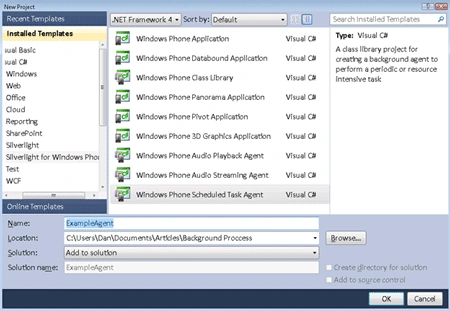
The project will open up and show you the template for the ScheduledAgent. Below
is what I see as the bare minimum for this class.
using Microsoft.Phone.Scheduler;
namespace ExampleAgent
{
public class ScheduledAgent
: ScheduledTaskAgent
{
protected override void OnInvoke(ScheduledTask
task)
{
if (task is PeriodicTask)
{
//
Logic for Periodic Task
}
else
{
//
Logic for ResourceIntensiveTask
}
// Use this
to invoke your task much quicker when debugging
#if DEBUG_AGENT
ScheduledActionService.LaunchForTest(task.Name,
TimeSpan.FromSeconds(60));
#endif
//
Tell the Scheduler we are done
NotifyComplete();
}
}
}
Join the conversation! Your thoughts help the community grow.