

Welcome Readers.
Share
Yes “Share” assigns permissions. SharePoint 2013 and Office 365 have a platform of sharing as do social sites in today's technology. Share is a way to assign permissions to users of their sites.
Sharing
Sharing is a way to assign permissions to users by just clicking on “Share” present on the top of all the pages of the site.
Let us see what it has.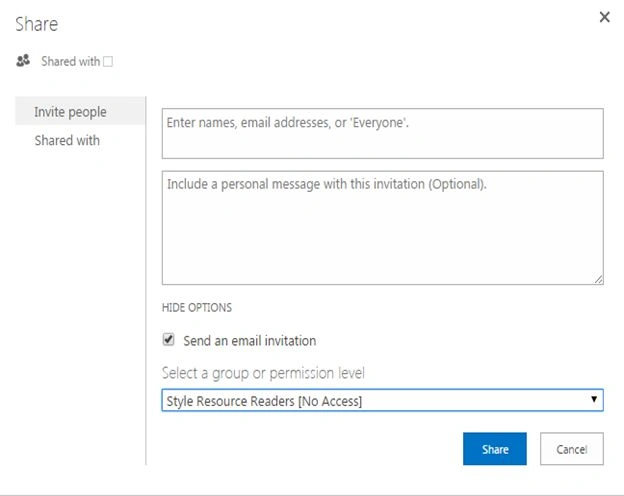
You have two tabs on the dialog box that state:
- Invite people: Here you can, as it says, invite people to your site.
On the first box you can rovide the name and through user profile services it will fetch the user's details.
On the second box, you can write a message for the user you are adding.
- Send an email invitation: An option to send an email once you have added users to the site along with the personal message.
- Select a group or permission level: Here you can assign a permission level to the users or directly assign them to groups.
- Click on ”Share”.
- The next tab has what to be shared with.
This tab will show you the name of the users this site has been shared with.
Share your site and just keep learning.
Cheers!
Manpreet SinghPosted Oct 7, 2015, 11:58 PM
Thanks Gowtham Rajamanickam !!
Gowtham RajamanickamPosted Apr 5, 2015, 1:39 AM
good one...