

Personalization
Good web sites not only present content in a good appealing way but also know how to present the correct content to the right user. Personalized content means that the user is displayed the content he might be interested in based on his preferences and other known information about him.
This ability to display personalized content and track information about the user is known as Personalization. This personalization is provided in ASP.NET by the Profile service.
Profile service provides the ability to easily store and retrieve information about the user. Profile service stores and retrieves the data of the user and maps the data for the user. We are not concerned with manually storing and retrieving the user information as this task is performed by the ASP.NET Profile Service and we don't need to write any code for it.
To use Profile service in the web site we need to define the properties we want to store and retreive in web.config.In the following xml markup defined in the web.config we have added two new properties.
Type attribute defines the datatype of the Property .Since default is System.String we can omit the below type attribute.
<properties>
<add name="name" type="System.String" allowAnonymous="true" />
<add name="age" type="System.Int32" allowAnonymous="true"/>
</properties>
We can also define the Profile properties in Profile groups .Defining Profile properties in Profile groups serve to group logically related properties together and also to define two properties having same name in different groups. To define profile group we need to add the <group name ="name"> tag in the <properties> tag.If we had defined the address property inside the group named "user" we need to access the address property as Profile.User.address.
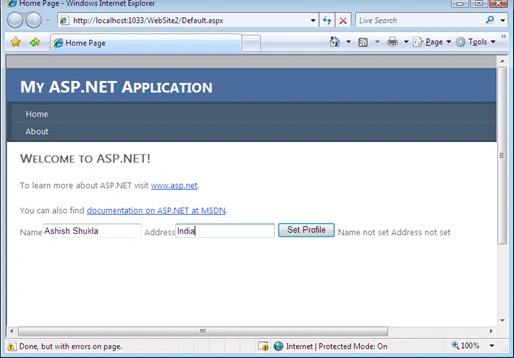
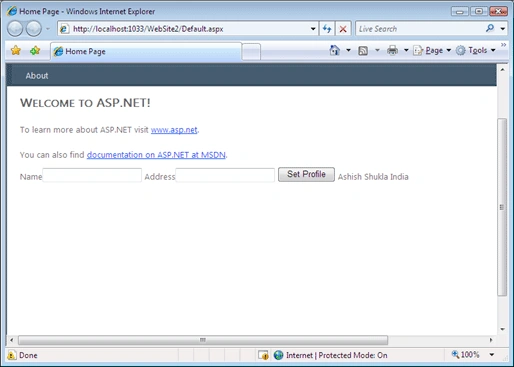
Based on this information in web.config ASP.NET automatically generates a class for us which gives us access to the Profile service which we can access in the web pages using the Profile property of the page class .In the following code in the code behind we are setting the values of the Profile properties we have defined earlier in web.config.
Following is the code we add in the Page Load event handler.
if (Profile.name != ""
&& Profile.address != "")
{
lblAddress.Text = Convert.ToString(Profile.address);
Join the conversation! Your thoughts help the community grow.