

Introduction
In this article, we will be talking about the six most important pip commands that every Python developer should know. Here is what we will be covering in this article.
- What is a pip?
- pip search
- pip install
- pip show
- pip uninstall
- pip list
- pip freeze
What is a pip search?
Pip is a package manager for Python packages. When we install pip, it is added to the system as a command-line program that can be run from the command line. We not only use PIP to install and uninstall Python packages, but it is also a great tool to create a Python virtual environment. And in this article, we will be talking about different useful commands that a Python developer uses in a day to day life.
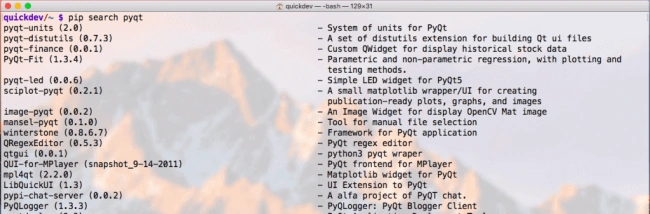
Here is an example.
pip install
You can install a package using the "pip install <package>" command. You may already know the package name or you can search for a package using the "pip search <package>" command. By default, a package is installed from PyPI. Below is a screenshot of installing Flask.
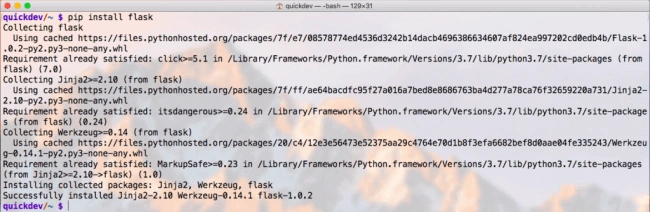
PIP installation has several stages
- Identify the base requirements. The user-supplied arguments are processed here.
- Resolve dependencies. What will be installed is determined here.
- Build wheels. All the dependencies that can be, are built into wheels.
- Install the packages (and uninstall anything being upgraded/replaced).
There is also a concept called caching. PIP provides a cache that functions similarly to that of a web browser and it is on by default. We can disable the cache and always access the PyPI using the --no-cache-dir option as,
quickdev/~$ pip install --no-cache-dir flask
quickdev/~$
As per PyPA documentation,
When making an HTTP request, pip will first check its local cache to determine if it has a suitable response stored for that request that has not expired. If it does then it simply returns that response and doesn’t make the request.
If it has a response stored, but it has expired, then it will attempt to make a conditional request to refresh the cache which will either return an empty response telling pip to simply use the cached item (and refresh the expiration timer) or it will return a whole new response which pip can then store in the cache.
Using PIP, we can also install packages from a requirements file, which we will cover later in the article.
pip show
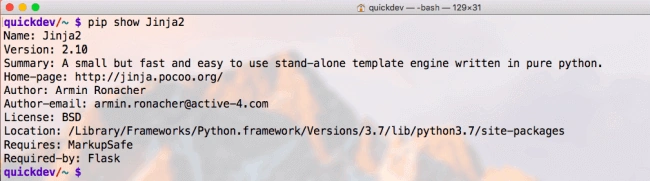
It's very common to get details about a package that is currently installed. For any package, this command returns details like name, version, summary, dependent packages, and much more. Here is an example.
pip uninstall
This is the simplest one of all. We can remove any package using the pip uninstall <package> command. Here is an example.

pip list
This is one of the most important commands that every Python developer must know. The pip list command returns the list of packages in the current environment. It also returns the installed version for each package. Packages are listed in a case-insensitive sorted order.
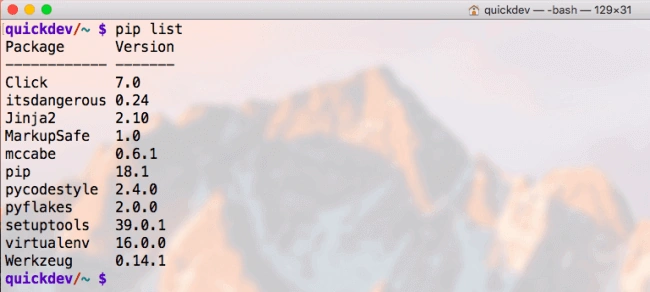
PIP list returns a list of all packages. However, for some reason, we may also want to list all the packages that are currently outdated. To do so, we can use the "pip list -o" or "pip list --outdated" command, which returns a list of packages with the version currently installed and the latest available.
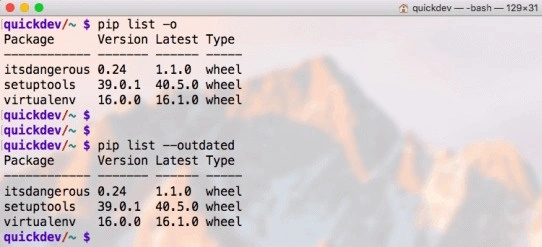
On the other hand, to list out all the packages that are up to date, we can use the pip list -u or pip list --uptodate command.
pip freeze
We use this command to freeze the packages and their current version. PIP freeze is most useful when we want to use the same set of packages on different platforms or environments. We pass a filename to the "pip freeze > filename" command. Here is an example,
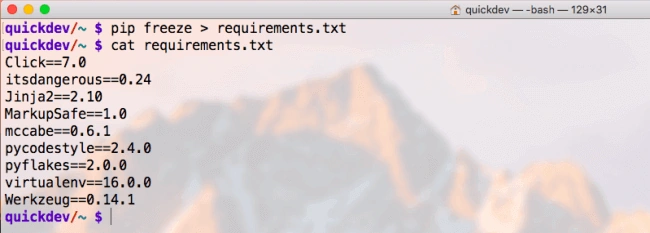
Once we have created the file that holds our packages, we can then use that file to set up another environment with those packages. Here is an example, where we have a virtual environment "venv" and we are now installing the required packages from the requirements.txt file, using the "pip install -r <path_to_file>" command.
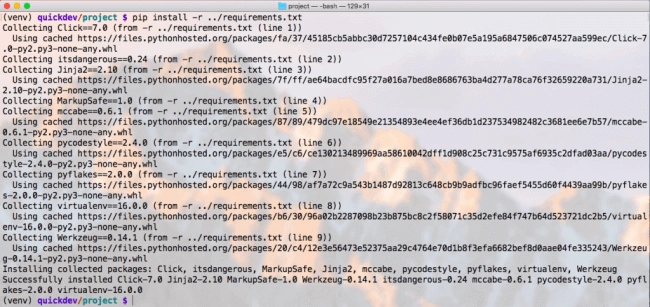
If you are not familiar with Python virtual environment, do check out my below articles.
Summary
This is fairly a small list, however, these are the most-used PIP commands for a Python developer in a day to day life. If we want to see other commands or options that are available with pip, just type pip and hit return. This will list all the alternates available.
What commands do you use the most? Don't forget to share.
Join the conversation! Your thoughts help the community grow.