

When planning to secure a SharePoint 2013 environment, you first need to consider the type of scenario you need to support as in the following:
- Intranet Scenario
This environment will only require access within your firewall, therefore you only need to be concerned with securing your resources for internal user access.
- Extranet Scenario
This environment will require you to configure security on your resources for external and internal user access.
- Internet Scenario
This environment will require you to configure security on your resources for anonymous external user access.
Each of these scenarios have different security requirements and they also each require different security measures and technologies.
Defense in depth
Because the majority of organizations store confidential, regulated, or at the very least, sensitive information on their SharePoint sites, it makes sense that these organizations need to commit to a defense in depth approach when planning security for their SharePoint farm. The term defense in depth refers to the use of multilayered security measures to help protect the information resources or an organization. The term has been borrowed from the military principle that it is much harder to breach a defense that is complex and has several layers to it than it is to breach a single barrier. So, the defense in depth principle for SharePoint requires considering your security at multiple levels of your infrastructure.
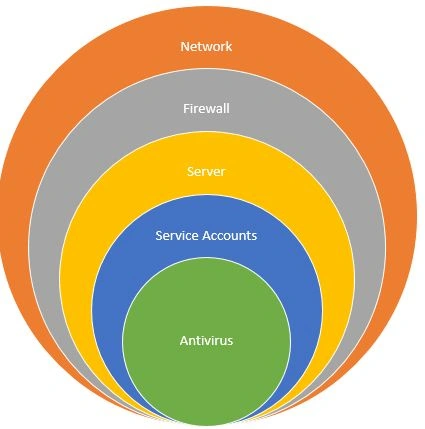
These are some examples of areas you need to include in your security planning:
- Network
This includes features such as a Threat Management Gateway (TMG) or Unified Access Gateway (UAG) and network isolation.
- Server
This includes steps such as shutting down non-essential services and deleting unnecessary accounts.
- Firewall
This includes blocking ports, opening ports and reconfiguring default ports and protocols.
- Service Accounts.
This includes applying least privilege principles to all service accounts and creating new application-specific and service-specific accounts. - Antivirus
This includes ensuring you have a sufficient, compatible and up-to-date antivirus solution in place.
Typically, security hardening refers to the process of securing a system by reducing its surface of vulnerability, by removing or disabling unnecessary software. In a SharePoint server farm environment, individual servers play specific roles, such as web server, application server and database server. Security hardening measures for these servers depend on the role each server plays. The primary measure for server hardening is to shut down non-essential Windows and SharePoint services.
Web and application server service hardening
Services that use insecure protocols, or that run under accounts with too much privilege are security risks; therefore, if you do not need them, disable them. When you disable non-essential and unnecessary services, you rapidly reduce your attack surface and reduce your maintenance overhead.
It is also possible that services running in Windows can be exploited and used by malicious attackers to obtain access to your system and resources. You should disable all services that your servers and applications do not require. To help secure your web and application servers, you should shut down all non-essential services other than those in the following list. Ensure that the following services are enabled on your web and application servers:
- ASP.NET State Service (if using InfoPath Forms Services or Project Server 2013)
- View State service (if using InfoPath Forms Services)
- World Wide Web Publishing Service
- AppFabric Caching Service
- Claims to Windows Token Service
- SharePoint Administration
- SharePoint Timer service
- SharePoint Tracing Service
- SharePoint VSS Writer service
- SharePoint User Code Host
- SharePoint Search Host Controller
- SharePoint Server Search
- Forefront Identity Manager service (This service is required by the User Profile service application on the server that imports profiles from the directory store.)
- Forefront Identity Manager Synchronization service (This service is required by the User Profile service application on the server that imports profiles from the directory store.)
Join the conversation! Your thoughts help the community grow.