

If you have built any video-enabled application prior to WPF, you must be familiar with the Windows Media Player ActiveX control. The WPF library provides the MediaElement control that encapsulates the Windows Media Player functionality.
The MediaElement tag in XAML allows you to play videos in XAML and WPF. The Source attribute of the tag takes the full path of the video. The following code snippet uses the MediaElement to display a video.
<MediaElementName="VideoControl"Width="200"Height ="400"
                  Source="C:\Windows\System32\oobe\images\intro.wmv" >
</MediaElement>
The file can also be an MPEG. The following code snippet plays a MPEG video.
<MediaElementName="VideoControl"Width="200"Height ="400"
                  Source="C:\TestV.MPG" >
</MediaElement>
The Width and Height attributes sets the width and height of the control respectively.
Setting MediaElement Properties Dynamically
You can also access the control programmatically and set its properties in your code. The following code snippet sets the MediaControls properties at run-time.
VideoControl.Volume = 100;
VideoControl.Width = 440;
VideoControl.Height = 280;
The Application
Now let's build our video application. I want to create an application that looks like Figure 1. As you can see from this figure, the Browse button allows me to browse a video file and Play, Pause, and Stop buttons plays, pauses, and stops the video.
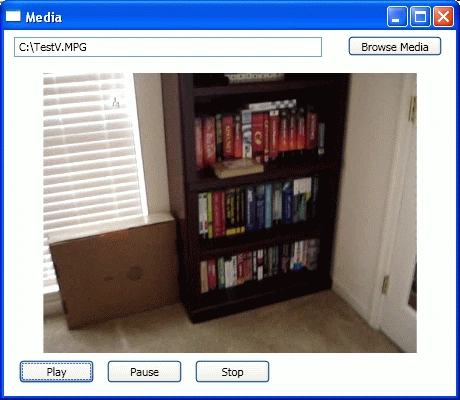
Figure 1. Video enabled WPF application
The code listed in Listing 1 creates the user interface screen.
<TextBoxHeight="20"Margin="10,7,134,0"Name="MediaPathTextBox"VerticalAlignment="Top"  ></TextBox>
    <ButtonHeight="20"HorizontalAlignment="Right"Margin="0,6,14,0"Name="BrowseButton"
            VerticalAlignment="Top"Width="94"Click="BrowseClick">
        Browse Media
    </Button>
    <MediaElementCanvas.Left="20"Canvas.Top ="40"
            Name="VideoControl"LoadedBehavior="Manual"UnloadedBehavior="Stop" >
      </MediaElement>
    <ButtonHeight="23"HorizontalAlignment="Left"Margin="15,0,0,13"
            Name="PlayButton"VerticalAlignment="Bottom"Width="75"
            Click="PlayClick">
      Play</Button>
    <ButtonHeight="23"HorizontalAlignment="Left"Margin="103,0,0,13"
            Name="PauseButton"VerticalAlignment="Bottom"Width="75"
            Click="PauseClick">
      Pause</Button>
    <ButtonHeight="23"Margin="191,0,186,13"Name="StopButton"
            VerticalAlignment="Bottom" Click="StopClick">
      Stop</Button>
  </Grid>
Listing 1.
The code behind looks like Listing 2. As you can see from this code, on the Windows1 constructor I set the Volume, Width, and Height of the control.
The Browse button click event handler calls OpenFileDialog, that lets us browse the files and sets the "MediaPathTextBox.Text" as the media file name.
The Play, Pause, and Stop button click handlers simply calls Play, Pause, and Stop methods of the MediaElement control.
public Window1()
{
    InitializeComponent();
    VideoControl.Volume = 100;
    VideoControl.Width = 440;
    VideoControl.Height = 280;
}

void BrowseClick(Object sender, EventArgs e)
{
    OpenFileDialog openDlg =new OpenFileDialog();
    openDlg.InitialDirectory = @"c:\";
    openDlg.ShowDialog();
    MediaPathTextBox.Text = openDlg.FileName;
}

void PlayClick(object sender, EventArgs e)
{
    if (MediaPathTextBox.Text.Length <= 0)
    {
        System.Windows.Forms.MessageBox.Show("Enter a valid media file");
        return;
    }
    VideoControl.Source = newUri(MediaPathTextBox.Text);
    VideoControl.Play();
 }
void PauseClick(object sender, EventArgs e)
{
    VideoControl.Pause();
}

void StopClick(object sender, EventArgs e)
{
    VideoControl.Stop();
}
Listing 2.
Download the attached source code for more details.
Hitanshi MehtaPosted Nov 21, 2018, 9:32 PM
Nice article sir!!!!
prabhuPosted Mar 21, 2017, 9:14 AM
Hi sir, I try to play video (.mp4) from file stream.It is possible to implement?,i am happy if you can help me.
Giz SonPosted Jan 7, 2013, 3:29 AM
Hi, I try to play video (.mpg) with this project. But video is not run. I install klite-codec-pack but it is still not work. I'm using Windows Media Player 9 Series. Is it because of my Windows Media Player version?
Atif Ali BhattiPosted Nov 26, 2012, 6:57 AM
I am working on an application which uses mediaelement. I convert that media element to xaml and save in database then I convert the saved xaml to mediaelement when user request and try to play video. Only audio can be heard and no video shows up. I wonder if you can help me with that.
Mahesh ChandPosted Sep 29, 2012, 9:32 AM
Source code is attached. See at the top.
SEB picassoPosted Mar 4, 2012, 12:12 AM
Can you post the complete source
David HenryPosted Feb 14, 2011, 8:18 AM
Ive tried this project, unedited, and have never managed to see a picture. I put a breakpoint on the VideoControl.Play() line and looked at the properties of VideoControl. No matter what kind of source (avi, wmv) the HasAudio and HasVideo properties are always false. I then added a handler for the "Loaded" event but never arrived there. So it would seem that the file never gets loaded. I have administrator privileges so there shouldn't be any permissions issue. Any insight would be gratefully received.
Ozkan candanPosted Dec 8, 2010, 3:36 PM
for this materials.. it was simple.. nice...
Pawel PiatekPosted Dec 4, 2010, 6:51 PM
Please upload a source code for updated version of video player. In article exstension there is only picture no code.
paveditedPosted Oct 31, 2007, 11:47 AMEdited Oct 31, 2007, 11:53 AM
Hi I replicated your code and on a different but relevant aspect of the tutorial i am getting a Security Exception. I am assuming the aspnet user does not have sufficient priveleges to 'Browse' the c:\ drive and i'm wondering what advice you would give here? Here is the exception: Request for the permission of type 'System.Security.Permissions.FileIOPermission, mscorlib, Version=2.0.0.0, Culture=neutral, PublicKeyToken=b77a5c561934e089' failed. My preference would be to perhaps code this using an attribute or instantiating a FileIOPermission Object reference, rather than getting my hands dirty with the .NET Security Policy Settings in IE / Administrative Tools Regards
Amit PathakPosted Sep 7, 2007, 3:49 AM
i am working on online exam using asp.net (c#)2.0, in which i have generated 200 radioButtonlist at run time , and timer for time limit, f5 trace and stopped but if refresh by Browser it can't stop and timer also refresh. so please either sugget me timer or stop Refresh by browser.