

Introduction
A TreeView control provides a way to display information in a hierarchical structure using nodes.
Root Node (Parent Node)
The top level nodes in a TreeView is called the Root nodes.
Child nodes
The root nodes (also known as parent nodes) can have nodes that can be viewed when they are expanded. These nodes are called child nodes. The user can expand a root node by clicking the plus sign (+) button.
Table Definitions
Parent Nodes
CREATE TABLE [dbo].[MNUPARENT](
               [MAINMNU] [varchar](20) COLLATE SQL_Latin1_General_CP1_CI_AS NULL,
               [STATUS] [varchar](1) COLLATE SQL_Latin1_General_CP1_CI_AS NULL,
               [MENUPARVAL] [int] IDENTITY(1,1) NOT NULL,
 CONSTRAINT [PK_MNUPARENT] PRIMARY KEY CLUSTERED
(
               [MENUPARVAL] ASC
)WITH (PAD_INDEX  = OFF, IGNORE_DUP_KEY = OFF) ON [PRIMARY]
) ON [PRIMARY]
Insert Sample Hierarchical Data
SET IDENTITY_INSERT MNUPARENT ON
GO
INSERT INTO MNUPARENT(MAINMNU, STATUS, MENUPARVAL) VALUES('Finanace','Y',1)
INSERT INTO MNUPARENT(MAINMNU, STATUS, MENUPARVAL) VALUES('Inventory','Y',2)
GO
SET IDENTITY_INSERT MNUPARENT OFF
GO
Child Nodes
CREATE TABLE [dbo].[MNUSUBMENU](
               [MENUPARVAL] [int] NOT NULL,
               [FRM_CODE] [varchar](50) COLLATE SQL_Latin1_General_CP1_CI_AS NULL,
               [FRM_NAME] [varchar](20) COLLATE SQL_Latin1_General_CP1_CI_AS NOT NULL,
               [MNUSUBMENU] [int] NOT NULL,
               [STATUS] [varchar](1) COLLATE SQL_Latin1_General_CP1_CI_AS NULL,
PRIMARY KEY CLUSTERED
(
               [MNUSUBMENU] ASC
)WITH (PAD_INDEX  = OFF, IGNORE_DUP_KEY = OFF) ON [PRIMARY]
) ON [PRIMARY]
N [PRIMARY]
Sample Insert Statements
INSERT INTO MNUSUBMENU(MENUPARVAL,FRM_NAME,MNUSUBMENU,STATUS) VALUES(1,'Child Finance',10,'Y')
INSERT INTO MNUSUBMENU(MENUPARVAL,FRM_NAME,MNUSUBMENU,STATUS) VALUES(1,'Accounting',20,'Y')
INSERT INTO MNUSUBMENU(MENUPARVAL,FRM_NAME,MNUSUBMENU,STATUS) VALUES(20,'Audit',30,'Y')
INSERT INTO MNUSUBMENU(MENUPARVAL,FRM_NAME,MNUSUBMENU,STATUS) VALUES(30,'Acc. Standards',40,'Y')
Alternatively, you can have a single table to maintain this data of parent and child nodes.
Now let us start a new project and populate the TreeView.
-
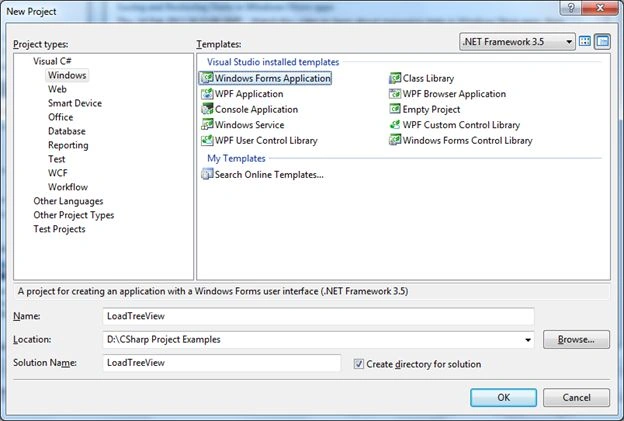
Create a new project and name it LoadTreeView.
-
Set the form's Name Property to FrmTreeView and its Text Property to Populate TreeView.
-
Add a tree view control to the form and set its dock property to Left
-
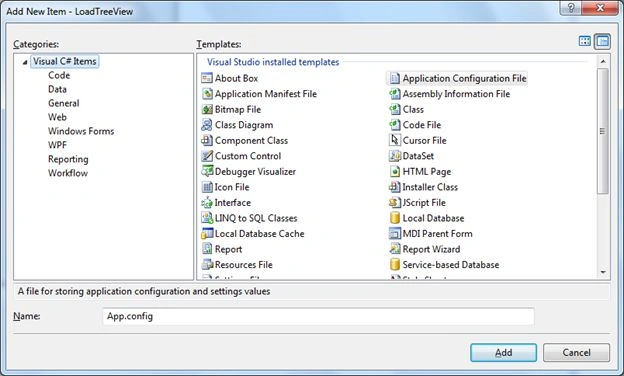
To configure the connection settings of the Data Source add an application configuration File
From Project -> "Add" -> "New Item..."
-
Paste the code below into the App.config File:
<?xml version="1.0" encoding="utf-8" ?> <configuration> <connectionStrings> <add name ="ConnString" connectionString ="Data Source=yourServerName; User Id =yourUserName; Password =yourPwd;" providerName ="System.Data.SqlClient"/> </connectionStrings> </configuration> -
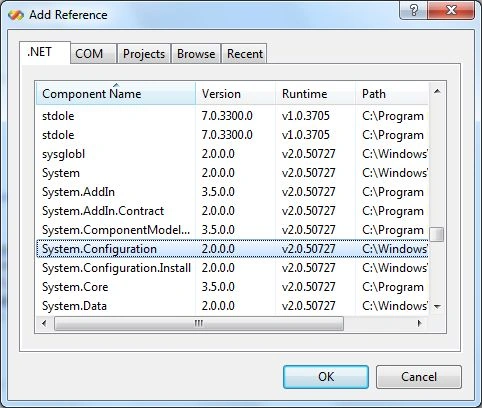
To access the connection string from code add a reference to System.Configuration and add the namespace using System.Configuration.
-
In the form's Load Event paste the following code:
String connectionString; connectionString = ConfigurationManager.ConnectionStrings["ConnString"].ConnectionString; conn = new SqlConnection(connectionString); String Sequel = "SELECT MAINMNU,MENUPARVAL,STATUS FROM MNUPARENT"; SqlDataAdapter da = new SqlDataAdapter(Sequel, conn); DataTable dt = new DataTable(); conn.Open(); da.Fill(dt); foreach (DataRow dr in dt.Rows) { parentNode = treeView1.Nodes.Add(dr["MAINMNU"].ToString()); PopulateTreeView(Convert.ToInt32(dr["MENUPARVAL"].ToString()), parentNode); } treeView1.ExpandAll(); -
The Treeview is populated with its child nodes using the PopulateTreeView Method we have defined as in the following:
private void PopulateTreeView(int parentId, TreeNode parentNode) { String Seqchildc = "SELECT MENUPARVAL,FRM_NAME,MNUSUBMENU FROM MNUSUBMENU WHERE MENUPARVAL=" + parentId + ""; SqlDataAdapter dachildmnuc = new SqlDataAdapter(Seqchildc, conn); DataTable dtchildc = new DataTable(); dachildmnuc.Fill(dtchildc); TreeNode childNode; foreach (DataRow dr in dtchildc.Rows) { if (parentNode == null) childNode = treeView1.Nodes.Add(dr["FRM_NAME"].ToString()); else childNode = parentNode.Nodes.Add(dr["FRM_NAME"].ToString()); PopulateTreeView(Convert.ToInt32(dr["MNUSUBMENU"].ToString()), childNode); } } -
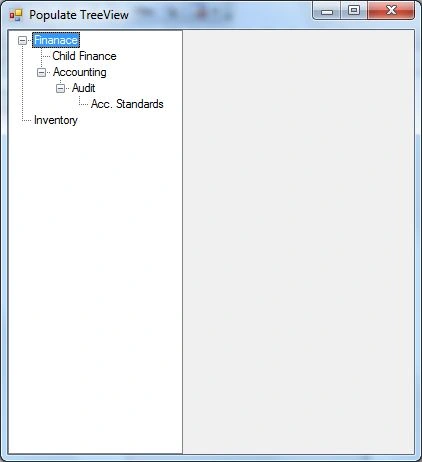
Build and run the program that results in the output shown in the following:
-
Add the following piece of code to the treeview Double-Click Event:
private void treeView1_DoubleClick(object sender, EventArgs e) { MessageBox.Show(treeView1.SelectedNode.FullPath.ToString()); } -
When you double-click a node on the Treeview control a message is displayed with the fullpath to the node. Here I have clicked the Acc. Standards node.

Program
using System;
using System.Collections.Generic;
using System.ComponentModel;
using System.Data;
using System.Drawing;
using System.Linq;
using System.Text;
using System.Windows.Forms;
using System.Configuration;
using System.Data.SqlClient;
namespace LoadTreeView
{
    public partial class FrmTreeView : Form
    {
        SqlConnection conn;
        TreeNode parentNode = null;
        public FrmTreeView()
        {
            InitializeComponent();
        }
        private void FrmTreeView_Load(object sender, EventArgs e)
        {
            String connectionString;
            connectionString = ConfigurationManager.ConnectionStrings["ConnString"].ConnectionString;
            conn = new SqlConnection(connectionString);
            String Sequel = "SELECT MAINMNU,MENUPARVAL,STATUS FROM MNUPARENT";
            SqlDataAdapter da = new SqlDataAdapter(Sequel, conn);
            DataTable dt = new DataTable();
            conn.Open();
            da.Fill(dt);
            foreach (DataRow dr in dt.Rows)
            {
                parentNode = treeView1.Nodes.Add(dr["MAINMNU"].ToString());
                PopulateTreeView(Convert.ToInt32(dr["MENUPARVAL"].ToString()), parentNode);
            }
            treeView1.ExpandAll();
        }
        private void PopulateTreeView(int parentId, TreeNode parentNode)
        {
            String Seqchildc = "SELECT MENUPARVAL,FRM_NAME,MNUSUBMENU FROM MNUSUBMENU WHERE MENUPARVAL=" + parentId + "";
            SqlDataAdapter dachildmnuc = new SqlDataAdapter(Seqchildc, conn);
            DataTable dtchildc = new DataTable();
            dachildmnuc.Fill(dtchildc);
            TreeNode childNode;
            foreach (DataRow dr in dtchildc.Rows)
            {
                if (parentNode == null)
                    childNode = treeView1.Nodes.Add(dr["FRM_NAME"].ToString());
                else
                    childNode = parentNode.Nodes.Add(dr["FRM_NAME"].ToString());
                PopulateTreeView(Convert.ToInt32(dr["MNUSUBMENU"].ToString()), childNode);
            }
        }
        private void treeView1_DoubleClick(object sender, EventArgs e)
        {
            MessageBox.Show(treeView1.SelectedNode.FullPath.ToString());
        }
    }
}
Conclusion
In this article, we have discussed how to populate a treeview dynamically in a C# application and display the entire path to the node on an event.
Vivek Kumar VishwasPosted Nov 13, 2017, 2:00 AM
This is one bevel Treeview, Suppose i want n level of treeview how would be done..
Aggelos TzitzifasPosted May 20, 2017, 9:43 AM
Hi , I try this Perfect project ... But when i add more records in "MNUSUBMENU"
Ajith SnPosted Mar 6, 2017, 4:06 AM
Hi shankar, can i populate tree structure in treeview in win forms using C# from the existing database ? The database having 130 tables with more then 50 fields each. so right now i'm not having ParentID column name in all tables ? so could you help me with this
Munesh SharmaPosted May 25, 2016, 12:38 AM
good one
amir aminiPosted May 23, 2016, 8:30 AM
Perfect !!!!
Ka IszoPosted Dec 29, 2015, 6:42 AM
thanks to this code shankar! followed the code using vb.net ... save my day!
Kevin Nha NguyenPosted Sep 17, 2015, 5:05 AM
Dear Shankar, how to do , I can open a new winform in treeview from database. exsample I have a form already desiger with name is :"MNUSUBMENU", when i click node childrent form "MNUSUBMENU" will open . I hope could you help me .Thanks so much
Daniel TasnadiPosted Jul 6, 2015, 4:11 PM
It's a really good article! Thank you!
성식 장Posted Nov 5, 2014, 12:22 AM
mysql? mssql?
Ehtesham MehmoodPosted Mar 5, 2014, 6:23 AM
nice
Santosh JaiswalPosted Jan 17, 2014, 2:56 AM
hii shankasr i want treeview datawith sqldatabase with add and delete nodes in vb.net window forms plz help me
Rosi Sreenivasa ReddyPosted Aug 23, 2013, 5:29 AM
i need the same treeview with checkbox for everyone(both for parent and child)
Mahesh ChandPosted Mar 5, 2013, 11:22 PM
I've updated article based on the question people ask :)
Mahesh ChandPosted Mar 5, 2013, 11:22 PM
Welcome to C# Corner Sankar. Good article. You have no idea how many people have asked me this question. Thanks for sharing.