

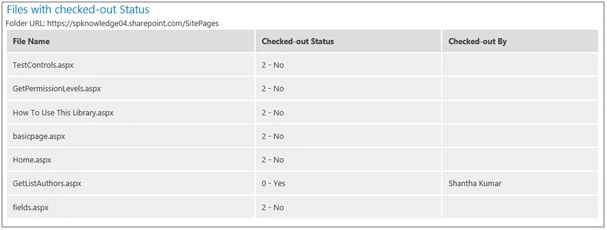
This article shows you how to list out the files from the top folder of the library with the checkout status of each files and to whom the document is checked out.
To do this, we will pass the list name as a parameter to the script.
- Create an HTML structure.
- Load the jQuery file. Some methods from jQuery used to generate the result in table format.
- ExecuteOrDelayUntilScriptLoadedmethod initiate the call of JavaScript method to intiate the call to the server.
- Get the List object based on list name using SP.Web.get_lists().get_ByTitle(<list name>).
- Get the root folder of the list SP.List.get_rootFolder().
- Get the files from root folder using SP.Folder.get_files().
- Specify the following properties to retrieve the information about files.
Property Description Name Name of the file. CheckOutType Returns the SP.CheckOutType enumeration value that specifies the type of checkout. CheckedOutByUser Returns the user, who checked out the file.
- In the success method, generate the table with results.
The type of file check out has either of the following three values,
Value Description 0 - Online The file checked out the server for editing. 1 - Offline The file check-out to local computer for editing. We can edit the file in local and saved back to server later. 2 - None The file not check-out.
HTML Snippet
- <!-- Style required for HTML Snippet -->
- < style type = "text/css" >
- .lst - table th
- {
- background - color: #ddd;
- border: 2 px solid# fff;
- text - align: left
- }
- .lst - table td
- {
- background - color: #eee;
- border: 2 px solid# fff;
- }
- .web - heading
- {
- padding: 2 px;
- } < /style>
- <!--Include jQuery library to perform dynamic html dom manipulation -->
- < script type = "text/javascript" src = "/siteassets/jquery.js" > < /script> < div >
- < h2 class = "web-heading" > Files with checked - out Status < /h2> < div id = "fldrUrl" > < /div> < /div> < table width = "100%"
- cellpadding = "10"
- cellspacing = "2"
- id = "lstTable"
- class = "lst-table" >
- < thead >
- < tr >
- < th > File Name < /th> < th > Checked - out Status < /th> < th > Checked - out By < /th> < /tr> < /thead> < tbody > < /tbody> < /table>
Santhakumar MunuswamyPosted Dec 28, 2015, 11:16 PM
Thanks for nice article
Humayun Kabir MamunPosted Dec 28, 2015, 11:09 PM
Nice...