Abstract:
I will show here step-by-step, how to develop DataGrid, which is able to retrieve data from joined tables and editable. I have used classical MS-SQL Server database northwind in my sample.
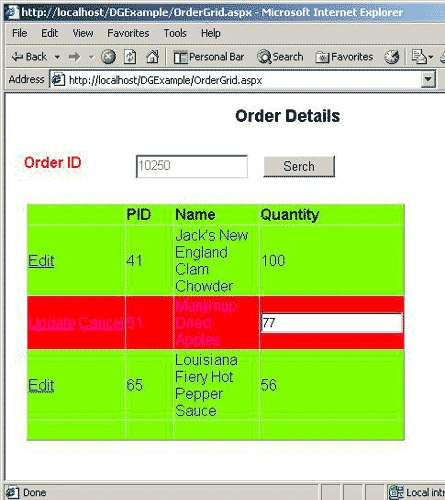
Figure 1:
Task:
I want to create an ASP.NET Page, which displays products of an Order. I am going to use tables Order Details and Product to accumulate required Information. It must be also able update quantity of ordered products.
You need change only the class OrderGrid.strConnection to adapt the source code in your system.
Implementation :
Create an ASP.NET Web Project and place the following webcontrols (I am giving only the important controls) and create their event handlers.
|
Button |
|
|
Id |
Search |
|
Eventhandler : Click |
SearchClick |
|
DataGrid |
|
|
Id |
OrdGrid |
|
Eventhandler : CancelCommand |
CancelGrid |
|
Eventhandler : EditCommand |
EditGrid |
|
Eventhandler: UpdateCommand |
UpdateGrid |
Now I want to create the columns for the DataGrid. In order to do that you must set DataGrid property AutoGenrateColumns=false. I use the Property Builder to create the columns (See Figure 2)
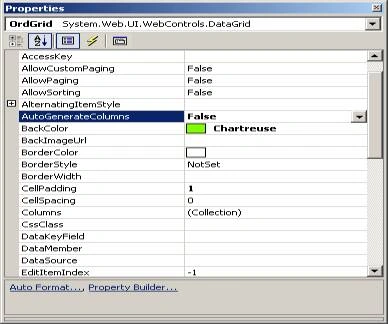
Figure 2:
Column Edit
|
type |
Button/Edit,Update/Cancel(See Fig3) |
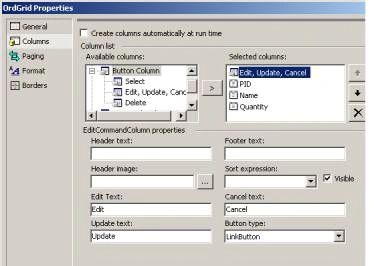
Figure 3:
Column PID
| type |
Bound Column |
| Readonly |
yes |
|
DataField |
Product ID |
Column Quantity
| type |
Bound Column |
| Readonly |
No(Editable) |
|
DataField |
Quantity |
Please see the source code to understand what each Event handler do, when the a certain event occurs.
Now I want to look a partial source code from the method PopulateGrid().
private void PopulateGrid()
{
// Connect to the Database
SqlConnection objConnection = GetConnection();
objConnection.Open();
DataSet objDataSet = new DataSet("OD-Prod");
SqlDataAdapter objDataAdapter = new SqlDataAdapter();
// Construct the SqlStatement
string strCmd = "SELECT OD.ProductID,OD.Quantity,P.ProductName FROM [Order Details] OD, ";
strCmd += " Products P WHERE OD.ProductID=P.ProductID AND ";
if (OrderID.Text.Length > 0)
{
strCmd += "OD.OrderID = " + OrderID.Text;
}
else
{
objConnection.Close();
return;
}
SqlCommand selCommand = new SqlCommand(strCmd, objConnection);
objDataAdapter.SelectCommand = selCommand;
objDataAdapter.Fill(objDataSet, "JoinTable");
OrdGrid.DataSource = objDataSet.Tables["JoinTable"];
OrdGrid.DataBind();
}
Note: SqlDataAdapter will create Table with the Name "JoinTable" according to the Sql Command, there fore you dont need to define it.

Join the conversation! Your thoughts help the community grow.