

This article assumes the developer knows how to create a web site and reference the projects using Visual Studio 2008. This article focuses on the simple display of data in a GridView control in an ASP.NET page using LinqToSql class and by populating the data running a stored procedure.
Open Visual Studio 2008 and create a web application project. Now go to the Server Explorer and add a new database or open an existing database. I am using a new database for testing purposes.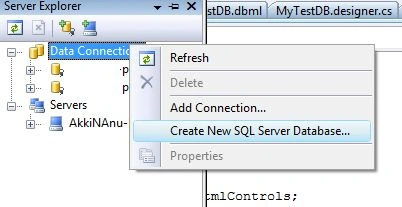
I name my new database "MyTestDB". Note that you need to provide the credentials for the SQL Server you are connecting to.
Now add a new table called Students by expanding the tree in the Server Explorer and right-click on the tables and select "Add New Table".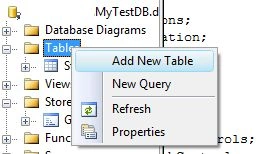
Now define the columns to be added to the table. For simplicity I have named the table "Students" and added the two columns StudentID and StudentName. Also I have specified StudentID is a primary key column and set the Identity property to seed by 1.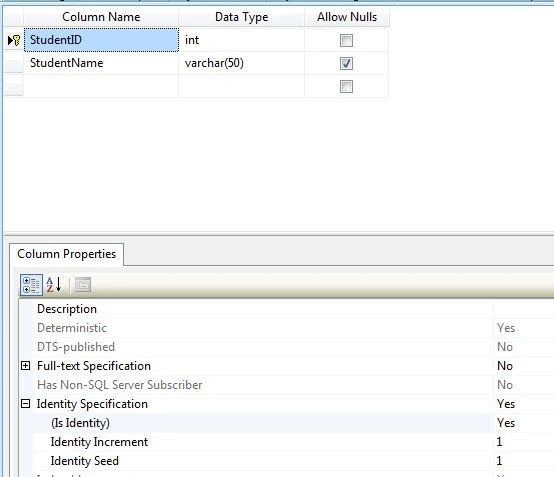
Now save the table with the name "Students". Right-click on the table Student and select "Show Table Data". Add data to the table.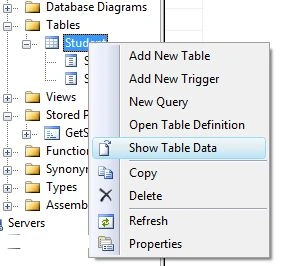
Note that the StudentID is a primary key with Identity set with seed 1, you do not need to enter the value for this column. Just enter the data for the StudentName and then click the "!" icon in the right on the top tool bar.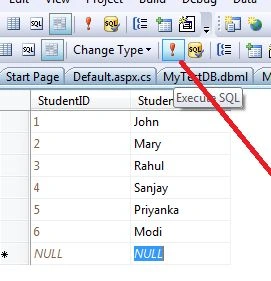
This saves your data. The next step is to write a stored procedure to get the data. Expand the tree in the Server Explorer and right-click on the "Stored Procedures" and select the option "Add New Stored Procedure" and you are shown a stored procedure with basic syntax as below:
CREATE PROCEDURE dbo.StoredProcedure2
/*
(
@parameter1 int = 5,
@parameter2 datatype OUTPUT
)
*/
AS
/* SET NOCOUNT ON */
RETURN
Now you need to modify the stored procedure to populate the Students data as below:
ALTER PROCEDURE dbo.GetStudents
AS
select * from dbo.student
Now click the "Save" button on the top to save the stored procedure.
We are done with the database stuff needed for this example. Let us create a LinqToSQL class by adding a new item to the web application project.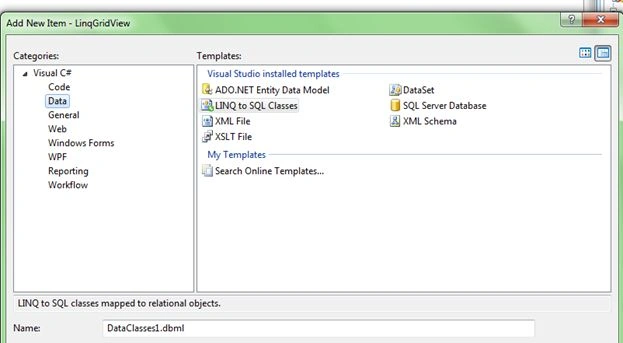
I named my DBML file as "MyTestDB.DBML" and now drag and drop the Table and Stored procedure created in the Server Explorer.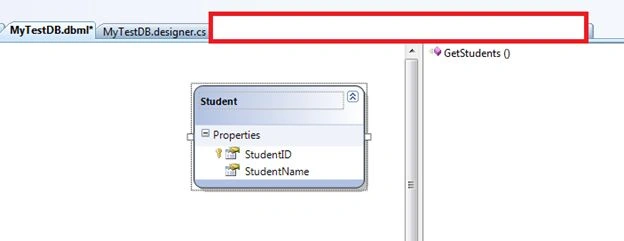
Now we are done with adding table and stored procedure. This makes the Visual Studio generate code for you to access the table and stored procedures in your program. You can check the code generated by opening the MyTestDB.designer.cs file which is available under MyTestDB.dbml file.
Code for stored procedure:
[Function(Name="dbo.GetStudents")]
public ISingleResult<GetStudentsResult> GetStudents()
{
IExecuteResult result = this.ExecuteMethodCall(this, ((MethodInfo)(MethodInfo.GetCurrentMethod())));
return ((ISingleResult<GetStudentsResult>)(result.ReturnValue));
}
Now we need to add a GridView in the default.aspx page and add the following code in the code behind file:
ASPX file
<%@ Page Language="C#" AutoEventWireup="true" CodeBehind="Default.aspx.cs" Inherits="LinqGridView._Default" %>
<!DOCTYPE html PUBLIC "-//W3C//DTD XHTML 1.0 Transitional//EN" "http://www.w3.org/TR/xhtml1/DTD/xhtml1-transitional.dtd">
<html xmlns="http://www.w3.org/1999/xhtml" >
<head runat="server">
<title>Untitled Page</title>
</head>
<body>
<form id="form1" runat="server">
<div>
<asp:GridView ID="gvStudents" runat="server"></asp:GridView>
</div>
</form>
</body>
</html>
Code behind
using System;
Girish SoniPosted Jul 5, 2017, 7:02 AM
I am facing error in procedure when i created alter then ..please give a reason
anil babuPosted Nov 27, 2012, 6:33 AM
Can you give me one example display two tables data in a single gridvew using asp.net? I am trying not showing the data pls help me
Akkiraju IvaturiPosted Aug 7, 2012, 11:19 PM
So this shows Microsoft still has different purpose for Entity Framework and the LinqToSQL and they do not want to replace the LinqToSQL with Entity framework. I see Entity Framework does a good job in Enterprise applications and LinqToSQL does a good job for smaller applications.
Akkiraju IvaturiPosted Aug 7, 2012, 11:17 PM
We will continue make some investments in LINQ to SQL based on customer feedback. This post was about making our intentions for future innovation clear and to call out the fact that as of .NET 4.0, LINQ to Entities will be the recommended data access solution for LINQ to relational scenarios. As mentioned, we have been working on this decision for the last few months. When we made the decision, we felt that it was important to immediately to let the community know. We knew that being open about this would result in a lot of feedback from the community, but it was important to be transparent about what we are doing as early as possible. We want to get this information out to developers so that you know where we’re headed and can factor that in when you’re deciding how to build future applications on .NET. We also want to get your feedback on the key experiences in LINQ to SQL that we need to add in to LINQ to Entities in order to enable the same simple scenarios that brought you to use LINQ to SQL in the first place. Tim Mallalieu Program Manager, LINQ to SQL and LINQ to Entities
Akkiraju IvaturiPosted Aug 7, 2012, 11:17 PM
Hi Miroslav, good question and the answer is no. It seems Microsoft has not yet thought of making Entity Framework to replace LinqToSQL. They are still supporting LinqToSQL in latest release .NET 4.5 too. You can get more details from the MSDN on LinqToSQL in .NET 4.5 and here is that URL http://msdn.microsoft.com/en-us/library/bb386989(v=vs.110).aspx
Miroslav BuckoPosted Aug 7, 2012, 5:01 PM
Isn't linq to sql replace by entity framework?