

Step 1
Add ASP.Net Web Service in 4.0.
Step 2
For Twitterizer reference use the following procedure:
- Go to "Tools"
- Select "Library Package Manager"
- Select the "Package Manager Console" then select the source as a Nugget official package source and select your project name in the default project
- Execute command
- Install-Package twitterizer -Version 2.4.1
Step 3
Check the code behind the web service Service1.asmx.cs
- public class Service1 : System.Web.Services.WebService
- {
- string requestToken = string.Empty;
- string pin = string.Empty;
- string oauth_consumer_key;
- string oauth_consumer_secret;
- [WebMethod]
- public string HelloWorld()
- {
- return "Hello World";
- }
- [WebMethod]
- public OAuthTokenResponse function1(string x)
- {
- OAuthTokenResponse reqToken = null;
- oauth_consumer_key = "abcdefghijk";
- oauth_consumer_secret = "1234567890123213232";
- if (HttpContext.Current.Request["oauth_token"] == null)
- {
- reqToken = OAuthUtility.GetRequestToken(oauth_consumer_key, oauth_consumer_secret, x);
- }
- return reqToken;
- }
- [WebMethod]
- public bool function2(string requestToken, string pin)
- {
- oauth_consumer_key = "abcdefghijk";
- oauth_consumer_secret = "1234567890123213232";
- var tokens = OAuthUtility.GetAccessToken(oauth_consumer_key, oauth_consumer_secret, requestToken, pin);
- OAuthTokens accesstoken = new OAuthTokens()
- {
- AccessToken = tokens.Token,
- AccessTokenSecret = tokens.TokenSecret,
- ConsumerKey = oauth_consumer_key,
- ConsumerSecret = oauth_consumer_secret
- };
- //~/img/th2.jpg
- byte[] photo = File.ReadAllBytes(@"D:\MVC_GROUP_DEAL\WebApplication1\WebService1\th22.jpg");
- TwitterResponse<TwitterStatus> response = TwitterStatus.UpdateWithMedia(accesstoken, "img", photo);
- if (response.Result == RequestResult.Success)
- {
- return true;
- }
- else
- {
- return false;
- }
- }
- }
Step 4
Add a new project. Create an ASP.Net web application in Framework 3.5. Add a default page. In the code behind add the following code.
- using Twitterizer;
- using WebApplication1.localhost;
- protected void Page_Load(object sender, EventArgs e)
- {
- Service1 oService1 = new Service1();
- if (Request["oauth_token"] == null)
- {
- WebApplication1.localhost.OAuthTokenResponse oaToken = (WebApplication1.localhost.OAuthTokenResponse)oService1.function1(Request.Url.AbsoluteUri);
- HttpContext.Current.Response.Redirect(string.Format("http://twitter.com/oauth/authorize?oauth_token={0}", oaToken.Token));
- }
- else
- {
- string requestToken = Request["oauth_token"].ToString();
- string pin = Request["oauth_verifier"].ToString();
- bool i = oService1.function2(requestToken, pin);
- Response.Write("Message Posted ");
- }
- }
Step 5
It will ask for a Twitterizer reference; for that use the following procedure:
-
Go to Tools
-
Select "Library Package Manager"
-
Select the Package Manager console then select the source as a Nugget official package source and select your project name in the default project
-
Execute command
-
Install-Package twitterizer -Version 2.3.1
Step 6
Rebuild all and see the output.
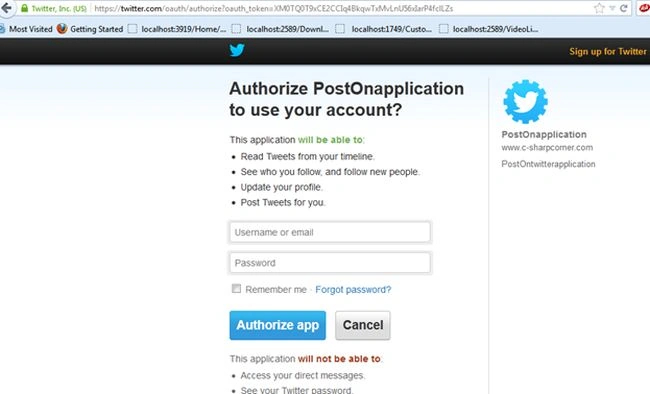
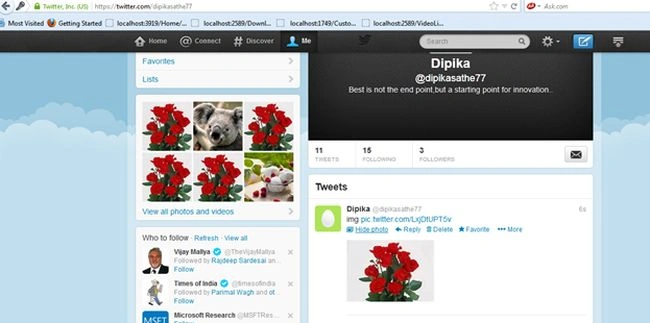
Ankush RathodPosted Jul 18, 2017, 9:30 AM
ConsumerKey, ConsumerSecret, requestToken and pin parameters have proper values. But, I'm getting an error : Twitterizer.OAuthUtility.GetRequestToken() “Value cannot be null. Parameter name: String”.
vaishali kaduPosted Apr 4, 2014, 3:12 AM
I am still getting error in using WebApplication1.localhost; that is webapplication could not found and 1 more thing inconsistant accesibility returntype OAuthTokenResponse is less accessible.....help will be apriciate thanks in advance :)
vaishali kaduPosted Apr 4, 2014, 3:09 AM
Hi depika
Mahesh ChandPosted May 8, 2013, 10:39 AM
Good article Depika. Should you hide your Auth keys? Also, can you please explain if a programmer needs to get those keys from Twitter? If yes, how? That will be useful.