

Until the Previous month, PowerBI Service used to provide the below set of details w.r.t PowerBI Dataset Refresh history.
- Type of Trigger
- Start Time of Refresh
- End Time of Refresh
- Status of Refresh
- Message in case of any failures
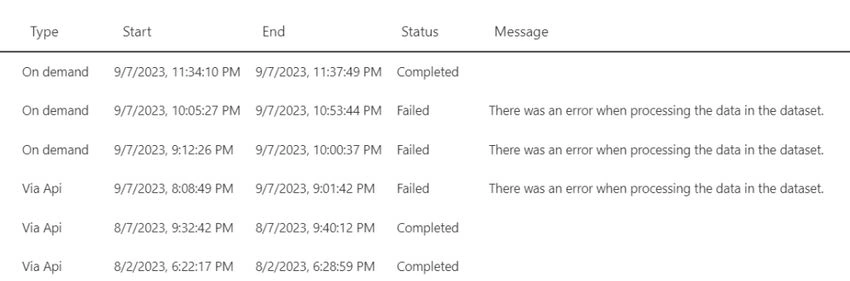
The dataset Refresh History page has been enhanced to help one diagnose and resolve refresh issues more quickly and in an efficient manner.
1. Refresh Attempt Details
Each PowerBI refresh attempt is divided into 2 Operations.
- Data: To Load data into the dataset
- Query Cache: Premium query caches and/or dashboard tiles refresh
In Case of Success
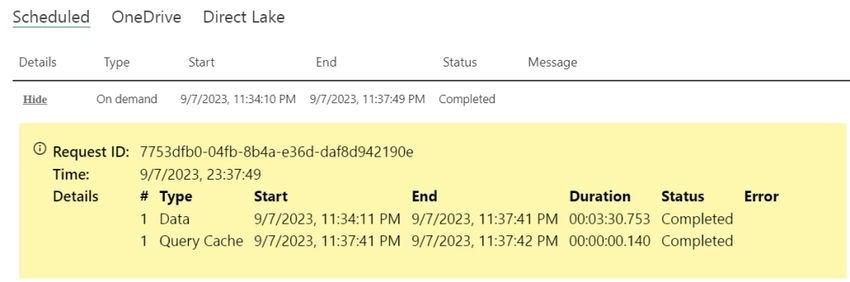
- One can now view these operations for each refresh attempt and identify any excessive use of dashboard tiles or premium caching.
- By optimizing the use of dashboard tiles and cache refresh settings, one can reduce overall refresh duration.
2. Automatic Refresh Attempts Tracking
- Power BI automatically makes multiple attempts to refresh a dataset if it experiences a refresh failure.
- One can now visualize all the refresh attempts and gain insight into the reason for failure or unusual duration.
- This information is relevant even when the refresh succeeds and can help identify delays caused by previous failures.
In case of Failure

One can also see when Power BI succeeds when previous attempts fail, as seen below, which reveals that Power BI succeeded only after three previous failures. Notice the successful data refresh and query cache share the same index number, indicating they both were successful on the fourth attempt.

Mohamed Azarudeen ZPosted Sep 15, 2023, 11:52 AM
Thanks, Informative