

While developing some of automation tools, I was required to send emails to the intended users, sometimes, to inform them about the operational progress or other things.
In this article, I will take you through the steps to develop PowerShell functions that can send emails to the intended participants.
Let’s look into the codebase used for this article.
Step 1
This will be the final step where we are calling the “Send-Email” function, implementation of which can be seen in the upcoming steps.
Step 2
In this step, I have shown the distribution list consisting of intended participants. Here, in this article, I chose to make it hardcoded within the code which is an absolutely bad idea and should be avoided. Rather, we should have an external content source (CSVs, SharePoint Lists) to configure this list of intended recipients.
Step 3
In this step, we declare a variable holding subject for the email.
Step 4
In this step, we prepare the body of the email. It is worth noting that you can use any valid HTML to prepare the mail body. Make sure you don’t use CSS Classes as they won’t work here. You can use inline styles to format the HTML.
Step 5
In this step, we will call the helper function and pass on the data we have prepared in the previous steps. This function has the responsibility to send the email to the required recipients.
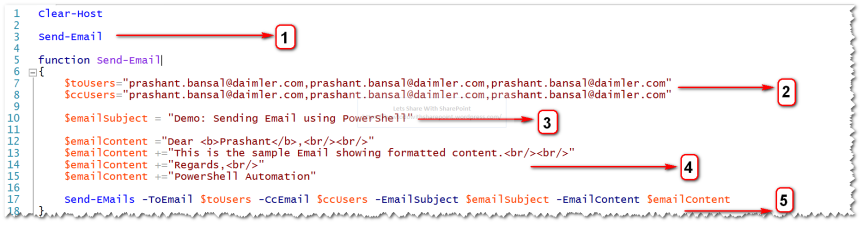
- function Send - Email {
- $toUsers = "<To User List>"
- $ccUsers = "<CC User List>"
- $emailSubject = "<Any suitable Subject>"
- $emailContent = "<Any suitable Body Content>"
- Send - EMails - ToEmail $toUsers - CcEmail $ccUsers - EmailSubject $emailSubject - EmailContent $emailContent
- }
Step 6
In this step, we get the Sender’s Id. As a part of the best practice, this should be a generic Id.
Step 7
In this, we get SMTP Server Address to relay through the mail.
Step 8
In this step, we are creating the array of recipient since “Send-MailMessage” function uses Array as parameter return type to “-To” parameter.
Step 9
In this step, we are calling “Send-MailMessage” function by passing required parameters, as shown below.
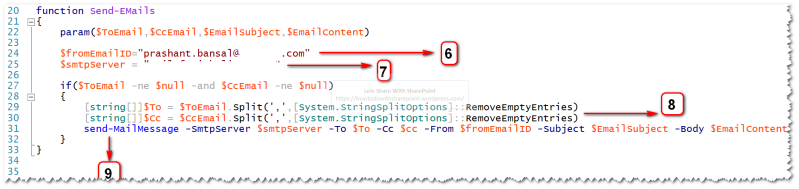
- function Send - EMails {
- param($ToEmail, $CcEmail, $EmailSubject, $EmailContent)
- $fromEmailID = "<From Email ID>"
- $smtpServer = "<SMTP Server Address>"
- if ($ToEmail - ne $null - and $CcEmail - ne $null) {
- [string[]] $To = $ToEmail.Split(',', [System.StringSplitOptions]::RemoveEmptyEntries)[string[]] $Cc = $CcEmail.Split(',', [System.StringSplitOptions]::RemoveEmptyEntries)
- send - MailMessage - SmtpServer $smtpServer - To $To - Cc $cc - From $fromEmailID - Subject $EmailSubject - Body $EmailContent - BodyAsHtml
- }
- }
That’s all for the code.
On successful execution, we will get a new email in the Inbox, as shown below-

That is all for this simple demo.
Hope you find it helpful.
Join the conversation! Your thoughts help the community grow.