

Objective
This purpose of this document is to mention the steps to cleanup site collection administrator from site collection administrator group using PowerShell script. The reusable script for this job has also attached with this document.
This script offers
- To read a set of site collections, which we want to exclude/include in this process, from a configurable XML file.
- Configure a set of users with their login id, whom you want to remove from Site Collection Administrator group.
Business Case
| S. No. | Business Case |
| 1 | For several reasons (Some application troubleshooting, Deployment,Migration, Testing etc.) SharePoint Support team requires an access toPROD site collections. Most of the time we forgot to revoke access ofthese users from PROD sites which may result into access matrixviolation for Customer. However, there are some test site collectionwhich we use for testing purpose for offshore development team, we wantteam to have an access to only those test Site collection. This scriptwill allow administrator to do this job just by configuring the XMLfile. |
Targeted Audience
- SharePoint Application Developers
- SharePoint Administrator
- SharePoint Architect
Offerings
- One reusable PowerShell script is provided which needs to be run to cleanup a setoff users from site collection administrator group.
- Format of XML file is provided where site collection (which you want to exclude/include) needs to be configured.
- Configure a list of users with their login id in provided XML format.
Technical Details
Below are the technical details for this PowerShell script,
- Pre-requisites
- Login to server with Farm administrator account and copy the folder and paste the same to the location where you want to keep it.
- Open the folder and Configure XML file as per your requirement.
- <?xml version="1.0" encoding="utf-8" ?>
- <Configuration Environment="DEV" Version="1.0.0.0">
- <GlobalWebApplications>
- <GlobalWebApplication url="http://myWebApplication" SitesToExclude="False">
- <SiteCollections>
- <SiteCollection relativeURL="sites/TeamSite"></SiteCollection>
- <SiteCollection relativeURL="Sites/ProjectSite"></SiteCollection>
- </SiteCollections>
- <UsersToCleanup>
- <User UserLogin="i:0#.w|Domain\LoginId"></User>
- <User UserLogin="i:0#.w|Domain\LoginId"></User>
- </UsersToCleanup>
- </GlobalWebApplication>
- </GlobalWebApplications>
- </Configuration>
As shown in above image;
- Enter Web Application URL.
- Define SitesToExculde Tag to True/False
- True
If we configure this attribute value to True; which means we want to exclude the below configured site collections in this process. So that the cleanup activity will not work on this Site Collections. - False
If we configure this attribute value to False; which means we want to include the below configured site collections in this process. So that the cleanup activity will work on all other Site Collections but not on those which are configured in XML.
- True
- Configure a set of Site collection relative URL which you want to exclude form this cleanup activity.
- Configure a list of users which you want to cleanup from Site Collection Administrator group.
Note: Name the file as Configuration.xml only.
- Login to server with Farm administrator account and copy the folder and paste the same to the location where you want to keep it.
- Execution
Prerequisite:
Login to SharePoint Server as Farm Administrator and copy the required files (PowerShell script and configuration XML).Configure the XML file as per your requirement.
Run:- Run the PowerShell Script as “Run as Administrator“.
- Browse the folder path where you have kept this PowerShell script file and execute a command as shown in below image.
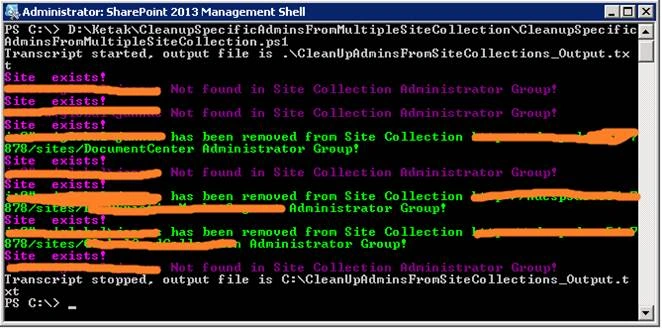
- Run the PowerShell Script as “Run as Administrator“.
PowerShell Script
Omkar AcharyaPosted May 12, 2020, 3:26 AM
Will this work for SP Online? how can it be altered for sharepoint online?
Ketak BhalsingPosted May 5, 2016, 1:41 AM
Thanks Vignesh
Ketak BhalsingPosted May 5, 2016, 1:41 AM
Thanks debasis
Vignesh ManiPosted May 4, 2016, 4:24 PM
Nice
Debasis SahaPosted May 4, 2016, 10:19 AM
Nice One..
Ketak BhalsingPosted May 4, 2016, 8:21 AM
Thanks Nitin
Ketak BhalsingPosted May 4, 2016, 8:21 AM
Thanks Mohammed
NitinPosted May 4, 2016, 7:35 AM
Good one
Mohammed IbrahimPosted May 4, 2016, 6:37 AM
nice