

Introduction: Consider a scenario where you want to remove multiple users or groups from SharePoint web applications. Doing it manually consumes time. A PowerShell script is useful here. This articles outlines how to remove users or groups from a SharePoint web app user policy using a PowerShell script.
Functionality: The script discussed in this section does the following:
1. Remove a specific user or group from the web app policy
2. Remove a list of users or groups from the web app policy
Function 1
The following piece of code removes a specific user of a group from the web app policy, this functionality requires an input file (WebapplicationList.txt) that lists the web application details in which the user or group should be removed.
- Function RemoveSpecificUser()
- {
- $UserOrGroup = read-host "Enter the user or group to remove from the user policy (e.g domain\user) "
- write-host "Place the WebapplicationList.txt file under the folder where the script exists" -fore Magenta
- $Didyouplacethefile = read-host "Did you place the WebapplicationList.txt file under the folder where the script exists (y/n)?"
- if($Didyouplacethefile -eq 'y')
- {
- $testpath = Test-path -path $scriptbase\WebapplicationList.txt
- if($testpath)
- {
- foreach($webapplication in get-content"$scriptbase\WebapplicationList.txt")
- {
- $webapp = get-spwebapplication $webapplication -ea silentlycontinue
- if($webapp -ne $null)
- {
- #Not enumerating the policies... Once the policy changes by removing the first user it terminates enumeration at that step, so sending it to an output file
- foreach($policy in $webapp.policies)
- {
- $policy.username | out-file $scriptbase\UserName.txt -append
- }
- foreach($username in get-content "$scriptbase\UserName.txt")
- {
- if($username -eq $UserOrGroup)
- {
- write-host "User policy found" -for magenta
- write-host "Removing user policy for the user or group " $userorgroup " from the webapplication " $webapplication -fore yellow
- $policy = $webApp.Policies.Remove($userOrGroup)
- write-host "User policy for the User or group " $userorgroup " removed from the webapplication " $webapplication -fore green
- $webApp.Update()
- }
- else
- {
- write-host "No action required for the user or group " $username " on the web app " $webapplication -fore cyan
- }
- }
- #removing the output file for next web app in the list
- remove-item $scriptbase\UserName.txt -confirm:$false
- write-host ""
- write-host ""
- }
- else
- {
- write-host ""
- write-host "Invalid webapplication ...." $webapplication " please check the URL ...." -fore red
- write-host ""
- }
- }
- }
- else
- {
- write-host ""
- write-host "The file is not placed or its incorrectly spelled" -fore cyan
- write-host ""
- }
- }
- else
- {
- write-host ""
- write-host "The user choose to exit.... Please try again after placing the file" -fore cyan
- write-host ""
- }
- }
Function 2
The following piece of code removes multiple users or groups from a web app policy. This functionality requires 2 input files (WebapplicationList.txt and UserList.txt).
• WebapplicationList.txt: to hold the list of web applications in which the users or groups are to be removed
• UserList.txt: to hold the list of users or groups that needs to be removed from the web applications
• WebapplicationList.txt: to hold the list of web applications in which the users or groups are to be removed
• UserList.txt: to hold the list of users or groups that needs to be removed from the web applications
- Function RemoveListOfUsers()
- {
- write-host "Place the UserList.txt file under the folder where the script exists" -fore Magenta
- $Didyouplacethefile = read-host "Did you place the UserList.txt file under the folder where the script exists (y/n)?"
- if($Didyouplacethefile -eq 'y')
- {
- $TestPath = Test-path -path $scriptbase\UserList.txt
- if($TestPath)
- {
- write-host "Place the WebapplicationList.txt file under the folder where the script exists" -fore Magenta
- $Didyouplacethefile1 = read-host "Did you place the WebapplicationList.txt file under the folder where the script exists (y/n)?"
- if($Didyouplacethefile1 -eq 'y')
- {
- $TestPath1 = Test-path -path $scriptbase\WebapplicationList.txt
- if($TestPath1)
- {
- foreach($webapplication in get-content "$scriptbase\WebapplicationList.txt")
- {
- $webapp = get-spwebapplication $webapplication -ea silentlycontinue
- if($webapp -ne $null)
- {
- foreach($user in get-content $scriptbase\UserList.txt)
- {
- #Not enumerating the policies... Once the policy changes by removing the first user it terminates enumeration at that step, so sending it to an output file
- foreach($policy in $webapp.policies)
- {
- $policy.username | out-file $scriptbase\UserName.txt -append
- }
- foreach($username in get-content "$scriptbase\UserName.txt")
- {
- if($username -eq $user)
- {
- write-host "User policy found" -fore magenta
- write-host "Removing user policy for the user or group " $user " from the webapplication " $webapplication -fore yellow
- $policy = $webApp.Policies.Remove($user)
- write-host "User policy for the User or group " $user " removed from the webapplication " $webapplication -fore green
- $webApp.Update()
- }
- }
- #removing the output file for next web app in the list
- remove-item $scriptbase\UserName.txt -confirm:$false
- write-host ""
- write-host ""
- }
- }
- else
- {
- write-host ""
- write-host "Invalid webapplication ...." $webapplication " please check the URL ...." -fore red
- write-host ""
- }
- }
- }
- else
- {
- write-host ""
- write-host "The file is not placed or its incorrectly spelled" -fore cyan
- write-host ""
- }
- }
- else
- {
- write-host ""
- write-host "The user choose to exit.... Please try again after placing the file" -fore cyan
- write-host ""
- }
- }
- else
- {
- write-host ""
- write-host "The file is not placed or its incorrectly spelled" -fore cyan
- write-host ""
- }
- }
- else
- {
- write-host ""
- write-host "The user choose to exit.... Please try again after placing the file" -fore cyan
- write-host ""
- }
- }
- Complete Code:
- $LogTime = Get-Date -Format yyyy-MM-dd_hh-mm
- $LogFile = ".\RemoveUserOrGroupFromWebAppPolicyPatch-$LogTime.rtf"
- # Add SharePoint PowerShell Snapin
- if ( (Get-PSSnapin -Name Microsoft.SharePoint.PowerShell -ErrorAction SilentlyContinue) -eq $null )
- {
- Add-PSSnapin Microsoft.SharePoint.Powershell
- }
- $scriptBase = split-path $SCRIPT:MyInvocation.MyCommand.Path -parent
- Set-Location $scriptBase
- write-host "TESTING FOR LOG FOLDER EXISTENCE" -fore yellow
- $TestLogFolder = test-path -path $scriptbase\Logs
- if($TestLogFolder)
- {
- write-host "The log folder already exist in the script location" -fore yellow
- $clearlogfolder = read-host "Do you want to clear the log folder (y/n)"
- if($clearlogfolder -eq 'y')
- {
- write-host "The user choosen to clear the log folder" -fore yellow
- write-host "Clearing the log folder" -fore yellow
- remove-item $scriptbase\Logs\* -recurse -confirm:$false
- write-host "Log folder cleared" -fore yellow
- }
- else
- {
- write-host "The user choosen not to clear the log files" -fore yellow
- }
- }
- else
- {
- write-host "Log folder does not exist" -fore yellow
- write-host "Creating a log folder" -fore yellow
- New-Item $Scriptbase\Logs -type directory
- write-host "Log folder created" -fore yellow
- }
- #moving any .rtf files in the scriptbase location
- $FindRTFFile = Get-ChildItem $scriptBase\*.* -include *.rtf
- if($FindRTFFile)
- {
- write-host "Some old log files are found in the script location" -fore yellow
- write-host "Moving old log files into the Logs folder" -fore yellow
- foreach($file in $FindRTFFile)
- {
- move-item -path $file -destination $scriptbase\logs
- }
- write-host "Old log files moved successfully" -fore yellow
- }
- start-transcript $logfile
- Function RemoveSpecificUser()
- {
- $UserOrGroup = read-host "Enter the user or group to remove from the user policy (e.g domain\user) "
- write-host "Place the WebapplicationList.txt file under the folder where the script exists" -fore Magenta
- $Didyouplacethefile = read-host "Did you place the WebapplicationList.txt file under the folder where the script exists (y/n)?"
- if($Didyouplacethefile -eq 'y')
- {
- $testpath = Test-path -path $scriptbase\WebapplicationList.txt
- if($testpath)
- {
- foreach($webapplication in get-content "$scriptbase\WebapplicationList.txt")
- {
- $webapp = get-spwebapplication $webapplication -ea silentlycontinue
- if($webapp -ne $null)
- {
- #Not enumerating the policies... Once the policy changes by removing the first user it terminates enumeration at that step, so sending it to an output file
- foreach($policy in $webapp.policies)
- {
- $policy.username | out-file $scriptbase\UserName.txt -append
- }
- foreach($username in get-content "$scriptbase\UserName.txt")
- {
- if($username -eq $UserOrGroup)
- {
- write-host "User policy found" -for magenta
- write-host "Removing user policy for the user or group " $userorgroup " from the webapplication " $webapplication -fore yellow
- $policy = $webApp.Policies.Remove($userOrGroup)
- write-host "User policy for the User or group " $userorgroup " removed from the webapplication " $webapplication -fore green
- $webApp.Update()
- }
- else
- {
- write-host "No action required for the user or group " $username " on the web app " $webapplication -fore cyan
- }
- }
- #removing the output file for next web app in the list
- remove-item $scriptbase\UserName.txt -confirm:$false
- write-host ""
- write-host ""
- }
- else
- {
- write-host ""
- write-host "Invalid webapplication ...." $webapplication " please check the URL ...." -fore red
- write-host ""
- }
- }
- }
- else
- {
- write-host ""
- write-host "The file is not placed or its incorrectly spelled" -fore cyan
- write-host ""
- }
- }
- else
- {
- write-host ""
- write-host "The user choose to exit.... Please try again after placing the file" -fore cyan
- write-host ""
- }
- }
- Function RemoveListOfUsers()
- {
- write-host "Place the UserList.txt file under the folder where the script exists" -fore Magenta
- $Didyouplacethefile = read-host "Did you place the UserList.txt file under the folder where the script exists (y/n)?"
- if($Didyouplacethefile -eq 'y')
- {
- $TestPath = Test-path -path $scriptbase\UserList.txt
- if($TestPath)
- {
- write-host "Place the WebapplicationList.txt file under the folder where the script exists" -fore Magenta
- $Didyouplacethefile1 = read-host "Did you place the WebapplicationList.txt file under the folder where the script exists (y/n)?"
- if($Didyouplacethefile1 -eq 'y')
- {
- $TestPath1 = Test-path -path $scriptbase\WebapplicationList.txt
- if($TestPath1)
- {
- foreach($webapplication in get-content "$scriptbase\WebapplicationList.txt")
- {
- $webapp = get-spwebapplication $webapplication -ea silentlycontinue
- if($webapp -ne $null)
- {
- foreach($user in get-content $scriptbase\UserList.txt)
- {
- #Not enumerating the policies... Once the policy changes by removing the first user it terminates enumeration at that step, so sending it to an output file
- foreach($policy in $webapp.policies)
- {
- $policy.username | out-file $scriptbase\UserName.txt -append
- }
- foreach($username in get-content "$scriptbase\UserName.txt")
- {
- if($username -eq $user)
- {
- write-host "User policy found" -fore magenta
- write-host "Removing user policy for the user or group " $user " from the webapplication " $webapplication -fore yellow
- $policy = $webApp.Policies.Remove($user)
- write-host "User policy for the User or group " $user " removed from the webapplication " $webapplication -fore green
- $webApp.Update()
- }
- }
- #removing the output file for next web app in the list
- remove-item $scriptbase\UserName.txt -confirm:$false
- write-host ""
- write-host ""
- }
- }
- else
- {
- write-host ""
- write-host "Invalid webapplication ...." $webapplication " please check the URL ...." -fore red
- write-host ""
- }
- }
- }
- else
- {
- write-host ""
- write-host "The file is not placed or its incorrectly spelled" -fore cyan
- write-host ""
- }
- }
- else
- {
- write-host ""
- write-host "The user choose to exit.... Please try again after placing the file" -fore cyan
- write-host ""
- }
- }
- else
- {
- write-host ""
- write-host "The file is not placed or its incorrectly spelled" -fore cyan
- write-host ""
- }
- }
- else
- {
- write-host ""
- write-host "The user choose to exit.... Please try again after placing the file" -fore cyan
- write-host ""
- }
- }
- write-host "########################################################################################################" -fore cyan
- write-host "Enter 1 to remove specific user from user policy" -fore green
- write-host "Enter 2 to remove list of users from user policy" -fore green
- write-host "########################################################################################################" -fore cyan
- $option = read-host "Enter the option "
- switch($option)
- {
- 1{
- RemoveSpecificUser
- }
- 2{
- RemoveListOfUsers
- }
- }
- write-host "SCRIPT COMPLETED" -fore Blue
- stop-transcript
Execution Procedure
Step 1: Download and copy the script to the SharePoint server.
Step 2: Launch the SharePoint management shell.
Step 3: Navigate to the script path and execute the following script:
Step 1: Download and copy the script to the SharePoint server.
Step 2: Launch the SharePoint management shell.
Step 3: Navigate to the script path and execute the following script:
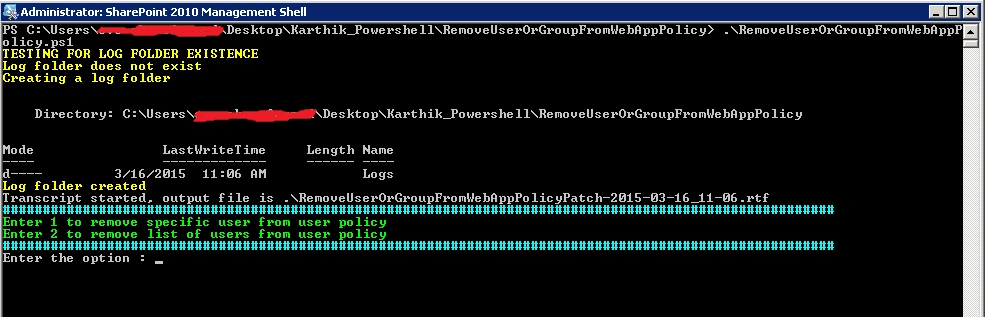
Enter option “1” or “2” to get the desired output.
Conclusion
Thus this article outlined how to remove users or groups from a SharePoint web app policy using a PowerShell script.
Karthik Muthu KaruppanPosted Apr 30, 2015, 11:06 AM
thanks
Vijay SPosted Apr 30, 2015, 3:41 AM
Nice
Karthik Muthu KaruppanPosted Mar 18, 2015, 2:17 PM
:)
Vithal WadjePosted Mar 18, 2015, 2:14 PM
nice one,keep it up
Karthik Muthu KaruppanPosted Mar 18, 2015, 10:34 AM
Thank you Tom
Tom MohanPosted Mar 17, 2015, 10:56 PM
Good one