

In this article we are going to see how to create a user control in ASP.NET.
Advantage of using a User Control
- The easiest way to combine several controls into a single control.
- Can simply be dragged onto a Web page without writing much code.
- Helps to reduce duplicate coding.
- Web pages can even be converted to user controls.
- User controls inherit from the UserControl class, which inherits from the Template-Control class, which inherits from the Control class.
Steps to Create User Control
1. Go to File -> New -> Project

2. Type the required name for the user control and click Add Button.
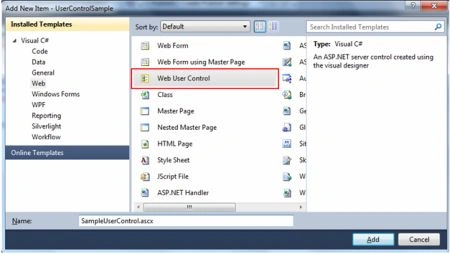
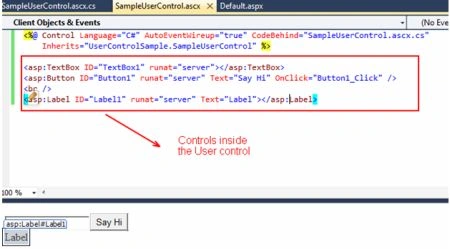
3. You will get the markup for SampleUserControl.ascx shown below.
<%@ Control Language="C#"
AutoEventWireup="true"
CodeBehind="SampleUserControl.ascx.cs"
Inherits="UserControlSample.SampleUserControl" %>
4. You will get the code behind as following.
namespace UserControlSample
{
public partial class SampleUserControl : System.Web.UI.UserControl
amandeep singhPosted Sep 17, 2012, 7:07 AM
nice and easy....
Amit MaheshwariPosted Apr 9, 2012, 12:34 AM
Hi, Arun It's a great effort and really very helpful for beginners, So keep it up and thanks for sharing.........
Jimmy UnderwoodPosted Apr 8, 2012, 11:53 PM
Hi, This article is so good keep it up...