

Introduction
This article is in continuation of my previous articles of the "Practical Approach To ASP.NET Web Services" series. So, we will be using the same examples again.
- Practical Approach To ASP.NET Web Services - Part One - Overview
- Practical Approach To ASP.NET Web Services - Part Two - Consuming A Web Service
- Practical Approach To ASP.NET Web Services - Part Three - Session State In A Web Service
- Practical Approach To ASP.NET Web Services - Part Four - Web Method Attribute Properties
- Practical Approach To ASP.NET Web Services - Part Five - Web Method Overloading
First, we will create a table called Students.
- CreateTable tblStudents(ID intidentityprimarykey, Namenvarchar(50), Gender nvarchar(20), TotalMarks int)
Now, we will insert some values in it.
- Insertinto tblStudents values('Akshay', 'Male', 900)
- Insertinto tblStudents values('Milind', 'Female', 760)
- Insertinto tblStudents values('Raghvan', 'Male', 980)
- Insertinto tblStudents values('Umesh', 'Male', 990)
- Insertinto tblStudents values('Gopal', 'Male', 440)
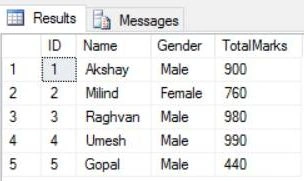
The next step is to create a procedure.
- CreateProc spGetStudentByID
- @ID int
- as
- Begin
- Select ID, Name, Gender, TotalMarks
- from tblStudents where ID = @ID
- End
Now, we have a stored procedure that will retrieve information by its ID.The name of the stored procedure is spGetStudentByID and it’s a simple straight forward Stored Procedure.
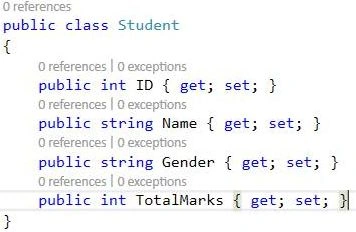
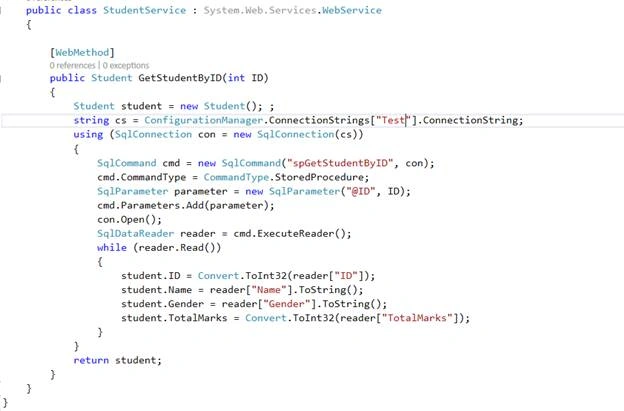
It’s a simple straight forward ADO.NET code where we had included Student object and initiated that we had passed the connection string which we had passed in our Web.config file.
Then, we used the SqlConnection object to initialize the connection and passed the SQL command to pass our stored procedure. It's expecting a parameter, so we passed a parameter as ID, and then we are opening our connection. Next, we are looping through each record.
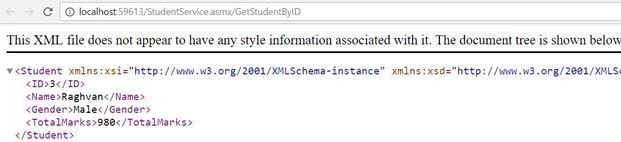
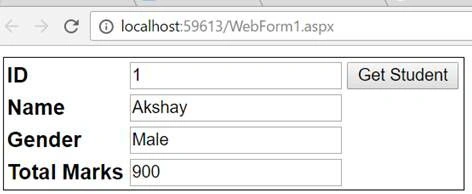
Copy and paste the following HTML between the opening and closing <html></html> tags in WebForm1.aspx.
- <htmlxmlns="http://www.w3.org/1999/xhtml">
- <headrunat="server">
- <title></title>
- <scripttype="text/javascript" language="javascript"> function GetStudentById() { var id = document.getElementById("txtStudentId").value; Webservice.StudentService.GetStudentByID(id, GetStudentByIdSuccessCallback, GetStudentByIdFailedCallback); } function GetStudentByIdSuccessCallback(result) { document.getElementById("txtName").value = result["Name"]; document.getElementById("txtGender").value = result["Gender"]; document.getElementById("txtTotalMarks").value = result["TotalMarks"]; } function GetStudentByIdFailedCallback(errors) { alert(errors.get_message()); } </script>
- </head>
- <body>
- <formid="form1" runat="server">
- <asp:ScriptManagerID="ScriptManager1" runat="server">
- <Services>
- <asp:ServiceReferencePath="~/StudentService.asmx" /> </Services>
- </asp:ScriptManager>
- <tablestyle="font-family:Arial; border:1px solid black">
- <tr>
- <td><b>ID</b></td>
- <td>
- <asp:TextBoxID="txtStudentId" runat="server"></asp:TextBox>
- <inputid="Button1" type="button" value="Get Student" onclick="GetStudentById()" /> </td>
- </tr>
- <tr>
- <td><b>Name</b></td>
- <td>
- <asp:TextBoxID="txtName" runat="server"></asp:TextBox>
- </td>
- </tr>
- <tr>
- <td><b>Gender</b></td>
- <td>
- <asp:TextBoxID="txtGender" runat="server"></asp:TextBox>
- </td>
- </tr>
- <tr>
- <td><b>Total Marks</b></td>
- <td>
- <asp:TextBoxID="txtTotalMarks" runat="server"></asp:TextBox>
- </td>
- </tr>
- </table>
- <asp:LabelID="lblPageTime" runat="server"></asp:Label>
- </form>
- </body>
- </html>
Former memberPosted Dec 7, 2016, 3:50 AM
Try to write article on web service security. basic every body knows.