

In this article, I will showcase why cost‑aware infrastructure pipelines matter , how they fit into modern DevOps practices, and practical ways teams can estimate and control Azure costs before deployment—without slowing down development. Also, I will share the step by step implementation of a approval pipeline in GitHub.
Cloud cost overruns rarely happen because teams ignore costs altogether. More often, they happen because cost visibility arrives too late—after resources are already deployed and invoices start coming in.
As Azure adoption grows and infrastructure becomes increasingly automated through pipelines, embedding cost awareness directly into infrastructure workflows is no longer optional. It is a practical necessity for engineering teams that want to scale responsibly.
Why Cloud Cost Control Needs to Start Earlier
Traditional cost management often relies on reactive processes :
Monitor monthly Azure invoices.
Review of cost reports after deployment
Optimize resources once budgets are exceeded.
While useful, these approaches do not prevent unnecessary spending, it merely explains it.
Modern DevOps teams work with:
Infrastructure as Code (IaC)
Continuous delivery pipelines
Rapid environment creation (dev, test, staging, prod)
In this model, infrastructure decisions are made inside pipelines , not in the Azure Portal. If cost visibility is missing at this stage, teams deploy blind.
Cost-aware pipelines shift financial insight left , making cost an engineering consideration—just like security, performance, and reliability.
What Is a Cost‑Aware Infrastructure Pipeline?
A cost‑aware pipeline is one that:
Estimates the cost impact of infrastructure changes.
Highlights cost differences between environments.
Flags expensive configurations early
Enables informed decision‑making before deployment.
Instead of discovering that a new environment costs $3,000 per month after release, teams know this upfront—during pull requests or pipeline validation stages.
This approach aligns closely with FinOps principles , where cost management becomes a shared responsibility between engineering, operations, and finance.
Where Cost Estimation Fits in the Pipeline
Cost awareness does not need to block developer productivity. In fact, when implemented well, it improves confidence and transparency.
A typical pipeline flow might look like:
Code is authored: Infrastructure changes are defined using Bicep, ARM, or Terraform.
Pipeline validation runs: Syntax validation, security checks, and policy checks execute.
Cost estimation stage runs: Expected monthly cost is calculated based on the declared resources.
Results are surfaced: Estimated cost is shown in pipeline logs, PR comments, or dashboards.
Decision is made: Teams proceed, optimize, or redesign before deployment.
Importantly, this step does not have to fail pipelines by default. In many organizations, cost estimation starts as an informational signal , evolving into gated controls as maturity increases.
Practical Scenarios Where Cost Awareness Helps
Let's look at a few real‑world scenarios where early cost visibility adds value.
1. Environment Parity Checks
A team creates a new non‑production environment mirroring production. Without cost insight, they unknowingly deploy:
Premium SKUs
Always‑on services
High availability in environments used only during business hours.
Early cost estimates highlight that non‑production costs are nearly equal to production, prompting immediate right‑sizing.
2. SKU and Tier Comparisons
Engineers often choose SKUs based on familiarity rather than need. A pipeline cost estimation can reveal:
Minimal cost difference between two acceptable SKUs
Significant cost increases for features not currently required.
This empowers teams to make data‑driven trade‑offs , instead of assumptions.
3. Preventing Cost Drift Over Time
Incremental changes add up. One storage account, one backup configuration, one scale change at a time.
By showing cost deltas per pipeline run, teams understand not just what changed—but what it costs .
Tooling Considerations in Azure
Azure provides strong building blocks to support cost‑aware pipelines:
Declarative infrastructure definitions
Cost estimation works best when infrastructure is consistently defined via code.Pricing models and metered resources
Understanding which services are consumption‑based versus fixed helps teams interpret estimates correctly.Pipeline extensibility
Azure DevOps and GitHub Actions make it easy to integrate custom validation and reporting stages.
While tooling supports the process, success depends more on how teams use the information , not just generating numbers.
Making Cost Culture Part of Engineering
Cost‑aware pipelines are not about restricting teams—they are about enabling better decisions.
To be effective:
Share cost estimates openly.
Treat overruns as learning opportunities, not failures
Encourage engineers to experiment and optimize.
Avoid overly rigid budget enforcement early on
Over time, engineers naturally start thinking in terms of:
"What does this architecture cost?" not just "Will this architecture work?"
That mindset shift is where real savings happen.
Starting Small: A Realistic Adoption Path
If your organization is new to this concept, start incrementally:
Add cost estimates as informational output.
Include cost summaries in pull requests.
Track cost trends across deployments.
Introduce thresholds or alerts later.
By keeping the initial experience lightweight, teams adopt cost awareness without resistance.
Below, I will explain how to create a threshold-driven pipeline that can help managing cost :
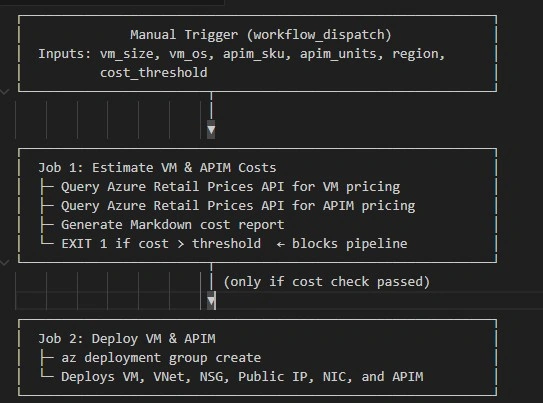
This architecture has a GitHub pipeline that estimates the cost of Azure resources using the Azure retail prices API and based on the defined threshold either resources are created or paused for review.
Architecture:
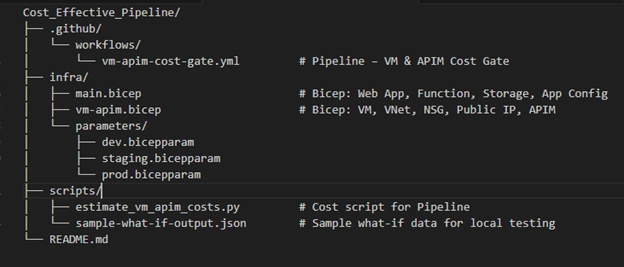
Project Structure:
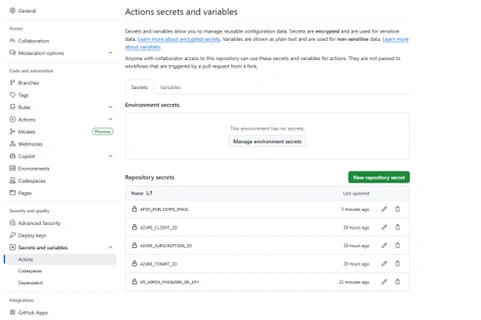
Step by step Guide
1. Fork the GitHub repo
2. In the left sidebar, under the Security section, click Secrets and variables → then click Actions.
3. You will see a list of all your repository secrets.
4. Find the secret you want to update and click the Update button (or the pencil icon) next to it.
5. Enter the new secret value in the text box. (You can paste API keys, tokens, passwords, etc.)
6. Click Update secret (or Add secret if it is the first time).
Details:
AZURE_CLIENT_ID
AZURE_TENANT_ID
AZURE_SUBSCRIPTION_ID
APIM_PUBLISHER_EMAIL
VM_ADMIN_PASSWORD_OR_KEY
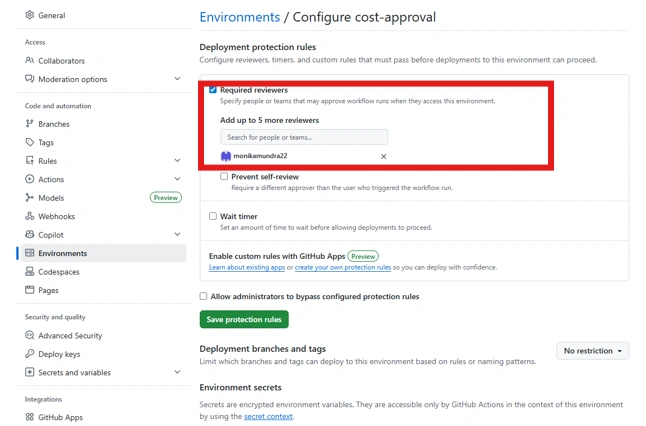
Configure approval for threshold exceed cost-approval
Configure Cost Threshold
a. The default threshold is $500/month. Override it by:
b. Editing the COST_THRESHOLD env variable in the workflow
c. Using the manual workflow_dispatch trigger with a custom value
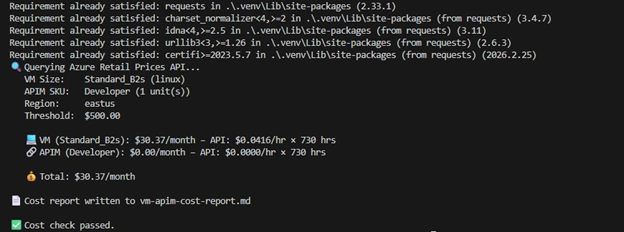
Run Python command to generate a cost-report to test locally.
$py = "<<githubrepopath>>\.venv\Scripts\python.exe"; & $py -m pip install requests; & $py scripts/estimate_vm_apim_costs.py --vm-size Standard_B2s --vm-os linux --apim-sku Developer --apim-units 1 --region eastus --threshold 500 --output vm-apim-cost-report.md
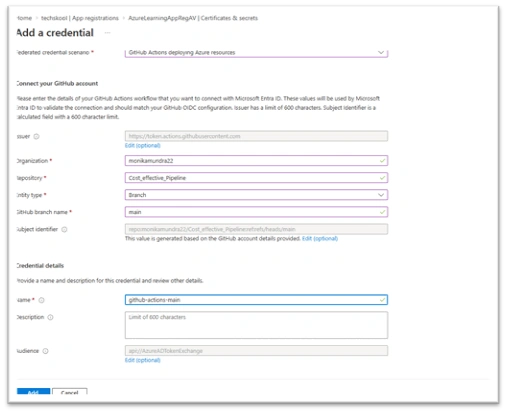
Add permission for Azure App AzureLearningAppRegAV for Federated credentials to run git pipeline.
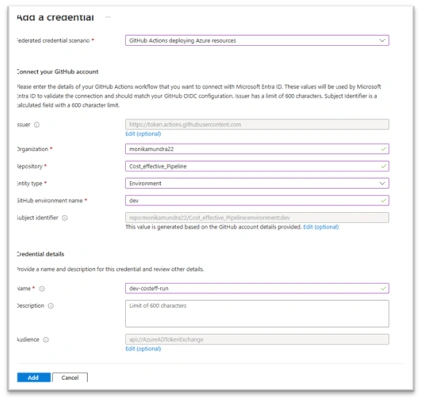
Make sure to add the AzureLearningAppRegAV app permission on Federated credential for dev environment.
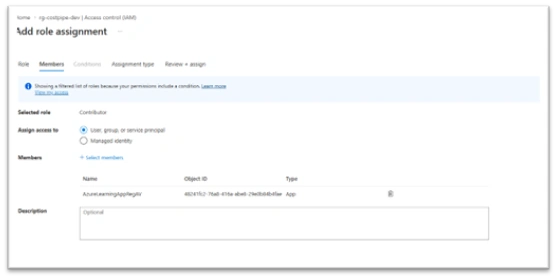
Make sure to add the AzureLearningAppRegAV app as contributor on the subscription id used.
Make sure the app has contribute permission on the resource group.
Manually trigger the workflow (change the bicep file if you need to remove resources needed). Update threshold as needed.
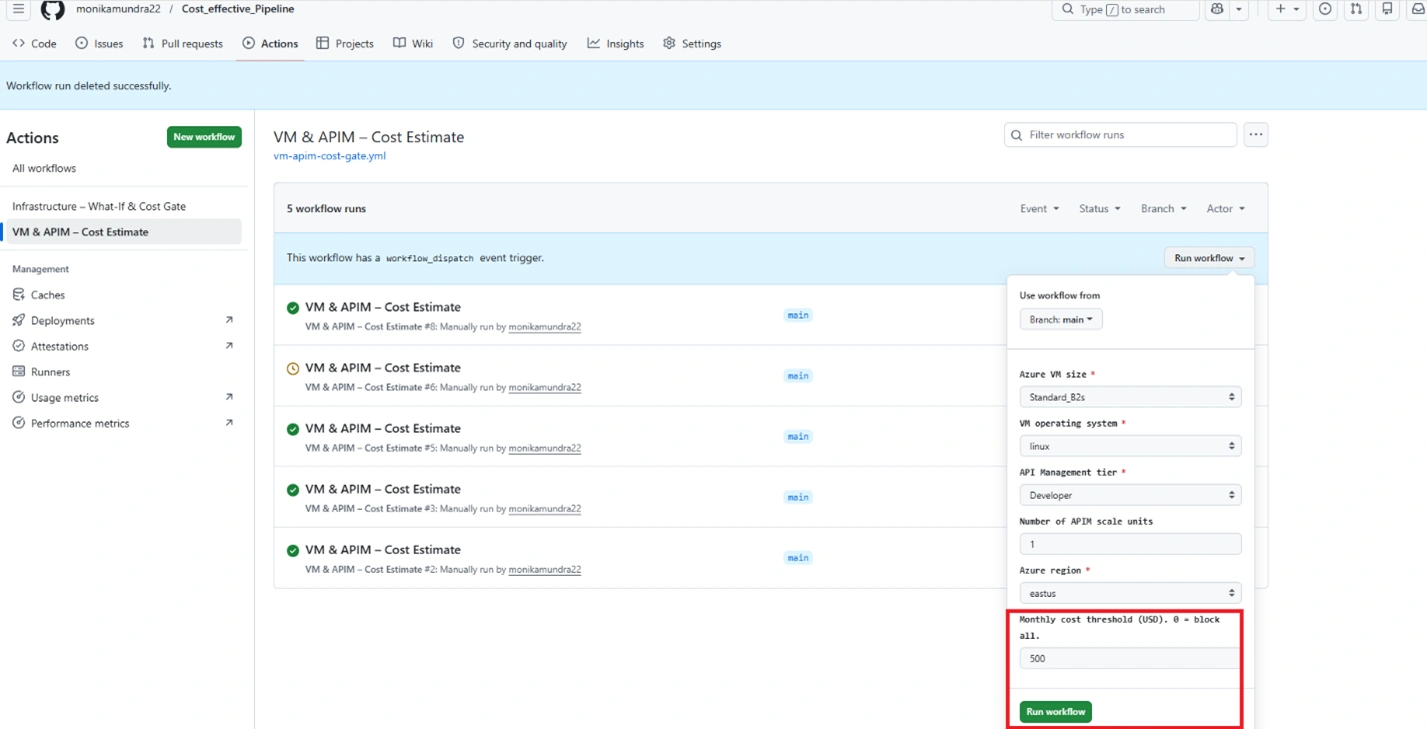
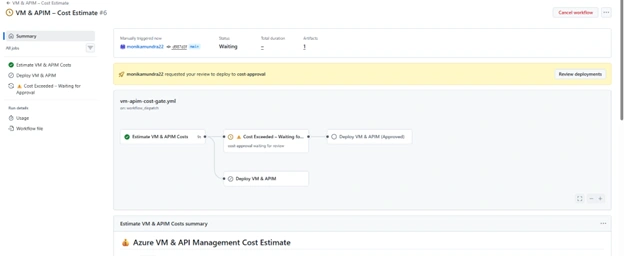
If the threshold exceeds pipeline waits for additional approval (if configured else pipeline auto approvals and continues).
Users will receive approval requests as below.
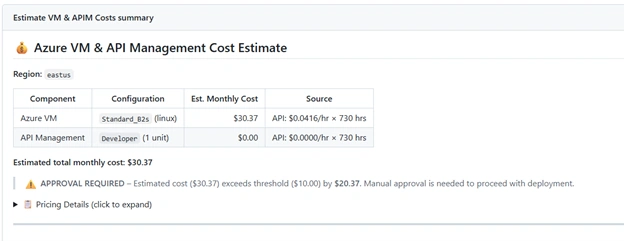
Also, can view the delta and more information on cost.
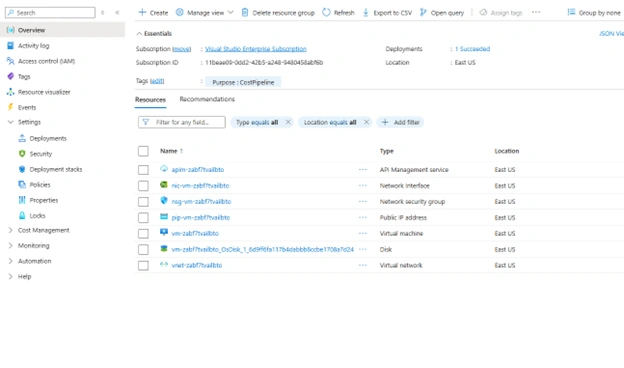
Once approved the deployment will be complete and resources will be deployed. If rejected pipeline doesn't deploy anything.
Adding More Resources
a. Add the resource to infra/vm-apim.bicep.
b. Add pricing for the resource type in scripts/estimate_vm_apim_costs.py
c. Update parameter files as needed.
Azure Resources Provisioned
| Resource | Bicep Type | Purpose |
|---|---|---|
| Network Security Group | Microsoft.Network/networkSecurityGroups | NSG with SSH/RDP rules |
| Virtual Network + Subnet | Microsoft.Network/virtualNetworks | Isolated networking |
| Public IP Address | Microsoft.Network/publicIPAddresses | VM public access |
| Network Interface | Microsoft.Network/networkInterfaces | VM NIC |
| Virtual Machine | Microsoft.Compute/virtualMachines | Linux (Ubuntu 22.04) or Windows Server 2022 |
| API Management | Microsoft.ApiManagement/service | API gateway |
Final Thoughts
Cloud cost management does not belong at the end of the delivery cycle. In modern Azure environments, cost is an architectural decision—and architecture is defined in code.
By bringing cost estimation into infrastructure pipelines, teams gain:
Predictability
Transparency
Faster feedback
Improved financial accountability.
Most importantly, they avoid surprise invoices and last‑minute optimizations.
Cost‑aware pipelines help teams build faster and smarter—without sacrificing governance or agility.
CA MundraPosted Apr 20, 2026, 4:55 PM
The provided information is exceptionally comprehensive and beneficial.
Abhijeet JadhavPosted Apr 15, 2026, 1:40 PM
This is very helpful, Thank you!