

In ASP.NET MVC 3 and MVC4, we have the objects ViewData and TempData to pass data from a controller to a view. I’ll use a sample application to show how these properties works.
TempData
First I’ll explain TempData that is driven from a TempDataDictionary. I’ll show you the functionality with an example.
The end result is that any data stored in TempData will be around for the life of the current request and the next request only, or until the item is removed.
- TempData is a dictionary object derived from the TempDataDictionary class.
- TempData is used to pass data from the current request to a subsequent request, in other words in the case of redirection.
- The life of a TempData is very short and it retains its value for a short period of time.
- It requires typecasting for complex data type as I’ve used in my example:
- @foreach (var item in (List<MVCSample.Models.EmpRegistration>)TempData["EmployeeRegistration"])
- You can retain its value using the Keep method for subsequent requests.
To show the practical usage of View Data, I provide the following sample application:
Step 1:
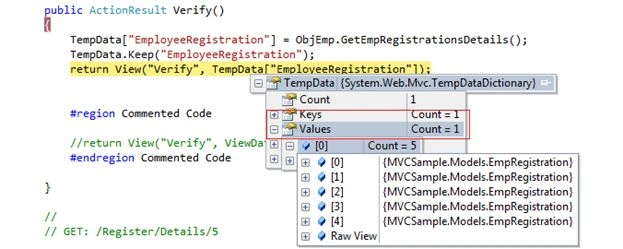
If you notice from the image above, it has the keys count =1 and has the value EmployeeRegistration.
Step 2:
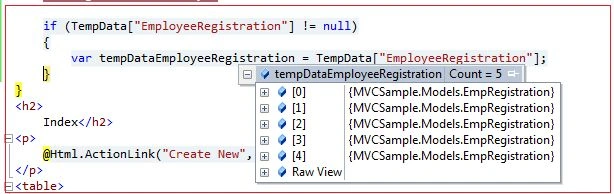
After redirecting to the View from the controller, we can use the TempData value at the View page like this.
Note: Kindly check that the value is always null and make it a best practice to use that in code to reduce the occurrences of errors.
Step 3:
Now we’ll determine whether the tempData value persists at the next level.
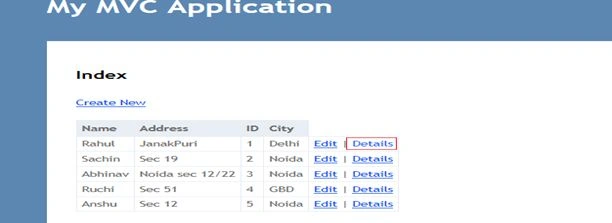
I’ll hit the other action method to verify this. In our case I call the details action method:
See the result is as depicted in the image below:
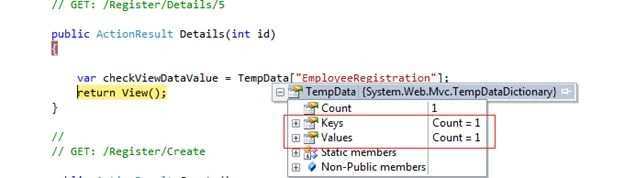
It’s magic. But this magic happens because of the statement in code TempData.Keep("EmployeeRegistration");
TempData.Keep () has two overloaded method and I’ve used one of them.
Note: We can understand TempData as the Session we used in ASP.NET.
Usage of TempData
Usage 1: If you want to keep TempData values even after reading them then call Keep().Then those values will be kept for next request also.
TempData.Keep("EmployeeRegistration");
Usage 2: If you want to remove TempData values then call Remove (). Then those values will be removed from the current and next request.
TempData.Remove("EmployeeRegistration");
Conclusion
We should use TempData for a subsequent request only to pass Controller data to a View and later also.
ViewData
ViewData that is driven from a ViewDataDictionary. I’ll show you the functionality with an example.There is a little snippet about ViewData as shown below:
- ViewData is a dictionary object derived from the ViewDataDictionary class.
- After redirecting its value becomes null.
- ViewData is used to pass data from the controller to the corresponding view.
- Its value persists for a single request. For example one redirection from the Controller to the View. After redirecting to the View it looses its value and become null.
- It requires typecasting for a complex data type.
- @foreach (var item in (List<MVCSample.Models.EmpRegistration>)ViewData["EmployeeRegistration"])
To show the practical usage of View Data, I provide the following sample application:
Step 1: 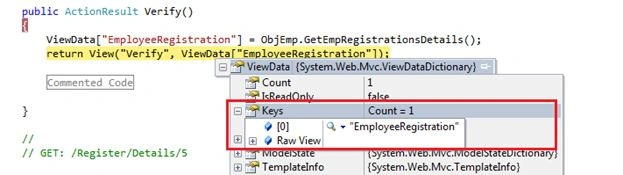
If you notice from the image above, it has the keys count =1 and has the value EmployeeRegistration.
Step 2:
After redirecting to the View from the controller, we can use a ViewData value at the View page like this.
Note: Kindly check that the value is always null and make it a best practice to use that in code to reduce the occurrences of errors.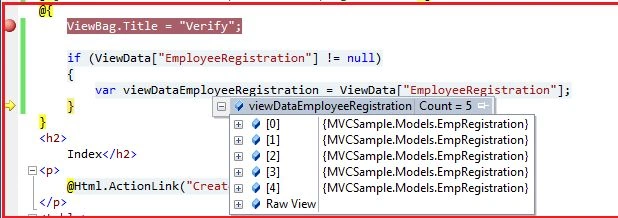
Step 3:
Now we’ll determine whether or not the ViewData value is persisted at the next level.
I’ll hit the other action method to verify this. In our case I call the details action method: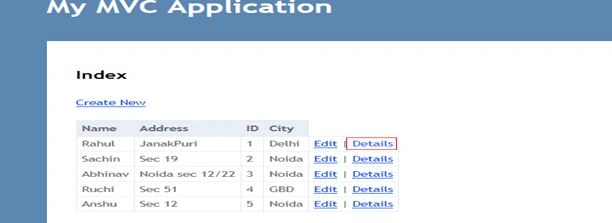
See the result is as depicted in the image below:
It doesn’t retain its ViewData value and has count=0.
Conclusion
We should use ViewData for a current request only to pass Controller data to the View.
Lalit RaghavPosted Aug 31, 2015, 2:37 AM
Nice Article But Sir you sholud also give some about Viewbag