Introduction
Predicting how users will behave is important for making their experience better, getting them more involved, and helping the business grow. By using AI and ML.NET, .NET developers can create smart applications that predict what users will do, personalize recommendations, and improve the decision-making process.
In this article, we will build a system that predicts how users will behave using .NET 9 and ML.NET. We will.
- Learn ML.NET and why we need it.
- SDCA Logistic Regression and some use cases
- Train a machine learning model to predict user behavior.
- Build an ASP.NET Core Web API to make predictions.
- Create a Blazor frontend to visualize predictions.
- Deploy the application using Docker.
Understanding Machine Learning and ML.NET
What is Machine Learning?
Machine Learning (ML), a subset of artificial intelligence (AI), enables systems to learn from data and make predictions or decisions without explicit programming. It involves training a model on historical data and using it to predict outcomes on new data.
Why use ML.NET?
ML.NET is an open-source, cross-platform machine learning framework for .NET developers. It allows .NET applications to integrate ML capabilities easily. Here are some of the key features of ML.NET.
- Automated Machine Learning (AutoML) for selecting and training models.
- Support for multiple machine learning (ML) tasks like classification, regression, and clustering.
- Integration with ONNX models for deep learning capabilities.
- Easy deployment within .NET applications
Understanding SDCA Logistic Regression
What is SDCA Logistic Regression?
Stochastic Dual Coordinate Ascent (SDCA) Logistic Regression is a powerful optimization algorithm for binary classification problems. It is efficient, scalable, and well-suited for large datasets. SDCA is particularly effective for,
- Binary Classification: Predicting whether an event will occur (e.g., will a user click an ad or not?).
- Fast Convergence: Uses stochastic updates to optimize the logistic regression model efficiently.
- Scalability: Handles large datasets effectively with minimal memory usage.
- Regularization: Reduces overfitting by applying L2 regularization.
Use Cases of SDCA Logistic Regression
- Ad Click Prediction: Determine if a user will click on an ad based on browsing behavior.
- Customer Churn Prediction: Identify users likely to cancel a subscription.
- Fraud Detection: Detect fraudulent transactions in real-time.
- Personalized Recommendations: Suggest content or products based on user interactions.
- Healthcare Diagnosis: Classify patients based on symptoms to predict diseases.
Project Description
This project aims to predict user behavior based on user interaction data. We will use ML.NET to train a classification model that predicts whether a user will click on an advertisement. The application consists of three major components.
- ML Model: A machine learning model using SDCA Logistic Regression for binary classification.
- ASP.NET Core Web API: Exposes an endpoint for making predictions.
- Blazor Server App: Provides a user-friendly interface for interacting with the model.
Let’s commence!
For complete source code: Click here
Step 1. Setting Up the .NET Solution.
We will create a new .NET 9 Web API project.
# Create API project
dotnet new webapi -n UserBehaviorAPI
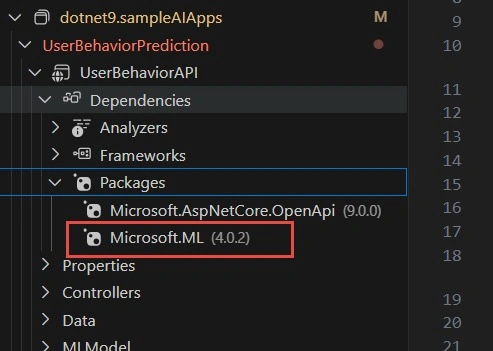
Let’s add the ML.NET NuGet package.
You can either run the command or do from VS Code UI as illustrated below.
dotnet add package Microsoft.ML
Step 2. Define the Data Models.
We create two records under the Models folder: UserBehaviorData.cs and UserBehaviorPrediction.cs.
UserBehaviorData.cs
This model is for training data for ML pipeline and the properties are as shown below.
using Microsoft.ML.Data;

namespace UserBehaviorAPI.Models;

public record UserBehaviorData
{
    [LoadColumn(0)]
    public float UserId { get; set; }

    [LoadColumn(1)]
    public float Age { get; set; }

    [LoadColumn(2)]
    public float PageViews { get; set; }

    [LoadColumn(3)]
    public float TimeSpent { get; set; }

    [LoadColumn(4)]
    public bool ClickedAd { get; set; }
}
UserBehaviorPrediction.cs records for prediction of user behavior.
using Microsoft.ML.Data;

namespace UserBehaviorAPI.Models;

public record UserBehaviorPrediction
{
    [ColumnName("PredictedLabel")]
    public bool Prediction { get; set; }

    public float Probability { get; set; }
}
Step 3. Training a SDCA Logistic Regression Model with ML.NET.
For simplicity, we’ll use a pre-trained model approach here, but ML.NET allows you to train your own model with a dataset. Create a UserBehaviorModelTrainer.cs class in a Services folder to simulate model setup.
To train the model with your own data.
using Microsoft.ML;
using UserBehaviorAPI.Models;
using System.IO;

namespace UserBehaviorAPI.Services;

public class UserBehaviorModelTrainer
{
    private readonly MLContext _mlContext;
    private ITransformer _model;

    public UserBehaviorModelTrainer()
    {
        _mlContext = new MLContext();
    }

    public void TrainModel()
    {
        var filepath = Path.Combine(Directory.GetCurrentDirectory(), "Data", "UserBehaviourData.csv");
        if (!File.Exists(filepath))
        {
            throw new FileNotFoundException("Data file not found");
        }

        var dataView = _mlContext.Data.LoadFromTextFile<UserBehaviorData>(
            filepath, separatorChar: ',', hasHeader: true);

        var pipeline = _mlContext.Transforms.Concatenate("Features", "Age", "PageViews", "TimeSpent") // Concatenate features
            .Append(_mlContext.Transforms.NormalizeMinMax("Features")) // Normalize features
            .Append(_mlContext.BinaryClassification.Trainers.SdcaLogisticRegression(labelColumnName: "ClickedAd"));

        _model = pipeline.Fit(dataView);
        _mlContext.Model.Save(_model, dataView.Schema, "MLModel/UserBehaviorModel.zip");
    }
}
Explanation
- Concatenate: This is correctly used to combine the features (Age, PageViews, and TimeSpent) into a single “Features” column.
- NormalizeMinMax: This is fine to use if you want to scale the feature values (normalization between 0 and 1).
- SdcaLogisticRegression: The binary classification trainer that you’re using is appropriate for predicting a binary label (0 or 1). You should just specify the labelColumnName parameter to make sure it is using the correct column (ClickedAd in this case).
sample UserBehaviourData.csv
UserId,Age,PageViews,TimeSpent,ClickedAd
1,25,15,120,1
2,30,8,90,0
3,22,20,300,1
4,35,5,60,0
5,28,12,150,1
6,40,7,80,0
7,23,18,250,1
8,33,10,110,0
9,29,16,200,1
10,45,6,70,0
Step 4. Create a prediction service from the trained model.
Add a class UserBehaviorPredict.cs in the service folder.
using Microsoft.ML;
using UserBehaviorAPI.Models;

namespace UserBehaviorAPI.Services;

public class UserBehaviorPredict
{
    private readonly PredictionEngine<UserBehaviorData, UserBehaviorPrediction> _predictionEngine;

    public UserBehaviorPredict()
    {
        var mlContext = new MLContext();
        var model = mlContext.Model.Load("MLModel/UserBehaviorModel.zip", out _);
        _predictionEngine = mlContext.Model.CreatePredictionEngine<UserBehaviorData, UserBehaviorPrediction>(model);
    }

    public UserBehaviorPrediction Predict(UserBehaviorData userBehaviorData)
    {
        return _predictionEngine.Predict(userBehaviorData);
    }
}
Step 5. Build the API Controller.
Create a UserBehaviourController in the Controllers folder.
using Microsoft.AspNetCore.Mvc;
using UserBehaviorAPI.Models;
using UserBehaviorAPI.Services;

namespace UserBehaviorAPI.Controllers
{
    [Route("api/[controller]")]
    [ApiController]
    public class UserBehaviourController : ControllerBase
    {
        //api to train the model
        [HttpGet("train")]
        public IActionResult TrainModel()
        {
            var userBehaviorModelTrainer = new UserBehaviorModelTrainer();
            userBehaviorModelTrainer.TrainModel();
            return Ok("Model trained successfully");
        }

        //api to predict if a user will click on an ad
        [HttpPost("predict")]
        public IActionResult Predict([FromBody]UserBehaviorData userBehaviorData)
        {
            var userBehaviorModelPrediction = new UserBehaviorPredict();
            var prediction = userBehaviorModelPrediction.Predict(userBehaviorData);
            return Ok(prediction);
        }
    }
}
Step 6. Register Services in Program.cs.
Update Program.cs to use minimal/Controller APIs and register the service.
builder.Services.AddControllers();

// Add user behavior services
builder.Services.AddSingleton<UserBehaviorModelTrainer>();
builder.Services.AddSingleton<UserBehaviorPredict>();

...

// Map the controller
app.MapControllers();
The final project structure should be as shown.
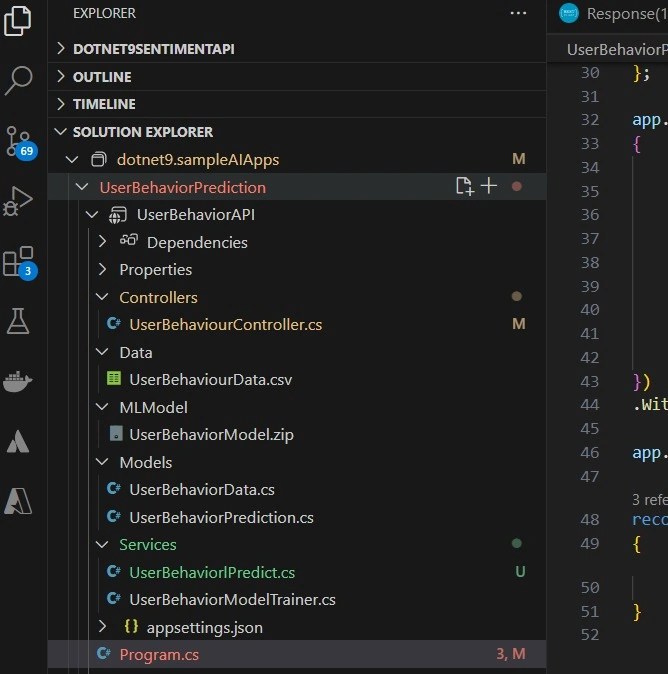
We are ready to test the solution. Let’s run the project.
dotnet run
You can use Postman to test the api or the HTTP file in VS Code. I will test using VS Code the HTTP file.
@UserBehaviorAPI_HostAddress = http://localhost:5215

# Initiate the training process for user behavior prediction
GET {{UserBehaviorAPI_HostAddress}}/api/userbehaviour/train
Accept: application/json

###

# Predict user behavior based on input data
POST {{UserBehaviorAPI_HostAddress}}/api/userbehaviour/predict
Content-Type: application/json

{
    "UserId": 1,
    "Age": 30,
    "PageViews": 15,
    "TimeSpent": 120,
    "ClickedAd": false
}
To train the model with the sample data.
localhost:5215/api/userbehaviour/train
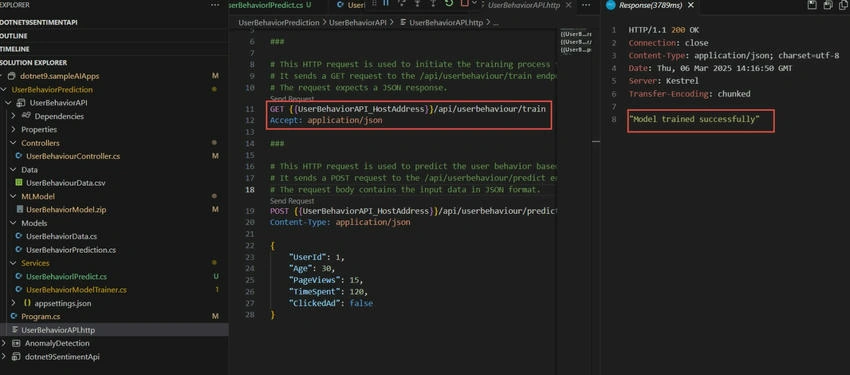
o predict our model with user data.
POST {{UserBehaviorAPI_HostAddress}}/api/userbehaviour/predict
Content-Type: application/json

{
    "UserId": 1,
    "Age": 30,
    "PageViews": 15,
    "TimeSpent": 120,
    "ClickedAd": false
}
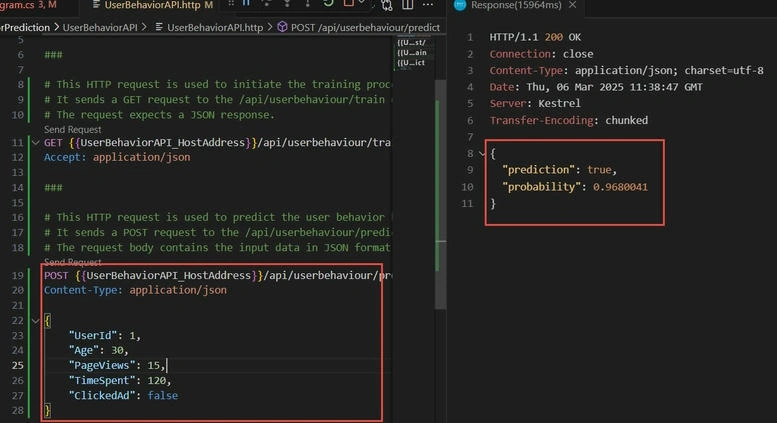
We have successfully built the solution to predict the user behavior using ML.NET and SDCA Logistic Regression.
For complete source code: Click here
Conclusion
In this article, we built a user behavior prediction system using .NET 9, ML.NET, and SDCA Logistic Regression. We developed an ASP.NET Core Web API that loads a trained machine learning model and provides real-time predictions on user behavior. By leveraging ML.NET, we efficiently trained a binary classification model to predict whether a user will click on an ad based on their attributes like age, page views, and time spent.
We can further enhance the solution with the following improvements.
- Expand Feature Set: Include additional user attributes such as location, device type, and browsing history to improve model accuracy.
- Model Optimization: Experiment with different ML.NET trainers like FastTree or LightGBM for better predictive performance.
- Real-time Prediction Pipeline: Integrate Apache Kafka or Azure Event Hubs for real-time data ingestion and prediction.
- Model Monitoring & Retraining: Implement an automated pipeline to retrain the model periodically using new data and evaluate performance.
- Deploy to Azure: Containerize the API with Docker and deploy it to Azure App Service or Kubernetes for scalability.
- Security & Rate Limiting: Secure the API with JWT authentication, and implement rate limiting to prevent excessive requests.


Join the conversation! Your thoughts help the community grow.